The workflow
Open Face Swap on Video
Open Face Swap and switch the menu at the top from Image to Video; the button on this page opens it on Video. On a phone the controls open in a sheet. If you close it, tap “Swap a face in your video” to bring it back.
Add your clip
Tap “Add a reference video to edit” and choose an MP4 or MOV. The box reads “Video duration: 2–15 seconds”: a longer clip is cut to its first 15 seconds before upload, and a large file is resized for you. A clip under 2 seconds, or one far narrower or wider than 9:16 or 16:9, is refused. Pick a clip where one person’s face is visible most of the time. “Select from motion library” loads a clip from Made’s Motion Library instead.
Add one face photo
Under Face photo, tap “Add a face photo” and choose one clear photo: JPG, PNG or WebP under 10 MB. A HEIC photo from an iPhone is converted for you. Pick a photo that faces the camera with a relaxed expression, because the swap takes on the photo’s expression. Use your own face, or one you have permission to use.
Check Options, then Generate
The button beside Generate opens Options: Resolution, 480p by default or 720p and 1080p, which are sharper and cost more, and an optional Prompt. If the clip has more than one person, use Prompt to say which one to change, such as “the woman on the left”. Generate shows the price; Face Swap checks it again before starting and stops if it came out higher. If you aren’t signed in, you sign in now, and your clip and photo wait for you.
Find it in Assets and check it
The swap goes to the top of Assets and usually takes about 10 minutes. You can leave the page; Made tells you when it’s ready. Play it with the sound on. Check the face in turns and laughs, the hairline, the earrings and the hands, and that the lips still match the words.
Recorded Made demonstration
One street vlog, one face photo
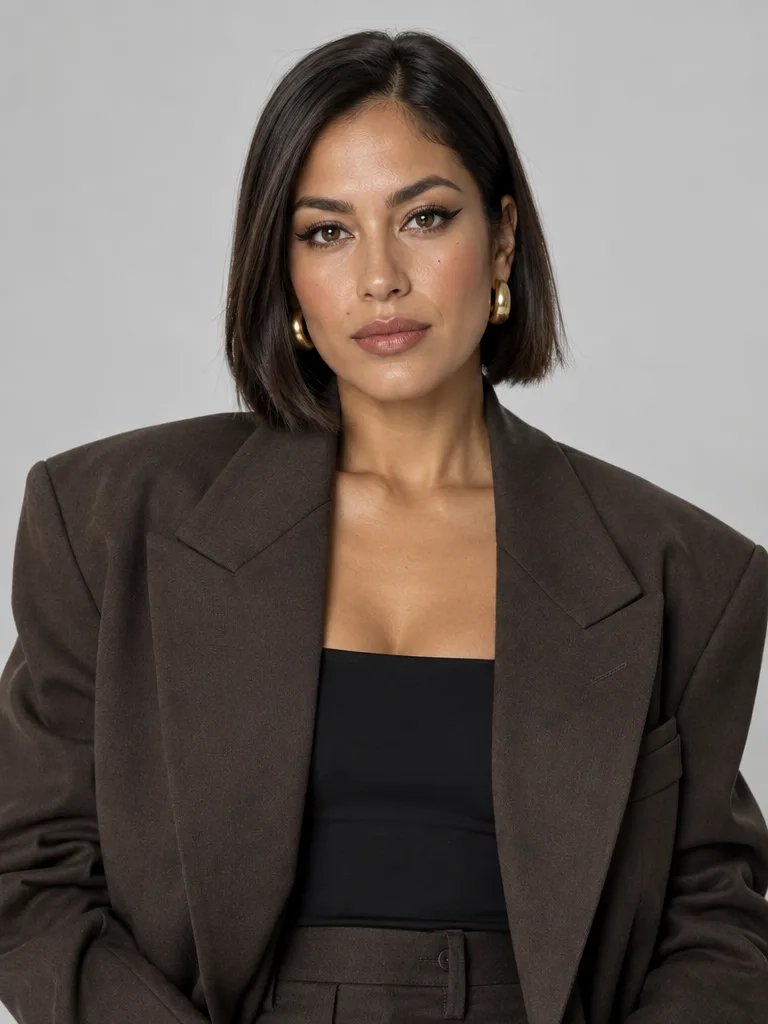
This is a real Face Swap run from November 12, 2026. The clip is Lucia, an AI-generated woman from Lip Sync Studio’s preset faces, not a real person, talking to the camera in Spanish on a street for 8 seconds, with her own sound. The face photo is Valentina, a woman Made generated for its AI Influencer examples. The request is exactly what Face Swap builds in video mode at 480p with nothing typed, sent through Made’s API from a script rather than clicked through the browser. The new face follows every expression of the clip at the same moments. The denim jacket, the dress, the hand gesture, the street and the people walking behind her stay. The clip’s own sound is kept unchanged, and the lips stay in time with it. But the photo’s chin-length bob replaced her long curls, and its small earrings replaced her hoops, although Face Swap asks to keep the original hair. A second run, with one line typed under Options → Prompt to keep her curls and hoops, kept them but brought in the photo’s brown blazer over her denim jacket, so the first run is shown. At 480p the face looks soft at full size. It’s one run, not a measure of how often a swap holds.
Face Swap video (WAN 3.0 Prime) · Generated · View the example record and price basis (JSON)
Prompts you can inspect and adapt
Recorded generation prompt
What Face Swap sent for this run
Recreate Video 1 shot for shot: the same body, hair, clothing, movement, camera motion, framing, lighting, background and timing. Replace only the facial identity of the main person in Video 1 with the face in Image 1. Use Image 1 only for who the person is (face shape, eyes, nose, mouth, skin tone, facial hair), never for expression, pose or mood. Every expression, smile, blink, mouth movement and head turn must match Video 1 at the same moment, so the original speech still lines up with the lips. Keep the original hair, body, clothing, lighting direction, camera shake and surroundings. Do not beautify or smooth the skin.You don’t type this. Face Swap writes it for every video swap, and anything you add under Options → Prompt goes after it. Here nothing was typed.
Prompt recipe to adapt
Ask to keep something from your clip
Keep her long, curly black hair and her large gold hoop earrings exactly as they are in the video. Use the photo only for her face.This line, typed under Options → Prompt, ran on the same clip and photo as the example. It kept her curls and hoops, but the photo’s blazer came in over her denim jacket. Name what matters most to you, then check the whole clip.
How a video face swap is priced
By the length of your clip and the resolution you pick. The total appears on Generate before you run it.
480p is the default and costs the least; 720p and 1080p cost more per second. The clip is rounded up to a whole second, and a clip cut to 15 seconds is priced on the part that’s sent. The face photo doesn’t change the price.
Price source: Public video-editor catalog · Checked
Add your clip to see its exact price on Generate. Before the swap starts, Face Swap checks the price again; if it came out higher than the button showed, it stops and asks you to try again instead of charging more. A swap that fails is refunded.
What to review before you use the result
| What you see | What to try |
|---|---|
| Your clip was cut short | Face Swap takes up to 15 seconds and keeps the first 15 of a longer clip. Split the video and swap each part with the same photo, or use Recast Pro, which takes up to 30 seconds, and say in its prompt to change only the face. |
| The photo’s hair or clothes came through | Face Swap asks to keep your clip’s hair and clothes, but it remakes the clip, so the photo’s hairstyle, earrings or clothes can come through, as in the example. Say what to keep under Options → Prompt and generate again, then check the whole clip. To take the photo’s hair and outfit on purpose, use Recast. |
| The face holds one expression | The swap takes on the photo’s expression. Use a photo with a relaxed face, looking at the camera. |
| The wrong person changed | Face Swap changes one face. With more than one person in the clip, name the one to change under Options → Prompt, such as “the woman on the left”. |
| Your clip is refused | Use an MP4 or MOV of at least 2 seconds. A very narrow or very wide video can’t be edited; crop it closer to 9:16 or 16:9. |
Work with Claude and Made
Face Swap’s video mode writes its own prompt and runs in the tool. With the Made connector in Claude, you can ask for the same job: Claude can look up the WAN 3.0 Prime edit model in Made’s catalog and quote a swap for a clip and face photo you supply, if your client offers that model and a way to upload.
Conversation starter
Ask your assistant
Use Made to put the face from my attached photo on the person in my attached 8-second clip. Check the current catalog for the WAN 3.0 Prime edit model and its video and image inputs. Change only the face; keep the hair, clothes, moves, camera and the original sound. Show me the price and the prompt before generating one result at 480p.If your client doesn’t offer the edit model or a way to upload, use Face Swap with the same files. It writes the prompt for you.
Questions about this workflow
How long can the video be?
2 to 15 seconds. A longer clip is cut to its first 15 seconds before upload, so a 30-second video takes two swaps, or Recast Pro, which takes up to 30 seconds.
Does it keep the original sound?
Yes. Face Swap puts your clip’s own audio back on the result, so the voice and its timing stay. In the example, the sound is the original, unchanged.
What changes, and what stays?
Face Swap asks for only the face to change: its shape, eyes, nose, mouth, skin tone and facial hair come from the photo, and the expressions, moves, clothes and scene stay. It remakes the clip rather than editing pixels, so the photo’s hairstyle or earrings can come through too. Check them before you post.
Should I use Face Swap or Recast?
Use Face Swap to change only the face and keep the person’s clothes. Use Recast to change the whole person, face, hair, body and outfit, from one photo; Recast Pro also takes clips up to 30 seconds.
Do I need to sign in?
Yes, to generate. You can add the clip and the photo first; if you sign in from Generate, Face Swap keeps them.