The workflow
Open AI Reframe and add your video
Tap “Upload a video”, or drop the file on the page. It takes MP4, MOV, WebM or MKV from 2 seconds to 10 minutes and under 4 GB, and it needs sound with speech in it, because the captions come from the words. The video opens in your browser and isn’t uploaded. The first time you upload on Made, the Media upload agreement asks you to tick two boxes and tap “I agree, continue”.
Pick the shape
Under Format, 9:16 is already selected, for Reels, TikTok and Shorts. 4:5 is for feed posts and 1:1 is square. All three are cut from your video’s full height, so a landscape video loses its sides. A video that’s already that shape or taller is used whole, with its captions.
Pick the captions
Under Captions, Pop is selected. Pop lights the word being said in heavy capitals, Highlight moves a color box from word to word, Karaoke fills a line of up to six words as it’s said, Impact shows two huge words at a time, and Clean is one tidy subtitle line. Pop, Highlight, Karaoke and Impact also take a color: Yellow, Blue, Pink or White. None turns the captions off.
Tap Generate
Generate shows the price before anything runs, and you sign in at this point if you haven’t. The bar reads “Finding who’s talking”, then “Rendering”. Only the sound is sent, to be transcribed; the faces are found and the file is made on your device, so keep the tab open. Each person’s turn is captioned on its own, so a caption never runs from one speaker into the next.
Check the words and download
Your video plays with the frame drawn on it, beside the vertical cut with the captions on. Play it with the sound and read the words against it, especially names. Then tap Download 9:16 (on a phone, Download). Signed in, the file is also saved to Assets. To try another style or color, pick it and tap Generate again: it renders again from the transcript you already have.
Recorded Made demonstration
A 12-second talking clip, captioned in five styles
This is a real AI Reframe run from November 12, 2026, made by the tool itself in Chrome. The clip is 12 seconds of 16:9 video at 480p that Made generated with Seedance 2.5, with its own speech: Imani, an AI-generated woman, not a real person, tells her camera four short lines at a desk. It went in on the tool’s defaults, Format 9:16 and Captions Pop in Yellow, and came back 1080 × 1920 with its sound. The transcript found 32 words, and the 32 captioned words match the four written lines except one: the voice says “Annalisa” where the line says “Anneliese”, and the captions follow the voice, as an independent transcript of the same sound also did. “Forty thousand” is captioned as words, not digits. The still strip shows the same moment, “forty thousand”, in all five styles, each rendered again from the same transcript. In Karaoke one line runs across two sentences (“taught me last month”). The picture is soft at full size, because the tool crops a 270 × 480 strip out of an 854 × 480 clip and scales it up. Only English was tried, and only one clip.
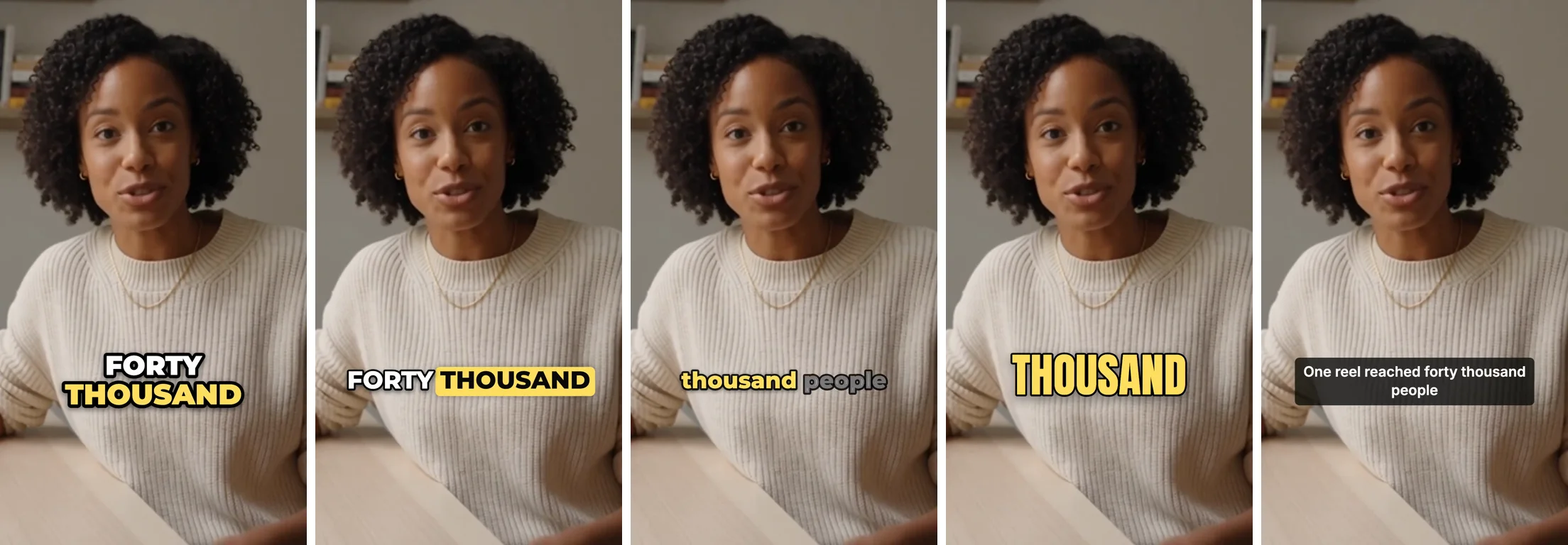
AI Reframe (ElevenLabs Scribe transcript, captions drawn in the browser) · Generated · View the example record and price basis (JSON)
Prompts you can inspect and adapt
Recorded settings
What the tool used for this run
Format: 9:16 (Reels, TikTok, Shorts)
Captions: Pop
Caption color: Yellow
Source: creator-captions-tip.mp4, 0:12, 854 × 480, with sound track
AI Reframe takes no prompt. These are the choices on screen when Generate was tapped, the ones the tool opens with, and the clip as the tool read it.
Prompt for the example clip
A talking clip to try this on
CAST
Imani: a woman in her late twenties, with deep brown skin, clear and even, and light everyday makeup; short natural curls, a gap between her front teeth and small gold stud earrings.

STORY
Imani, a creator, sits at her desk and tells her camera why she puts captions on every video she posts, and how one captioned reel reached more people than anything before it.

LOOK
Real video from a camera locked off on a tripod and never moving, a wide landscape frame with a medium shot of her, everything in sharp focus, with true daylight colour and natural, relaxed movement. Every laptop, mug and shelf object is plain and unbranded, with no lettering anywhere. Imani speaks only her written lines, in English, word for word, in a clear, even voice with a General American accent. Sound: her voice and a quiet room tone that stays the same in every shot.

SCENE 1: The corner of a small home office in a flat, mid-morning, soft daylight from a tall window on the left. Looking at her from the camera: in the foreground, the edge of a pale wooden desk with an unbranded laptop closed on it; in the middle, Imani seated at the desk on the right half of the frame, her face lit softly from the window side; behind her, a plain wall with two shelves of books and a trailing green plant. Nobody else is in the room.
Props: the camera stands on its tripod at the near edge of the desk, where the shot is filmed from; it is never seen. A plain ceramic mug stands on the desk by her right hand.
Wardrobe: Imani wears a soft cream knit sweater with the sleeves pushed up, and a thin gold chain.
Starting positions: Imani sits upright in a chair at the desk on the right half of the frame, facing the camera, her hands resting on the desk.
Screen direction: Imani faces the camera the whole time; the window is on frame left.

Shot 1 · 12 s · medium shot · 35mm · static on a tripod · at chest height on the near edge of the desk, looking at her
  Beat 1 (0–3 s)   Imani leans slightly toward the camera with a small knowing smile, her right hand lifting off the desk in a loose gesture as she speaks.
  Imani · English, General American accent · easy, matter-of-fact:
  {Most people scroll with the sound off.}
  Beat 2 (3–6 s)   She gives one small nod, her left hand tapping the desk lightly twice, her eyebrows lifting and her shoulders rolling easily as she speaks to the camera.
  Imani · English, General American accent · easy, matter-of-fact:
  {So I caption everything, like my friend Anneliese taught me.}
  Beat 3 (6–9 s)   She picks up the mug with her right hand, her gaze steady on the camera, and her left hand opens outward as she speaks.
  Imani · English, General American accent · warm, a little proud:
  {Last month, one reel reached forty thousand people.}
  Beat 4 (9–12 s)   She sets the mug down on the desk with her right hand, sits back in the chair, and smiles warmly as her head tilts gently and her shoulders settle.
  Imani · English, General American accent · warm, certain:
  {And captions are the reason they stayed.}
This is the Seedance 2.5 prompt that made the example’s source clip, at 480p and 16:9 for 12 seconds with sound on, so you can make a talking clip of your own. The lines in braces are what she says. The example was not re-timed or edited before it went into AI Reframe.
How the captions are priced
By the length of your video, for transcribing its sound: every word and when it’s said. Finding the faces, drawing the captions and making the file happen on your device. The total appears on Generate once your video is in.
The transcript is charged by the length of the video, so a video twice as long costs about twice as much. The format, the caption style and the color don’t change it, and a new style for a video already transcribed renders again without another charge. A video with no sound track has nothing to transcribe, so it gets no captions.
Price source: AI Reframe’s public price · Checked
Before any sound is sent, the tool checks that your balance covers the whole video and stops if it doesn’t. If transcribing a part fails, that part is refunded.
What to review before you use the result
| What you see | What to try |
|---|---|
| A word in the captions is wrong | AI Reframe has no way to edit a caption, and the words follow what the transcript heard, so names and unusual words come out spelled as they sound. In the example the voice said “Annalisa” and that is what the captions say. Say a hard name clearly, or leave it for a caption you write yourself: pick None, or use AI Clipper, which saves a .srt captions file for each clip that you can fix in another editor. |
| There are no captions at all | Captions are drawn from the transcript, so they need a sound track with speech in it. A silent video has nothing to transcribe. If the tool says “No speech turned up”, it found no words, so it frames the video without captions. Check that the file has its sound and that the speech is clear enough to hear. |
| Music or noise sits over the speech | In a check on the example’s sound with an instrumental track mixed in at the voice’s own loudness, the words came back unchanged. That is one clip and one track, not a promise. If the words are wrong, make the caption video from a cut with the music left out, and add the music afterwards. |
| I want my video to stay landscape | It can’t. AI Reframe makes a vertical or square video, and AI Clipper makes vertical clips; neither keeps a landscape frame. To keep the whole picture, pick 1:1 or 4:5, which keep more of the width, or use AI Clipper with Framing set to Fit, which puts the whole frame on a soft backdrop. |
| It says “No faces turned up, so the whole frame is kept” | The tool found no face to follow, so your whole frame sits over a blurred copy. The captions are still drawn from the transcript. Use footage where the speaker’s face is larger in frame. |
| It asks me to sign in, or says my balance is too low | A video with sound needs you signed in, because the transcript is the one paid step. The tool checks your balance for the whole video before sending any sound, and stops if it can’t cover it. Add credits, or try a shorter video. |
| Your video is refused | Use an MP4, MOV, WebM or MKV between 2 seconds and 10 minutes and under 4 GB. If the browser can’t decode it, try an H.264 MP4 in a current browser. For a longer video, use AI Clipper first. |
Questions about this workflow
Can I add captions and keep my video landscape?
Not in Made. Captions come with AI Reframe, which makes a 9:16, 4:5 or 1:1 video, and AI Clipper, which makes vertical clips. If your video is already vertical, or square with 1:1 selected, AI Reframe uses the whole frame and adds the captions.
Which languages does it caption?
There is no language setting. The sound is sent for transcription with no language named, so the transcript works out the language itself. The example is in English, and other languages weren’t tried for this guide, so check the words on your own video.
Can I edit the words or get a caption file?
Not in AI Reframe: the captions are drawn straight from the transcript and burned into the picture, so they can’t be turned off after you download. AI Clipper saves a .srt captions file for each clip, under its ⋯ menu as Captions file (.srt). Pick None here if you will add your own.
Does it work with two people talking?
Yes. The transcript says who speaks when, the frame cuts to whoever is talking, and each person’s turn is captioned on its own, so a caption never runs from one speaker into the next.
Does my video get uploaded?
No. The video stays in your browser, where the faces are found and the captions are drawn. Only the sound is sent, to be transcribed. Signed in, the finished file is saved to your Assets.
Work with Claude and Made
The Made connector in Claude has no automatic captions step. Its compose_video tool can put text you give it on a clip, but it doesn’t listen to the sound or time the words to the speech. For word-by-word captions from what is said, use AI Reframe in the browser with the same video.
Conversation starter
Ask your assistant
Use Made’s compose_video to put my caption text “Most people scroll with the sound off.” on my attached video for the first three seconds, keeping the sound. Show me the price first.You write the text and its timing yourself that way. AI Reframe is the one that writes the words down from your video’s sound.