The workflow
Add one photo of yourself
Open the AI Headshot Generator and, under Photo, tap Upload image (on a phone, Upload a photo), or paste a picture from your clipboard. It takes JPG, PNG or WebP up to 20 MB, and an iPhone photo in HEIC format is converted for you. A photo longer than 1,536 pixels on its long side is scaled down before it uploads. A sharp photo where your face is large, front-facing and lit evenly gives the model the most to keep. The background doesn’t matter, since it is replaced.
Describe the headshot
Under Try, tap Office backdrop, Business attire or Neutral studio look to fill the Prompt box with a sentence, then edit it. Or type your own: name the clothes, the background and the light, and end with “Keep my face exactly the same.” The Prompt box says Optional: if you leave it empty, the tool asks for “Turn this selfie into a professional headshot” and chooses the look itself. Name the clothes if your photo shows a hoodie, a backpack strap or a bare shoulder: the tool changes what you ask for, and the chips don’t all mention clothes.
Tap Generate
Generate shows the price before it runs. If you aren’t signed in, you sign in first and your photo and prompt wait for you. While it works the button reads “Making it…”, and the headshot appears in Generations beside the tool when it’s done, as a PNG you can download.
Check it against your photo
Put the headshot next to your original and look at the eyes, the nose, the smile, the hairline and the collar. The face is redrawn, not copied, so a likeness can shift even when you ask for it to stay. If people will meet you and expect the photo to look like you, use it only when it does.
Make a second look from the same photo
Each run starts from the photo you give it. Go back to your original, change the background or the light in the Prompt box (for example from a blurred office to a plain studio wall), and tap Generate again. Lay the looks side by side and keep the one that looks most like you. Every run is its own price and its own result.
Take it where you need it next
To make a headshot larger for a banner or a print, open the Image Upscaler, tap Upload an image or video, and keep Face recovery on. To make your headshot speak for a video intro, open Lip Sync Studio, upload the headshot under Upload a photo or video, and type up to 400 characters of script. Neither was run for this guide; their limits are below, and the talking-photo guide covers the second.
Recorded Made demonstration
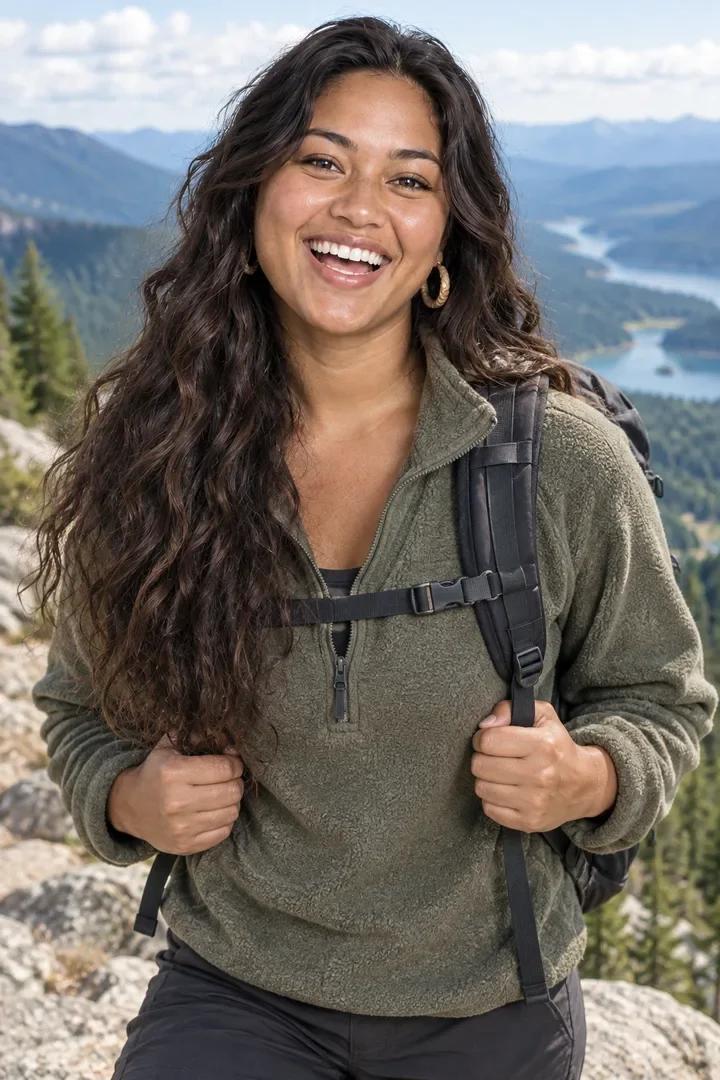
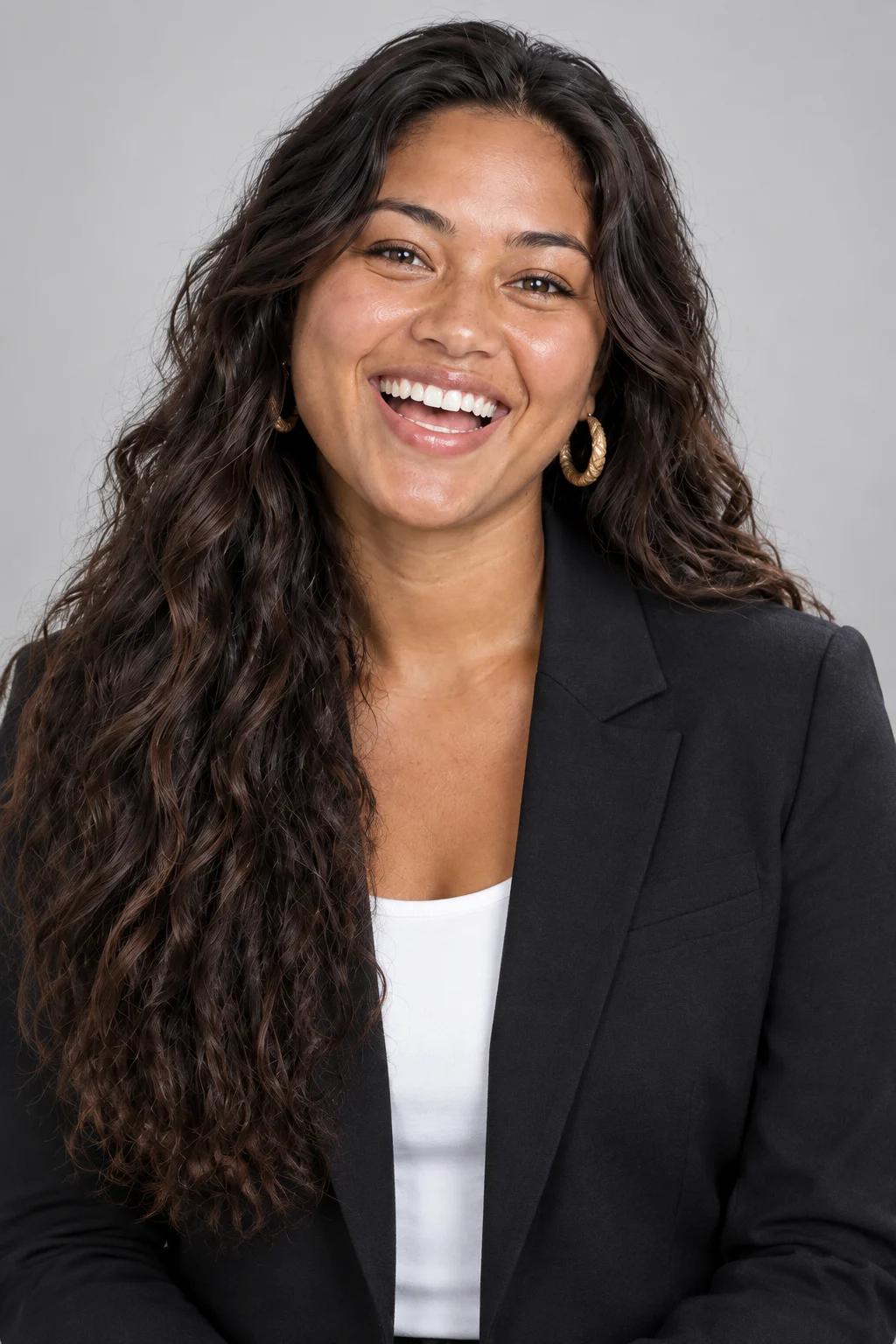
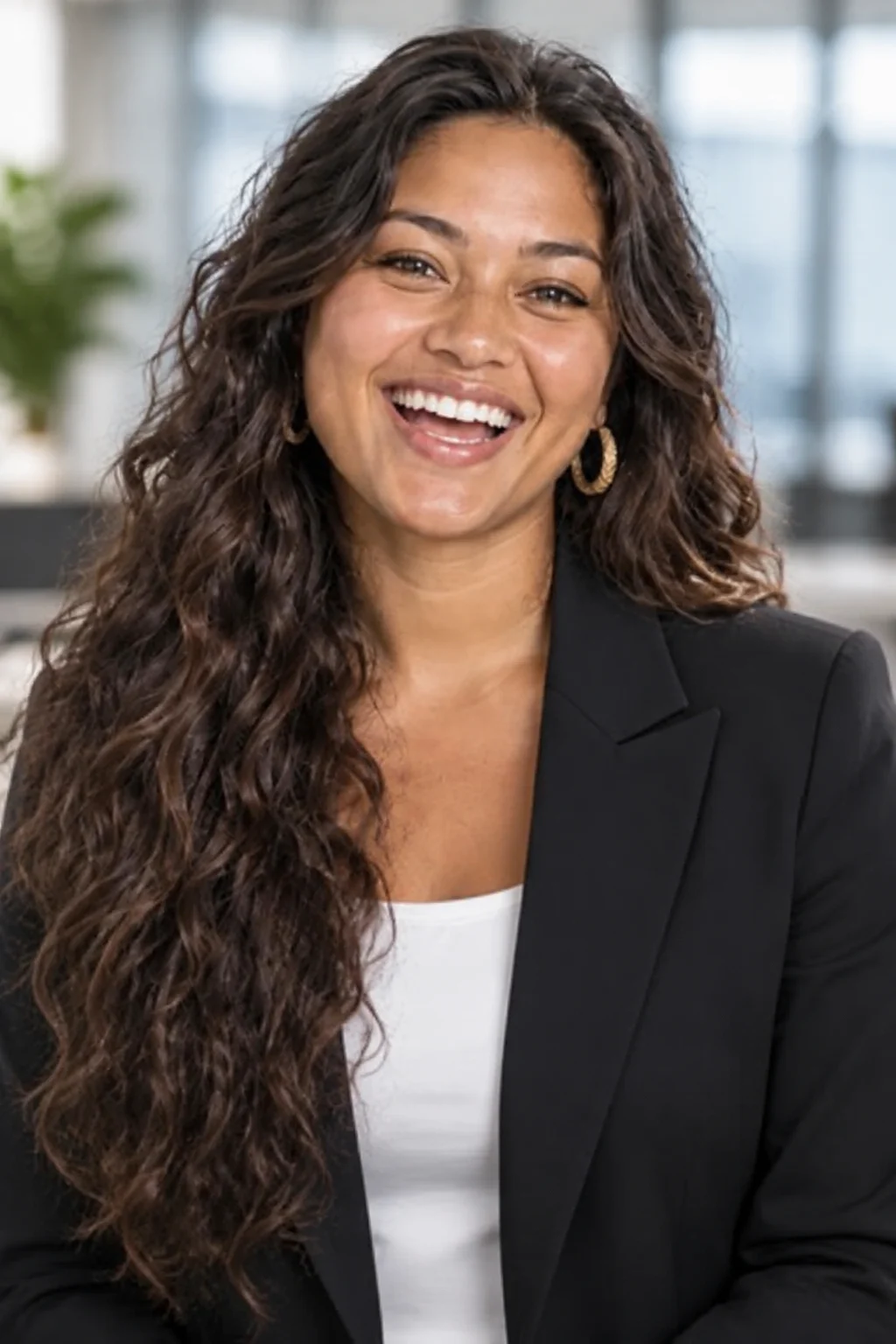
A casual lookout photo, as an office headshot and a studio headshot
These are real AI Headshot Generator runs from November 19, 2026. The photo is a made-up adult from Made’s AI Influencer examples, not a real person: a woman at a mountain overlook in a hiking fleece with a backpack, a candid photo rather than a literal selfie (720 × 1,080 pixels). The two headshots are exactly what the tool builds for that photo and the sentences typed in the Prompt box, sent through Made’s API from a script rather than tapped through the browser: first a dark blazer over a white shirt, a blurred office and soft studio light, then the same blazer on a plain light-gray studio wall with even light. Both came back as 1,024 × 1,536 PNGs, shown here as WebP. I looked at both next to the photo and at close crops of the face. In both she is clearly the same woman: the same long wavy hair, both hoop earrings and the same open laugh. The face is not identical. It is framed tighter, the cheeks and jaw read a little fuller, and the nose and teeth are shaped differently, and the two headshots differ from each other in those details too. The fleece and backpack straps are gone and the clothes look believable at the collar. What this doesn’t show: her hands (out of frame), a formal closed-mouth expression (the laugh stays, so pick a photo with the expression you want), or glasses, a beard or a different hair color. Two runs, not a measure of how every photo comes out.
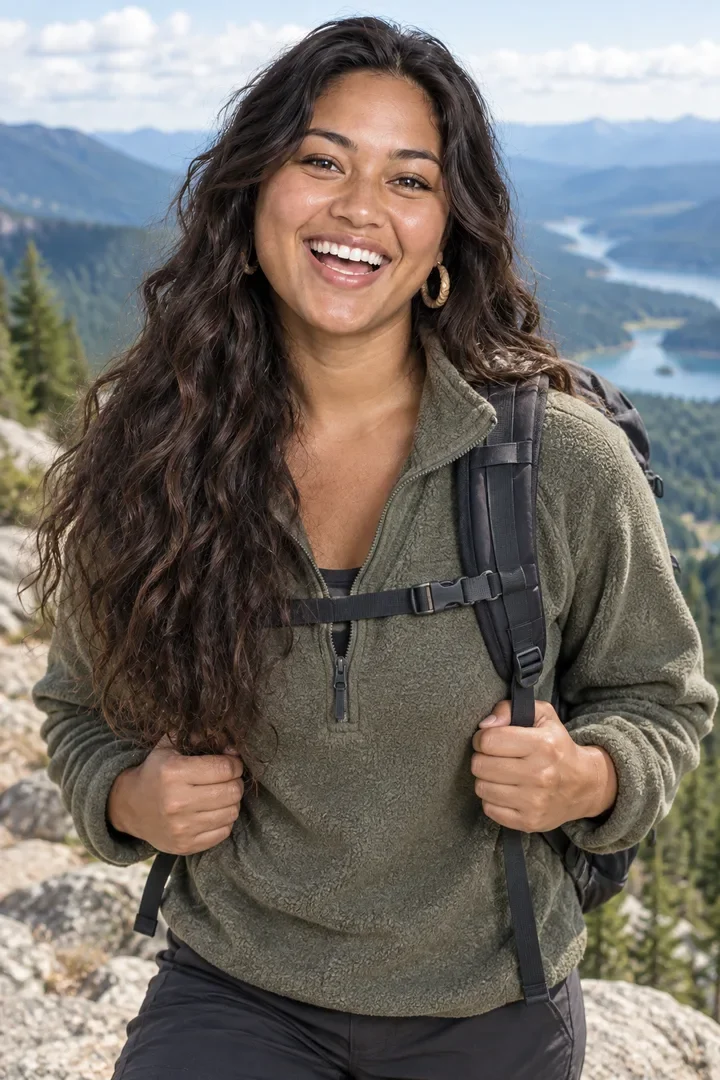
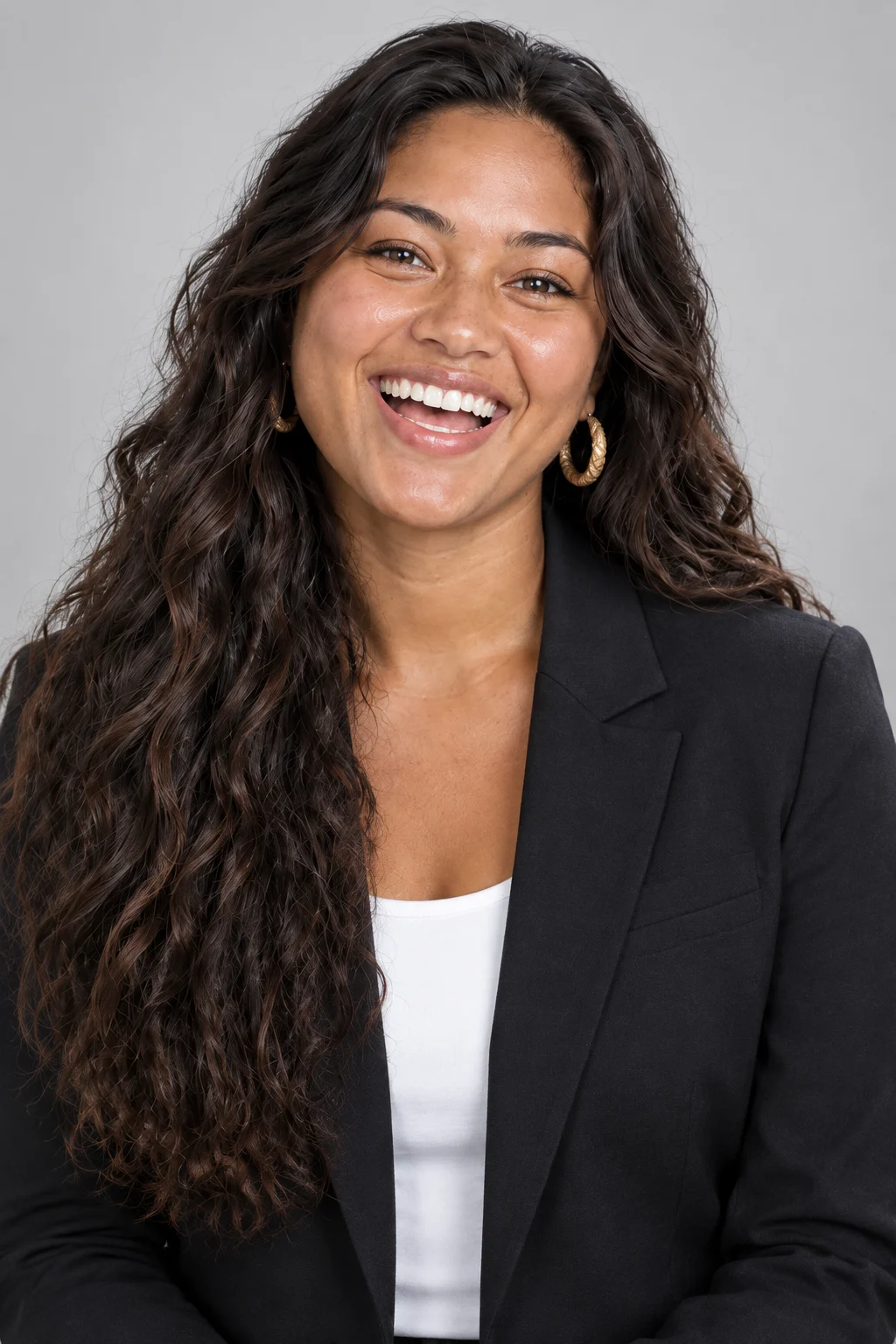
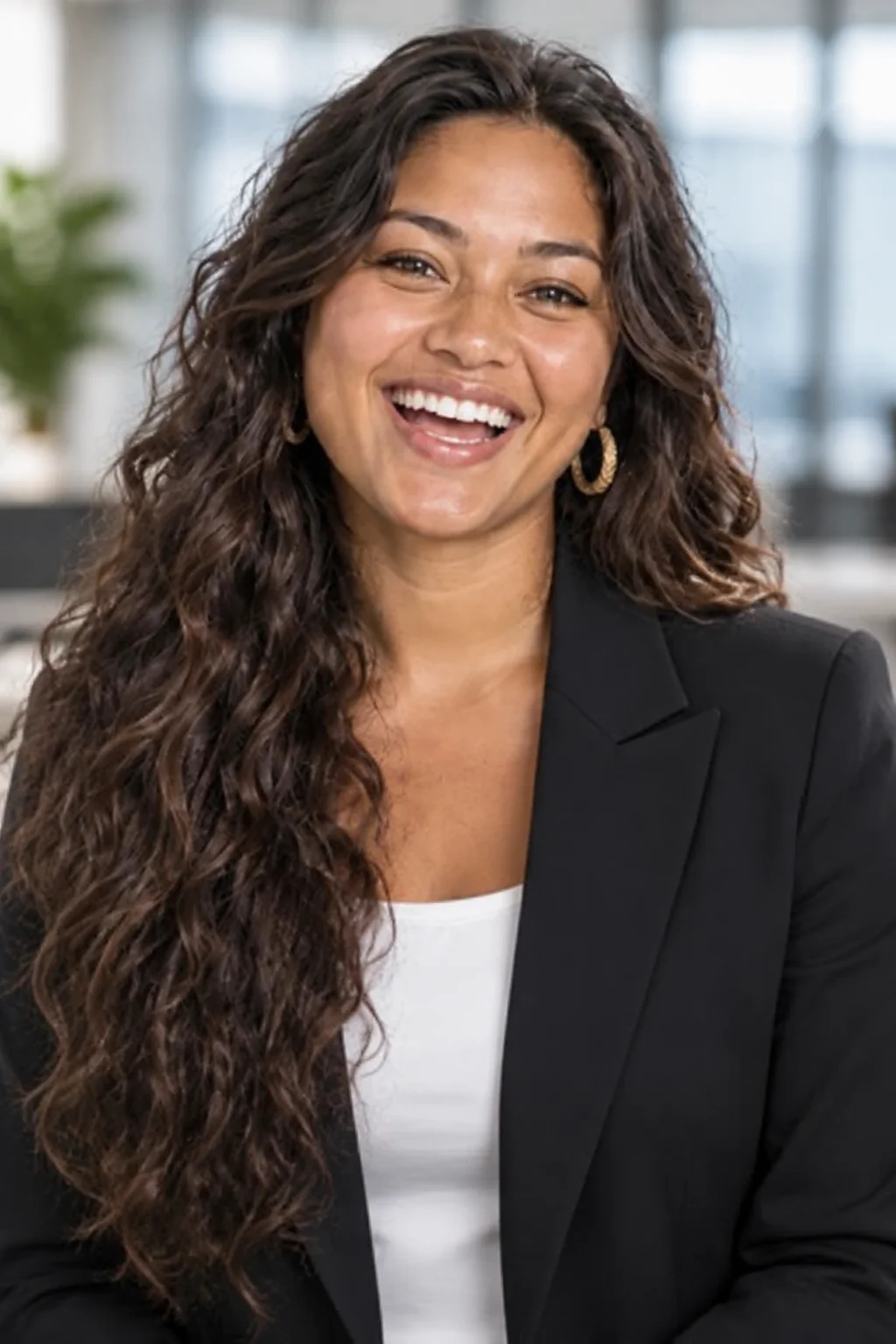
GPT Image 2.5 Flare (AI Headshot Generator) · Generated · View the example record and price basis (JSON)
Prompts you can inspect and adapt
Prompt recipe to adapt
A starting point for your own photo
Turn this photo into a professional headshot: [your clothes], [your background] and [your lighting]. Keep my face exactly the same.Put your clothes, background and light in the brackets. Only the two sentences below were run for this guide, so check what your own wording does.
Recorded generation prompt
The office look
Turn this photo into a professional headshot: a dark blazer over a white shirt, a blurred office background and soft studio lighting. Keep my face exactly the same.Typed in the Prompt box and sent as it is: the tool adds no other words to it.
Recorded generation prompt
The studio look
Turn this photo into a professional headshot: a dark blazer over a white shirt, a plain light-gray studio background and even lighting. Keep my face exactly the same.The second look from the same photo: only the background and the light changed.
How a headshot is priced
Per headshot: one photo and one prompt make one image each time you press Generate. The total appears on Generate before you run it.
The tool always runs GPT Image 2.5 Flare at low quality with one photo and makes one image per press. A second look is a second run, so it is priced again. In the example, the office look and the studio look were quoted the same.
Price source: AI Headshot Generator · Checked
Before the run starts, the tool checks the price again; if it came out higher than the button showed, it stops and asks you to press Generate again. If the provider it was priced on fails, a backup provider can take the run at its own price, which can be higher. A run that fails is refunded.
What to review before you use the result
| What you see | What to try |
|---|---|
| The face doesn’t look enough like me | The headshot redraws your face, so the nose, jaw, teeth and fine lines can shift even with “Keep my face exactly the same.” Start from a sharp, front-facing photo with even light, run it again from the original (each run comes out a little differently), and compare the results next to your photo before you pick one. |
| It’s still a big laugh, not a professional smile | The expression in your photo is kept. In the example the open laugh stayed in both looks. Start from a photo where you have the expression you want on a profile. |
| The clothes look off at the collar or shoulders | Name the clothes you want, such as “a dark blazer over a white shirt”, and look closely at the collar line, the lapels and the shoulders, which is where drawn clothing is most likely to look wrong. Run it again with a clearer description if they do. |
| Something from my photo is still there | A backpack strap, a bag or a hand at the edge can survive if you don’t mention it. Say what to remove or change, or crop the photo tighter first. Check the edges of the picture. |
| Use a JPG, PNG, or WebP image | Save or export the photo in one of those formats. HEIC photos from an iPhone are converted for you; a file that isn’t a picture can’t be used. |
| Images can be up to 20 MB | Make the file smaller before you add it. A photo longer than 1,536 pixels on its long side is scaled down for the upload anyway, so a smaller export loses nothing. |
| The run failed | The tool shows why, and a run that fails is refunded. Try again, or try another photo. |
Questions about this workflow
How do I make a professional LinkedIn headshot from a selfie with AI?
Open the AI Headshot Generator, add one sharp, front-facing photo, tap a chip under Try or describe the background, light and clothes, and tap Generate. You get one PNG back in the standard shape closest to your photo’s. Compare it with your original before you upload it anywhere, and run it again if the face drifted.
Can I make a headshot from a casual phone photo?
Yes, any single photo works as the start, and the background doesn’t matter because it is replaced. A sharp photo with your face large and evenly lit keeps the most. The example started from a candid photo at a lookout, not a posed selfie, and I did not test an arm-length selfie or a dark one.
Will the headshot look like me?
Close, not identical. It edits your photo, so the hair, earrings and expression in the example carried over, but the face was redrawn: the framing, cheeks, nose and teeth all shifted a little. Always compare the result with the original before you use it for work.
How is this different from HeadshotPro or Aragon?
Services like those train on a set of your photos and return many headshots in different looks. Made’s tool makes one edit of one photo per press of Generate, so you get fewer looks and less variety, and you steer it with a sentence. If you need a full pack with many outfits and backdrops, a trained service is built for that; if you have one decent photo and want one headshot or two looks, this is quicker.
Can I get the same look for a whole team?
Each run takes one photo, but you can use the same sentence on every person’s photo to get a similar background and light. The faces will each be redrawn, so check every one.
Can I make it bigger or make it talk afterward?
Yes, with other Made tools. The Image Upscaler takes a JPG, PNG or WebP up to 30 MB and enlarges it 2× or 4×. Lip Sync Studio takes a JPG, PNG or WebP under 10 MB, at least 300 pixels on each side, and a script of up to 400 characters. Neither was run for this guide.
What file do I get?
A PNG, in the standard shape closest to your photo’s: 1,024 × 1,536 for the 2:3 photo in the example. If a profile needs exact dimensions, resize it afterward.
Work with Claude and Made
The AI Headshot Generator runs in the tool. With the Made connector in Claude, you can ask for the same edit: Claude can find GPT Image 2.5 Flare in Made’s catalog, take your photo as the image to edit, quote the price and generate, if your client offers a way to upload.
Conversation starter
Ask your assistant
Use Made to turn my attached photo into a professional headshot: a dark blazer over a white shirt, a blurred office background and soft studio lighting. Keep my face exactly the same. Use GPT Image 2.5 Flare as a photo edit at low quality and the size closest to my photo’s shape. Show me the price before generating one image.If your client doesn’t offer a way to upload, use the AI Headshot Generator with the same photo and prompt.