The workflow
Pick the photo
Use one photo of one subject: you, a friend who agreed, or your pet. A sharp photo with the face large and in clear light carries over best, and a photo with some space around the head and shoulders gives the card room for a frame. For a pet, the face and the markings are what the card keeps, so choose a photo where the eyes are sharp.
Upload it
Open Trading Card Maker and tap “Upload image” (on a phone, Upload), or paste the picture from your clipboard. It takes one JPG, PNG or WebP up to 20 MB, and an iPhone HEIC photo is converted for you. A photo over 1,536 pixels on its long side is scaled down before the edit.
Describe the card
Type in the Prompt box. Name the style, the background and the frame, and ask for an empty name bar and an empty stats panel with no text or numbers on the card, then say what must stay the same, such as your face and hair. Under Try there are three starting points: Holo card, Pet card and Sports style. With the box empty, the tool sends “Turn me into a holographic-style trading card with an epic energy background.” Keep your sentence: you will reuse it for the next card.
Check the price and generate
Generate shows the price. If you aren’t signed in, you sign in first, and your photo and prompt wait for you. Before the run starts, the price is confirmed again; if it came out higher than the button showed, nothing runs until you press Generate again. While it works the button reads “Making it…”, and the card appears under Generations when it is done.
Check the card against your photo
Put the card next to the photo. Look at the face first, then the hair, any jewelry or markings, and the edge where the cut-out meets the background. Then look at the bars: they should be empty. If the likeness slipped, run it again from the original photo with the same sentence, and add what must stay the same.
Recorded Made demonstration
A portrait of a woman, as a sports-style card
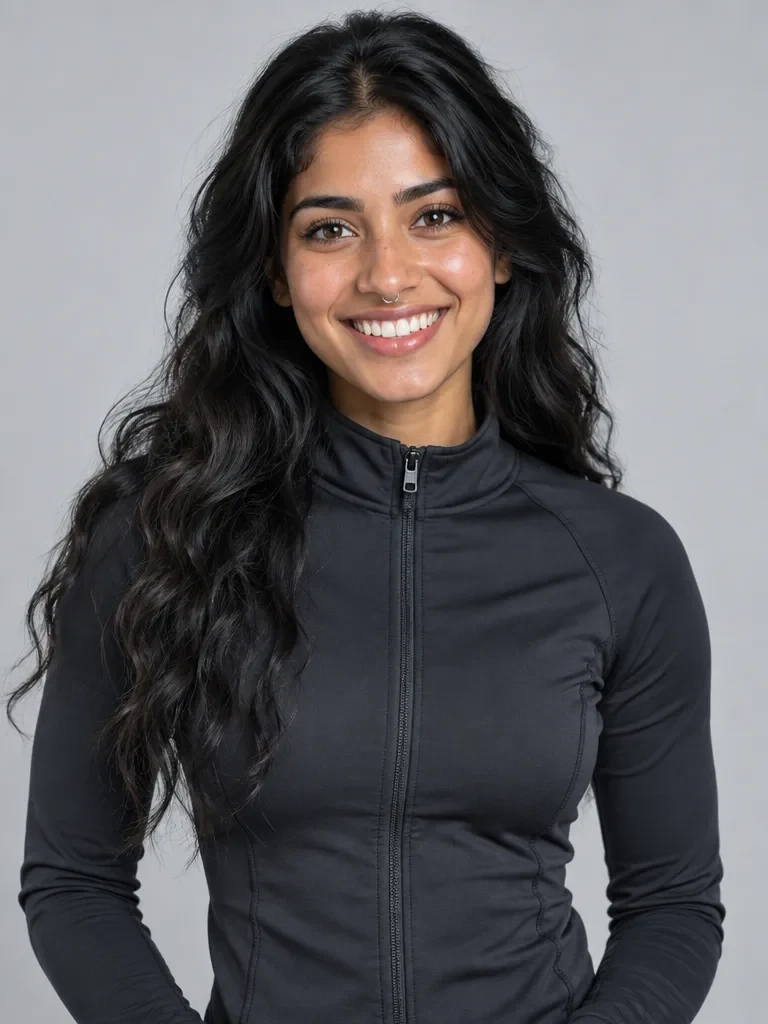
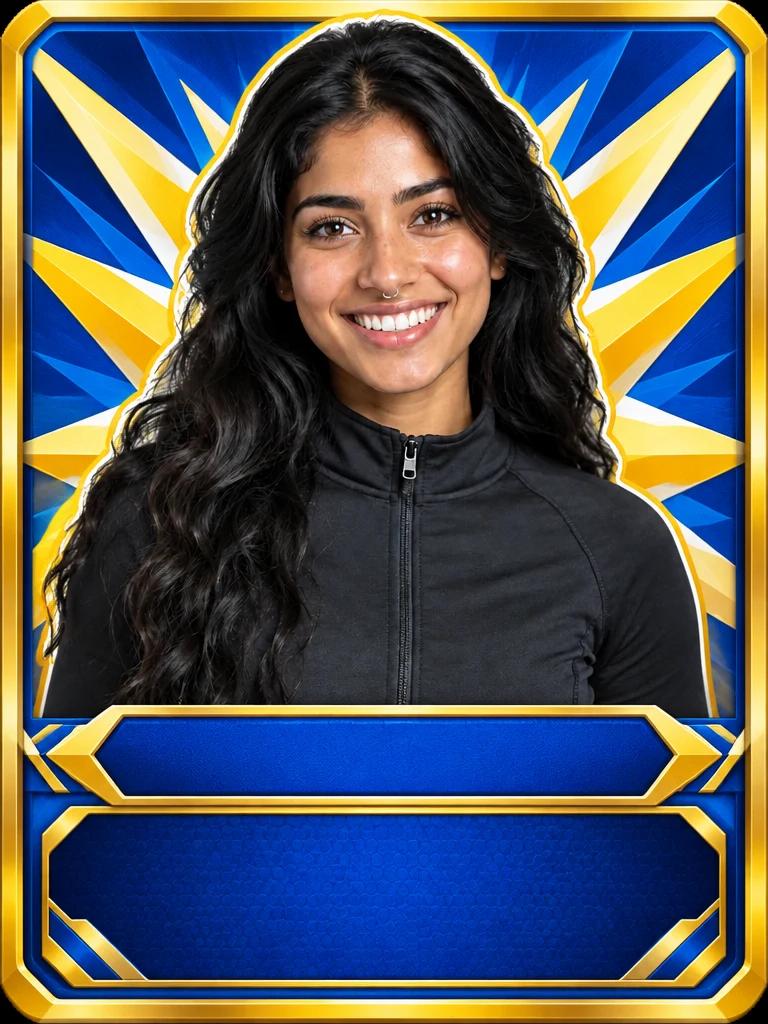
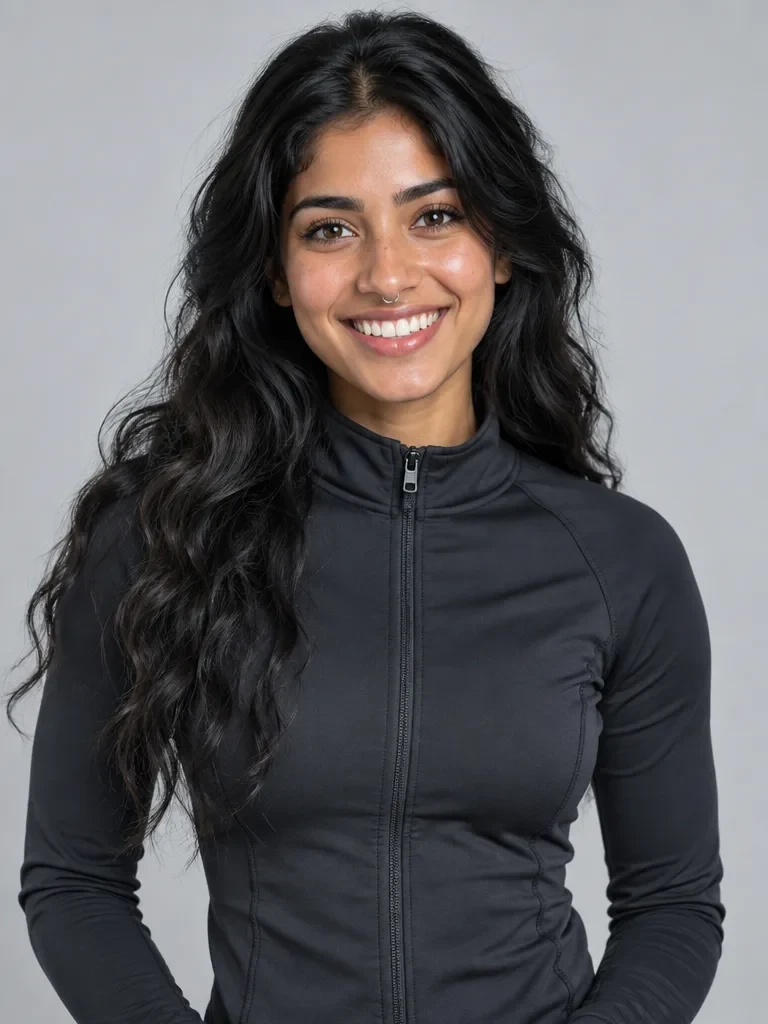
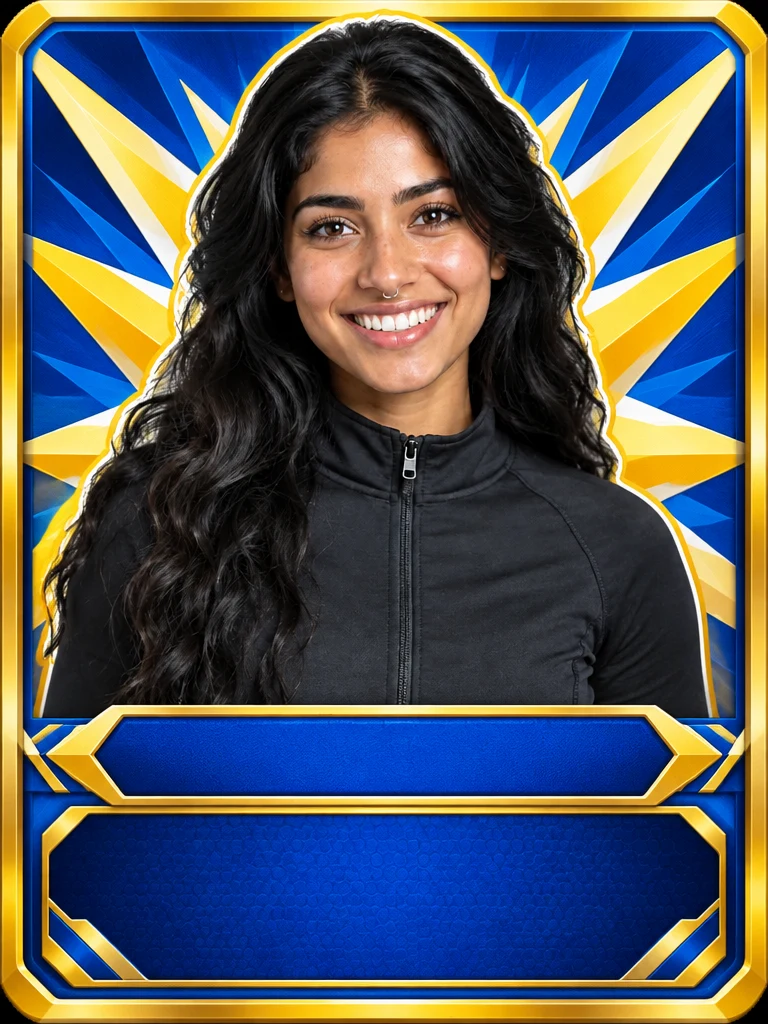
This is a real Trading Card Maker run from November 20, 2026. The photo is Maya, an AI-generated woman from Made’s AI Influencer examples, not a real person: a waist-up portrait on a plain gray backdrop, smiling, in a dark zip jacket, with long wavy black hair and a small nose ring. The prompt is the one shown below, and the request is exactly what the tool sends for that photo and prompt, sent through Made’s API from a script rather than clicked through the browser. The card came back at 768 × 1024 pixels, the photo’s own shape. I looked at it next to the photo: her face, smile, hair, nose ring and the jacket’s zip are the same. The photo is cut out in front of a blue-and-gold starburst, inside a thick gold frame with an empty name bar and an empty stats panel under her, and no text or numbers appear anywhere. Weak points: the cut-out has a thin white outline around her hair and shoulders, the name bar cuts her off at the waist, so her arms and hands aren’t shown, and the card is 3:4, not the 5:7 shape of a standard trading card. It is one run, not a measure of how often a card holds.
GPT Image 2.5 Flare (Trading Card Maker) · Generated · View the example record and price basis (JSON)
Do it again: a second card in the same style
Trading Card Maker takes one photo and the words in the Prompt box for each card, so a set comes from the words: keep the style sentence and change only who it is. Every card is its own run from its own photo. Close the loop with a print: a finished card can go straight into the Image Upscaler from your Assets.
The same style for the next photo
Copy the sentence you typed, change “me” to who the next card is (“my dog”, “my teammate”) and what must stay the same, and upload the next photo. Leave the style words exactly as they were. The second example below is exactly this.
A pet, a friend or a whole team
The tool takes one photo per card, so a team or a pet range is one run for each: same sentence, new photo. Look at the cards side by side before you print, because the frame can differ a little from card to card.
The real words, afterwards
Leave the name bar and the stats panel empty in every card and set the real names and numbers in a design tool. The tool can render text, but spelling is unreliable, and a misspelled name ruins a gift or a team card.
Recorded Made demonstration
A dog, in the same style, then upscaled for print
These are real runs from November 20, 2026. The photo is a made-up dog that a Made model generated for this guide, not a real pet: a small wiry-haired terrier mix sitting on a rug with its head tilted, 768 × 1024 pixels like the first photo. The prompt is the first card’s sentence word for word with only who it is changed (“my dog”, “my dog’s face and fur markings”); it is under Prompts below. The card came back with the dog’s face, floppy ears, tilted head and markings kept, and the same blue-and-gold starburst, name bar and stats panel as the first card, again with no text. It isn’t a copy of the first frame: the border is thinner and the bars are shaped a little differently, and the card shows the dog from the chest up, without its paws. Then the card went to the Image Upscaler, the way Assets → Use in another tool → Upscale sends it, with the request the Upscaler builds for that card, again sent from a script. It opened on Standard, Scale 4× and Face recovery on, with Format JPG, and I changed none of them. The upscale came back at 3,072 × 4,096 pixels with the same layout, frame and bars. Zoomed in on the same spot, the fur strands are finer and separate, the eye highlights are clearer and the edge of the cut-out is sharper, and nothing new was added. One run of each, not a measure of how often a set matches.
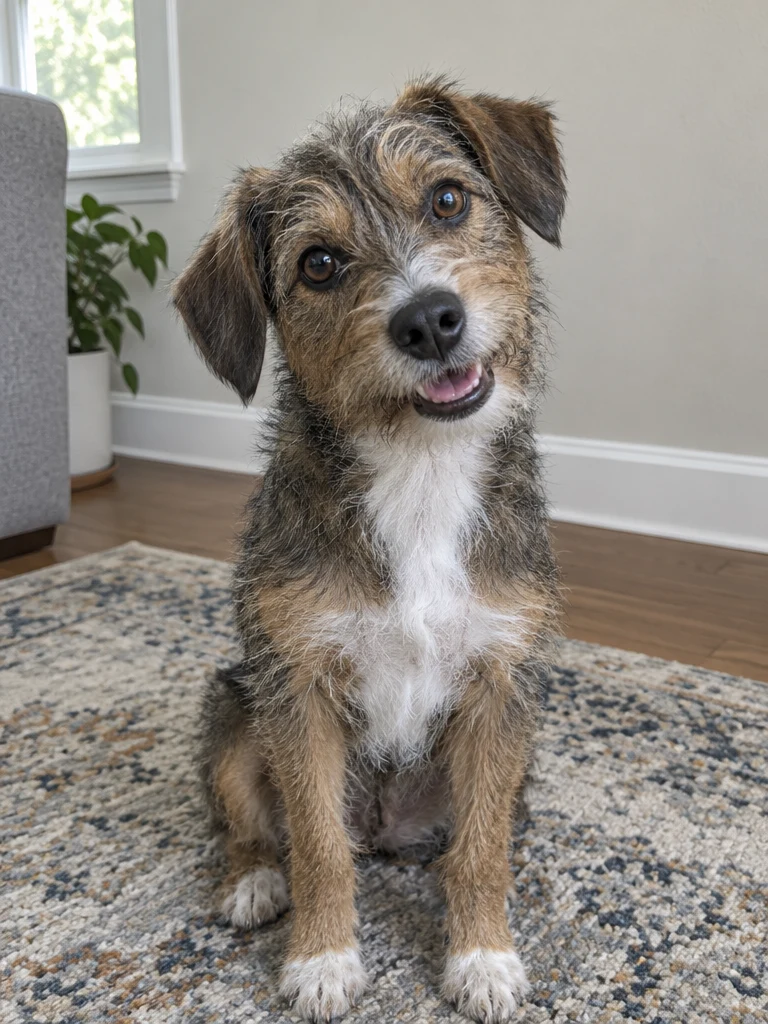
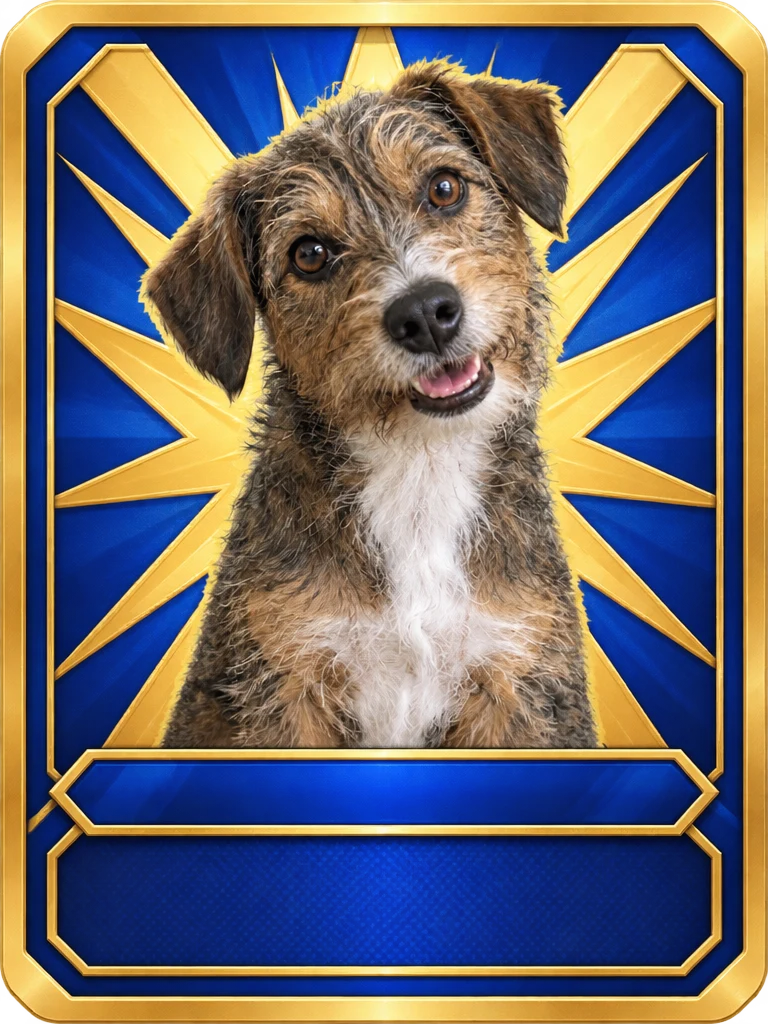
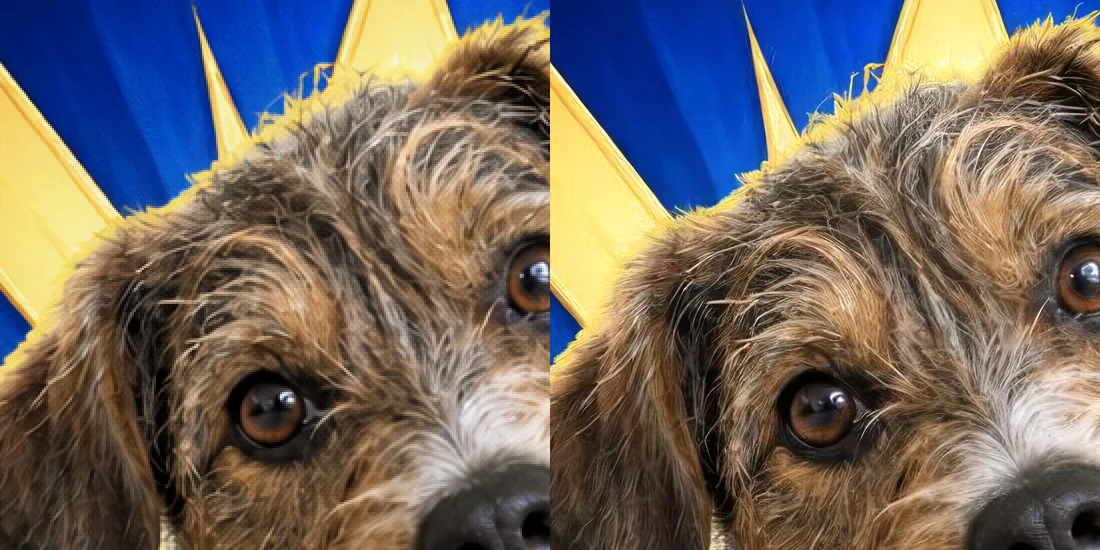
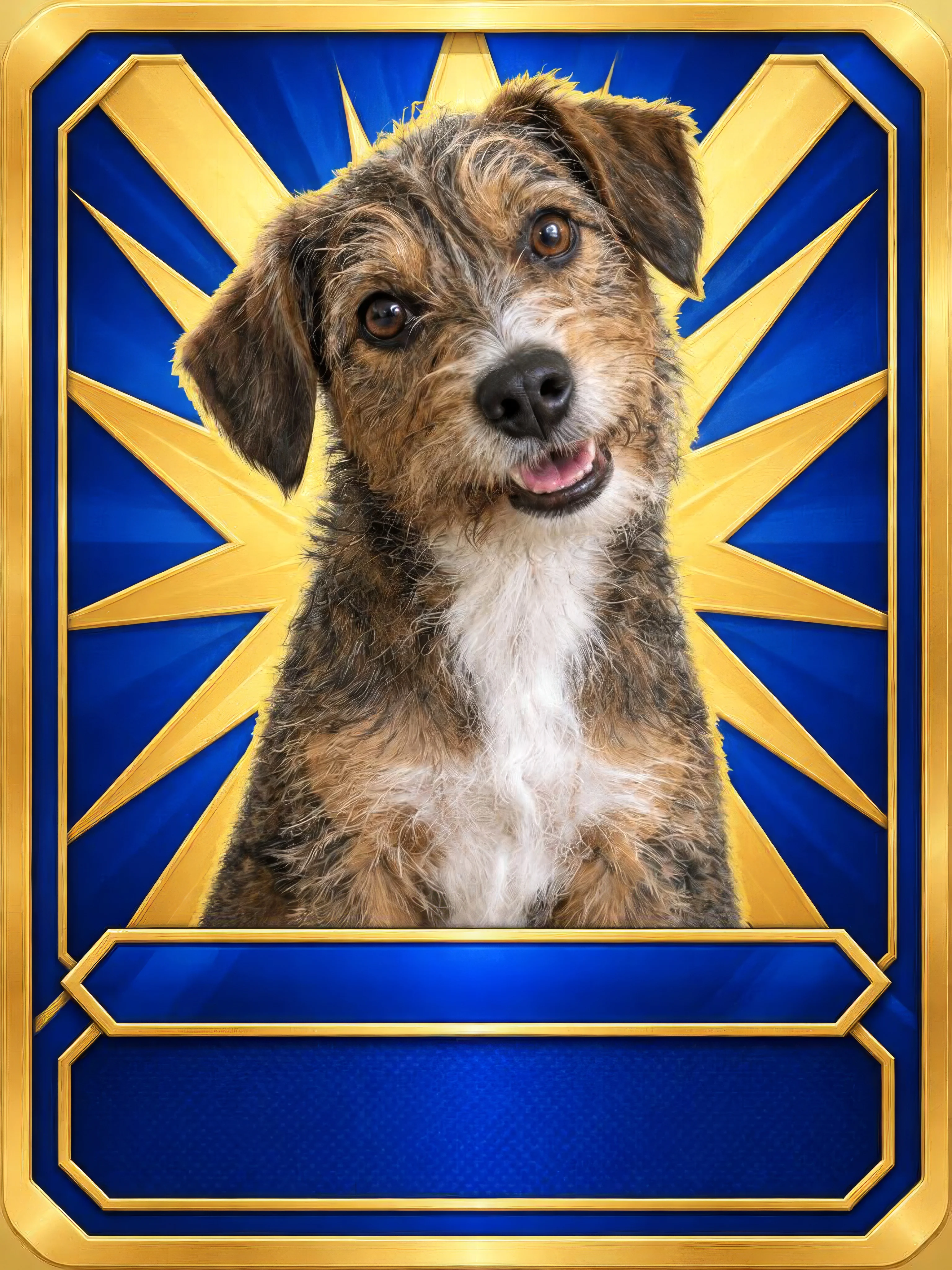
GPT Image 2.5 Flare (Trading Card Maker), then Topaz Image Upscale (Image Upscaler, 4×) · Generated · View both example records (JSON)
What creators make next
Make the card print-ready
Image Upscaler
The card comes back at 768 × 1024. A standard trading card is 2.5 × 3.5 inches, a shape of 5 to 7, so a card trimmed to that shape is about 290 dots per inch, a little under the 300 many print shops ask for. In Assets, open the card, tap Use in another tool, then Upscale: the Image Upscaler opens with it loaded. It takes a JPG, PNG or WebP up to 30 MB and makes it 2× or 4× larger, opening on 4× for a small image, with a Mode menu (Standard, Low-res rescue, High fidelity, Text & logos, Art & CGI), Face recovery and a JPG or PNG format. A result can be up to 16,384 pixels on a side and 100 megapixels. The example’s 3,072 × 4,096 file is about 10 × 13 inches at 300 dots per inch.
Make the person first
AI Influencer
No photo of yourself you want to use, or a character for the card of a brand or a team? Make a person in the AI Influencer studio and use the portrait as the card’s photo. Maya, in the first example, is one of the studio’s example people, and a made-up person has no one to ask for permission.
Make the card move
AI Video Generator
In Assets, open a card, tap Use in another tool, then Animate: the video generator opens with the card as the start frame, on Veo 3.1 Lite with a stock prompt, so check the Model menu and type your own prompt. This wasn’t run for this guide, so look at the result before you post it.
Prompts you can inspect and adapt
Prompt recipe to adapt
Your card, your style
Turn [me / my dog] into a trading card in a [sports-card] style: [the cut-out portrait] in front of a [geometric starburst] background, a [thick beveled] frame with rounded corners, an empty name bar along the bottom and an empty stats panel under it, and no text or numbers anywhere on the card. Keep [my face and hair] exactly as in the photo.Fill in the brackets. Keep the style words the same for every card in a set and change only who it is. Only the two sentences below were run for this guide, so check what your own wording does.
Recorded generation prompt
What was typed for the first card
Turn me into a trading card in a collectible sports-card style: the cut-out portrait in front of a bold geometric starburst background, a thick beveled frame with rounded corners, an empty name bar along the bottom and an empty stats panel under it, and no text or numbers anywhere on the card. Keep my face and hair exactly as in the photo.Trading Card Maker sends your words as you type them, with your photo. It adds nothing of its own.
Prompt typed for the second card
What was typed for the second card
Turn my dog into a trading card in a collectible sports-card style: the cut-out portrait in front of a bold geometric starburst background, a thick beveled frame with rounded corners, an empty name bar along the bottom and an empty stats panel under it, and no text or numbers anywhere on the card. Keep my dog's face and fur markings exactly as in the photo.The first card’s sentence with only who it is changed. The dog photo is the second example’s.
How a card is priced
Per card: one photo and one prompt make one card each time you press Generate. The total appears on Generate before you run it.
The tool always runs GPT Image 2.5 Flare at low quality with one photo, and at that setting every picture size it makes costs the same, so your photo’s shape doesn’t change the price. The Image Upscaler is priced separately, by the size of the file it makes.
Price source: Trading Card Maker · Checked
Each new try is priced again. Before a run starts, the price is checked; if it came out higher than the button showed, it stops and asks you to press Generate again. If the provider it was priced on fails, a backup provider can take the run at its own price, which can be higher. A run that fails isn’t charged.
What to review before you use the result
| What you see | What to try |
|---|---|
| The name or stats came out misspelled | The tool can draw letters, but spelling is unreliable. Ask for an empty name bar and an empty stats panel with no text or numbers, as the example does, and set the real words in a design tool afterwards. |
| The card doesn’t look like me or my pet | A strong style can pull a face away from the photo. Start from a sharp photo with the face large and in clear light, say what must stay the same (“my face and hair”, “my dog’s face and fur markings”), and run it again from the original: each run is a little different. |
| The second card doesn’t match the first | Use the first card’s style sentence word for word and change only who it is. Even then, details such as the frame’s thickness and the shape of the bars can differ, as they did here. Name the details you care about in the sentence and compare the cards side by side before you print the set. |
| There is a thin light outline around the cut-out | The first example’s card has one around the hair and shoulders. Look for it on every card, and trim it in an editor if it bothers you. Asking for “no outline” wasn’t tried for this guide. |
| The card isn’t the shape of a trading card | The card follows your photo’s shape: the closest of the tool’s sizes, 3:4 for the example, not the 5:7 of a standard 2.5 × 3.5 inch card. A print service will trim a little off the sides or ask for the shape you need. Keep the face away from the edges. |
| It isn’t sharp enough for a big print | The card is 768 × 1024 pixels for a 3:4 photo. For a poster-size print, send it to the Image Upscaler from Assets with Use in another tool, then Upscale, and look at it zoomed in before you order. |
| Use a JPG, PNG, or WebP image of up to 20 MB | Save or export the photo in one of those formats, or make the file smaller. HEIC photos from an iPhone are converted for you. |
Questions about this workflow
Can I make a trading card of my pet?
Yes. The second example is a dog: the card kept the dog’s face, ears, tilted head and markings. Use a sharp photo where the eyes are clear, and say what must stay the same in the prompt. Under Try, the Pet card chip is a starting point.
Can it write my name and stats on the card?
Not reliably. It can render text, but spelling is unreliable, and a card with your name misspelled ruins the gift. Ask for an empty name bar and an empty stats panel with no text on the card, and set the real words in a design tool.
Will the card look like me?
Usually. In the first example the face, smile, hair, nose ring and jacket zip carried over. A strong restyle can drift, so compare the card with your photo and run it again from the original if the likeness slipped.
How do I make a matching set for a team or a pet range?
Run one photo per card with the same style sentence, changing only who it is. The second example kept the starburst, the name bar and the stats panel in the same places and the same blue and gold, but the frame came out thinner, so line the cards up and check the set before you print it.
Can I make a card that looks like one from a card game I know?
No. Don’t ask for characters, frames or layouts from an existing card game or brand: it risks infringement, especially on anything you print or sell. Describe your own style, as in the example, and use cards of yourself, your friends and your pets.
How do I print them at real card size?
A standard card is 2.5 × 3.5 inches, a shape of 5 to 7. The card comes back 3:4, at 768 × 1024 for a 3:4 photo, so a print service will trim it. For consistent decks, check the service’s bleed and resolution specs, and upscale the cards first if they ask for more pixels.
Do I need to sign in?
Yes, to generate. You can upload the photo and type the prompt first; if you sign in from Generate, the tool keeps them.
Work with Claude and Made
Trading Card Maker runs in the tool. With the Made connector in Claude, you can ask for the same edit: Claude can find GPT Image 2.5 Flare in Made’s catalog, take your photo as the image to edit, quote the price and generate, if your client offers a way to upload.
Conversation starter
Ask your assistant
Use Made to turn my attached photo into a trading card in a collectible sports-card style: the cut-out portrait in front of a geometric starburst background, a thick beveled frame with rounded corners, an empty name bar along the bottom and an empty stats panel under it, and no text or numbers anywhere on the card. Keep my face and hair exactly as in the photo. Use GPT Image 2.5 Flare as an image edit at low quality and the size closest to my photo’s shape. Show me the price before generating one image.If your client doesn’t offer a way to upload, use Trading Card Maker with the same photo and prompt.