The workflow
Pick a shot that shows the product clearly
Start with one continuous take. A bottle standing on a table is a simpler first test than one spinning behind fingers. Watch the source once and note when the object is hidden, turns away, or leaves the frame. If you upload a longer clip, the tool lets you select a shorter window before it is sent.
Prepare the replacement reference
Use a well-lit JPG, PNG, or WebP under 10 MB. Keep the complete silhouette visible. A reference with a similar viewing angle makes the intended geometry easier to describe. Extra references can show another side, but say which image supplies which detail rather than giving the model conflicting versions.
Choose “Swap a product” and name the object
Open Video Object Replacement, upload the clip, and choose the product preset. Your first photo is @Image1 and the video is @Video1. Add a bounded instruction such as “replace the bottle on the glass pedestal,” then name the parts that should remain: the pedestal, hands, camera motion, and setting.
Check the quote, then inspect the whole result
Choose whether to keep source audio and read the displayed credit estimate. After generation, compare the opening, middle, closing, and all occluded frames. Play at normal speed as well as pausing: a rigid product can look convincing in one frame and change shape in motion.
Recorded Made demonstration
A real bottle swap, with all three inputs to inspect
This Made-generated demonstration replaces an ivory serum bottle with a cobalt perfume bottle. The source and result below are the actual files from a September 19, 2026 generation. It is an unbranded studio example, so it does not demonstrate exact logo or package-text reproduction.
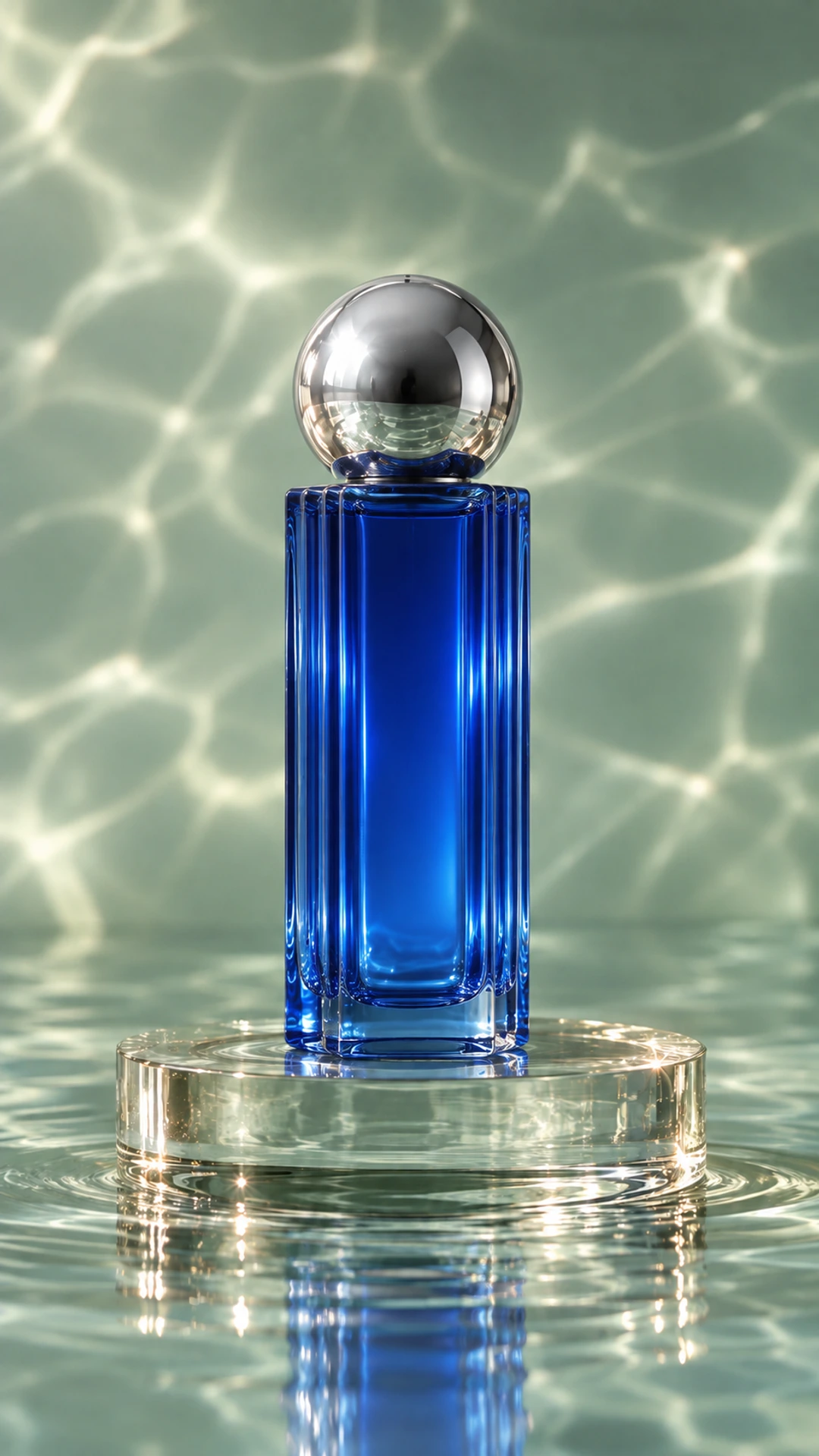
Kling O3 Edit Pro · Generated · View the example record and price basis (JSON)
Prompts you can inspect and adapt
Recorded generation prompt
The exact prompt used for the bottle example
Replace only the ivory cylindrical serum bottle and orange ball cap in @Video1 with the cobalt-blue rectangular fluted glass perfume bottle and polished silver ball cap in @Image1. Match the new product shape, precise glass edges and silver cap consistently. Preserve the exact pedestal, camera movement, shot timing, seafoam background, water ripple and lighting from @Video1. Update only the contact reflections and shadows needed for the new bottle. The bottle remains rigid and stable: no morphing, added objects, text or logos.These are instructions given to the model, not a claim that every requested detail was preserved perfectly.
Prompt recipe to adapt
Adapt it for a handheld product
Replace only the small white bottle held in the speaker’s right hand in @Video1 with the bottle in @Image1. Keep the replacement rigid and consistent in shape, cap, material, and color. Follow the original grip, perspective, motion, and partial occlusion by fingers. Preserve the speaker, clothing, background, camera movement, and shot timing. Change only the object and the contact shadows and reflections it requires.This handheld recipe is a starting point; the paired demonstration above uses a bottle on a pedestal.
A five-second edit: 84 credits at the observed rate
5 seconds × 16.8 credits/second = 84 credits
On October 14, 2026, the public catalog returned a customer rate of $0.168 per input second for this model. Made displays one credit per cent. This is a dated estimate for one five-second clip at the tool’s default settings with original audio off; it is not the historical bill for the example.
Price source: Public video-editor catalog · Observed
The tool estimates using input duration rounded up to a whole second, then rounds the credit total up. A 5.1-second input at the same rate is estimated as 6 × 16.8 = 100.8, rounded up to 101 credits. Upload your actual clip to see its estimate; the backend probes the clip and confirms the price before generation. Each new generation needs its own quote.
What to review before you use the result
| What you see | What to try |
|---|---|
| The wrong object changes | Describe its position, color, and relationship to a person or surface. Remove vague words such as “it.” Use one target for the first run. |
| Fingers merge into the packaging | Choose a segment with a clearer grip or a reference closer to the source angle. Inspect every point where the hand passes in front of the product. |
| The label or logo drifts | Treat the result as a visual draft. For exact branding, add approved artwork in your editor and check tracking across the shot; this generative tool does not promise exact typography. |
| The setting changes with the product | Keep the replacement instruction narrow. Explicitly name the original background and lighting, then compare the new result. Prompt constraints reduce ambiguity but do not lock pixels. |
Work with Claude and Made
Connect Made in Claude, then ask it to inspect the current catalog for a video-editing model and quote the job. Attach or supply the source assets in the format the connector requests. Use the returned model schema for media inputs; the @Image1 notation here describes the edit, not an API argument.
Conversation starter
Ask your assistant
Use Made to replace only the bottle on the pedestal in my attached video with the product in my reference photo. Preserve the shot and camera motion. Check the current catalog for Kling O3 Edit Pro and its supported video and reference inputs. Show me the exact credit quote and proposed prompt before generating one result, then return the video link.If the connected client does not expose this model or the required upload path, open Video Object Replacement with the same files. Do not substitute a text-to-video model for an edit of existing footage.
Questions about this workflow
Can I replace a product without drawing a mask?
Yes. This Object Swap workflow uses your description and reference images to identify the edit. It does not offer a hand-drawn mask, so a precise target description matters when several similar objects appear.
Will the new package text be exact?
No exact-text guarantee is provided. Check the entire video for spelling, logo shapes, fine print, and changes in proportions before treating it as an accurate product representation.
Can I reuse a longer campaign video?
Choose one 3–15 second shot for the edit. The tool can prepare a shorter window from a longer upload. Assemble multiple edited shots in your video editor and check continuity between them.