The workflow
Pick the photo
Use one photo of one person: you, or a friend who agreed. A sharp photo with the face large and in clear light carries over best. A photo that stops at the waist works: the tool draws the legs, the shoes and any hands the photo doesn’t show, so those are new.
Upload it
Open AI Action Figure Generator and tap “Upload image” (on a phone, Upload), or paste the picture from your clipboard. It takes one JPG, PNG or WebP up to 20 MB, and an iPhone HEIC photo is converted for you. A photo over 1,536 pixels on its long side is scaled down before the edit.
Describe the box
Type in the Prompt box. Say it is a full-body figure in a toy box, what the figure wears, two small accessories that match your life, and what must stay the same, such as your face and hair. For the name on the header, ask for one short word and for no other text, logos or numbers on the box. Under Try there are three starting points: Boxed collectible, Desk figurine and Themed accessories. With the box empty, the tool sends “Turn this photo into a boxed action figure”. Keep your sentence: you will reuse it for the next figure.
Check the price and generate
Generate shows the price. If you aren’t signed in, you sign in first, and your photo and prompt wait for you. Before the run starts, the price is confirmed again; if it came out higher than the button showed, nothing runs until you press Generate again. While it works the button reads “Making it…”, and the figure appears under Generations when it is done.
Check the figure against your photo
Put the figure next to the photo. Look at the face first, then the hair and anything you wear, then the hands. Then read the box: every letter of the name, and nothing else written on it. If the likeness slipped or a letter is wrong, run it again from the original photo with the same sentence.
Recorded Made demonstration
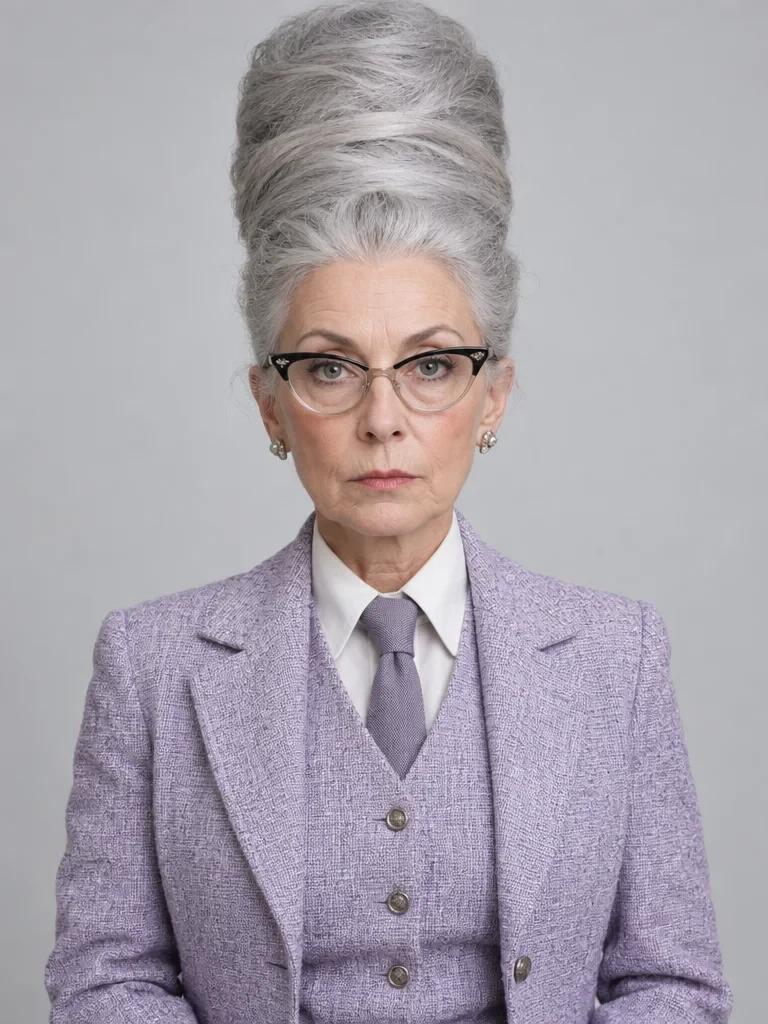
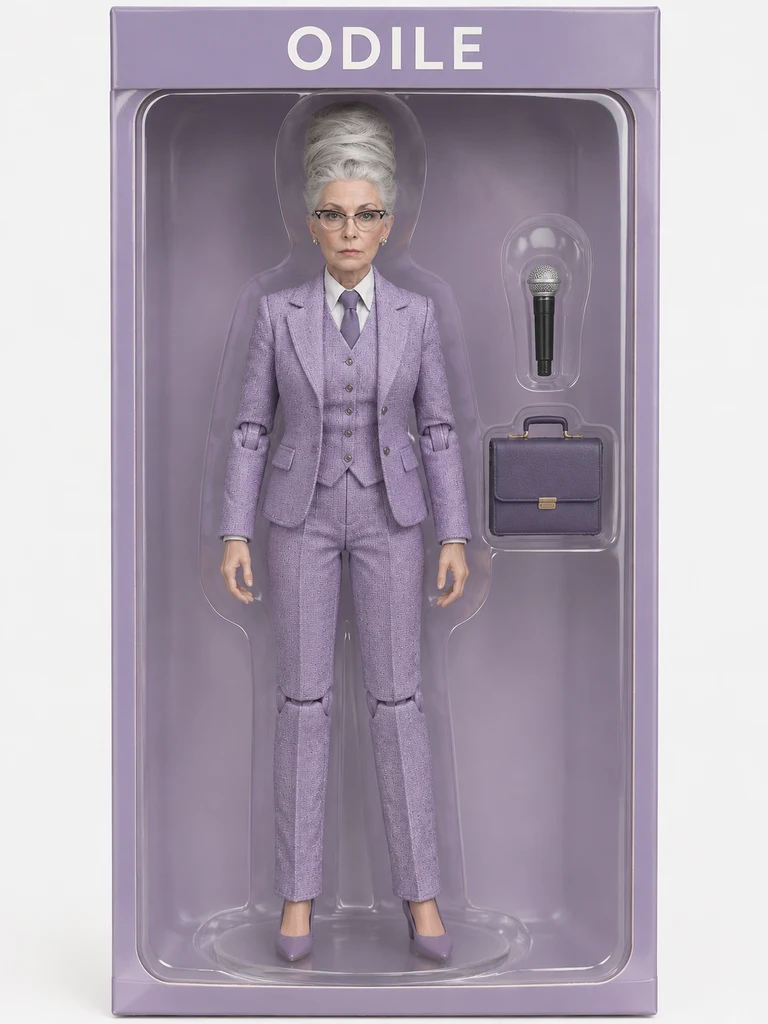
A portrait of a woman, as a boxed action figure
This is a real AI Action Figure Generator run from November 22, 2026. The photo is Odile, an AI-generated woman from Made’s AI Influencer examples, not a real person: a waist-up portrait on a plain gray backdrop, with a tall silver beehive, cat-eye glasses and a three-piece tweed suit with a narrow tie. The prompt is the one shown below, and the request is exactly what the tool sends for that photo and prompt, sent through Made’s API from a script rather than clicked through the browser. The figure came back at 768 × 1024 pixels, the photo’s own shape. I looked at it next to the photo and zoomed in on the face and the hands: her face, glasses, earrings, tall hair and suit are the same, and the figure stands full length in a card-backed box with a clear window, with a microphone and a briefcase in their own molded trays. The header reads ODILE, spelled right, and no other text, logo or number appears on the box. It has two arms and two legs, five fingers on each hand, and joint seams at the elbows, knees and wrists. Weak points: her photo stops at the waist, so the trousers, shoes and legs are new, the face and hands look like skin, not molded plastic, and the box is a flat pastel with no artwork. It is one run, not a measure of how often the text comes out right.
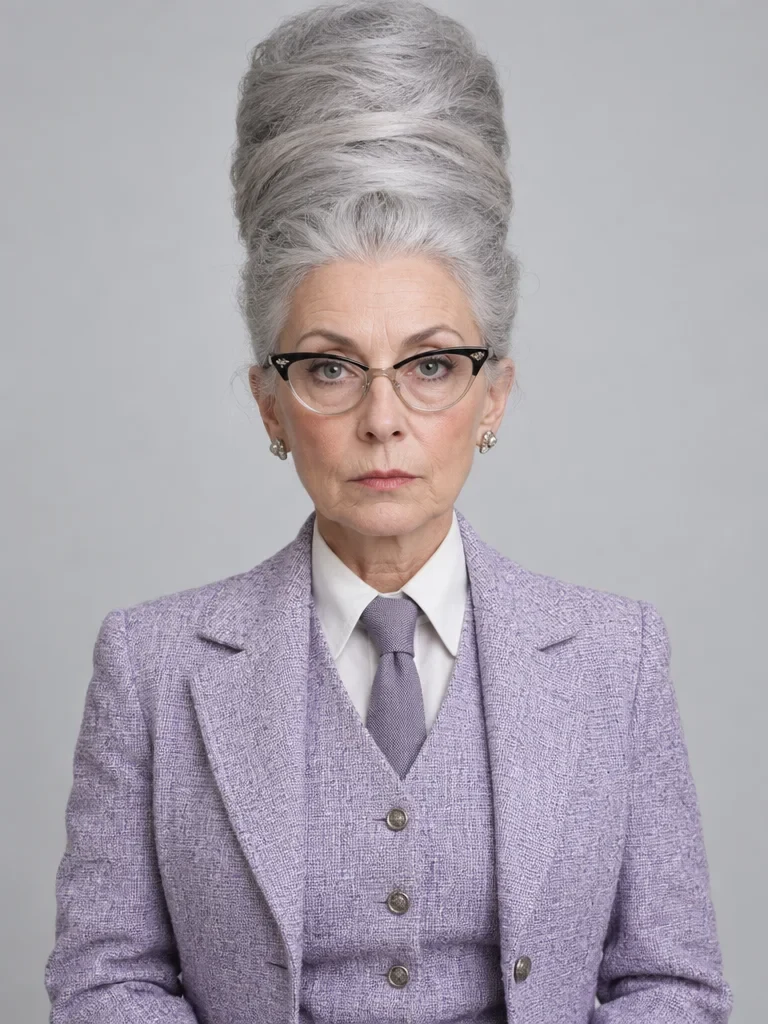
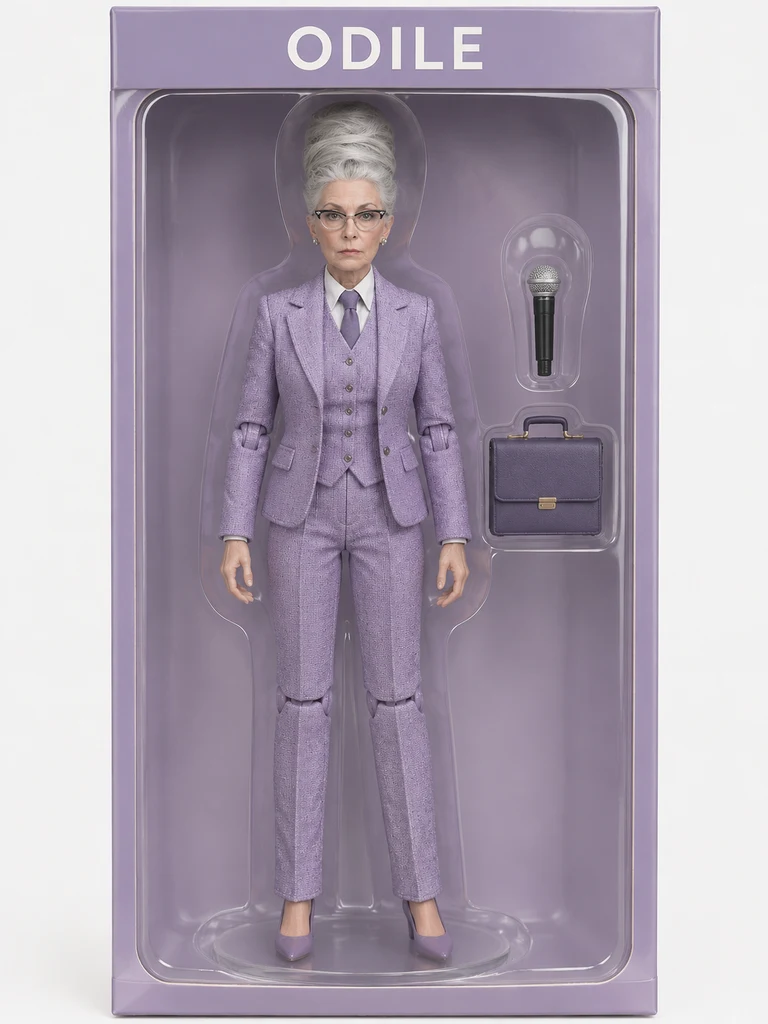
GPT Image 2.5 Flare (AI Action Figure Generator) · Generated · View the example record and price basis (JSON)
Do it again: a second figure for the same set
AI Action Figure Generator takes one photo and the words in the Prompt box for each figure, so a set comes from the words: keep the box sentence and change only the name, the accessories and what the figure wears. Every figure is its own run from its own photo. Then, if you want the figure to move, the Action figure effect in the video tool starts from a photo too.
The same box for the next photo
Copy the sentence you typed, change the name on the header, the two accessories and the clothes, and upload the next photo. Leave the box words exactly as they were. The second example below is exactly this.
A friend, a team or a whole shelf
The tool takes one photo per figure, so a team is one run for each: same box sentence, new photo, new name. Look at the boxes side by side before you post them, because the box color and the lettering can differ from figure to figure.
Accessories that say who you are
Two small things from your day make the figure yours: a microphone, a camera, a skateboard, a coffee cup. Name them as “a tiny …” so they come out toy-sized. Keep it to two, so each gets its own tray.
Recorded Made demonstration
Another person, in the same box
This is a real run from November 22, 2026. The photo is Nova, an AI-generated woman from Made’s AI Influencer examples, not a real person: a waist-up portrait with a short pixie cut, a light at one temple, a metal neck and a cream turtleneck. She is an android character, so the figure keeps her metal neck. The prompt is the first figure’s box sentence word for word, with the name NOVA, a tiny ring light and a tiny phone, and her sweater in place of the suit; it is under Prompts below. The figure came back at 768 × 1024 pixels with her face, hair, temple light, neck and sweater kept, and the same layout as the first box: a header across the top, a clear window with the figure standing on a base, two accessories in their own trays on the right. The header reads NOVA, spelled right, with no other text or logo on the box. It has two arms and two legs, five fingers on each hand, and joint seams at the elbows, knees and wrists. It isn’t a copy of the first box: this one came out a pale cream with dark lettering, where the first was lavender with white lettering, so the box followed the outfit. The phone shows a camera island like a real phone, but no logo. One run of each, not a measure of how often a set matches.
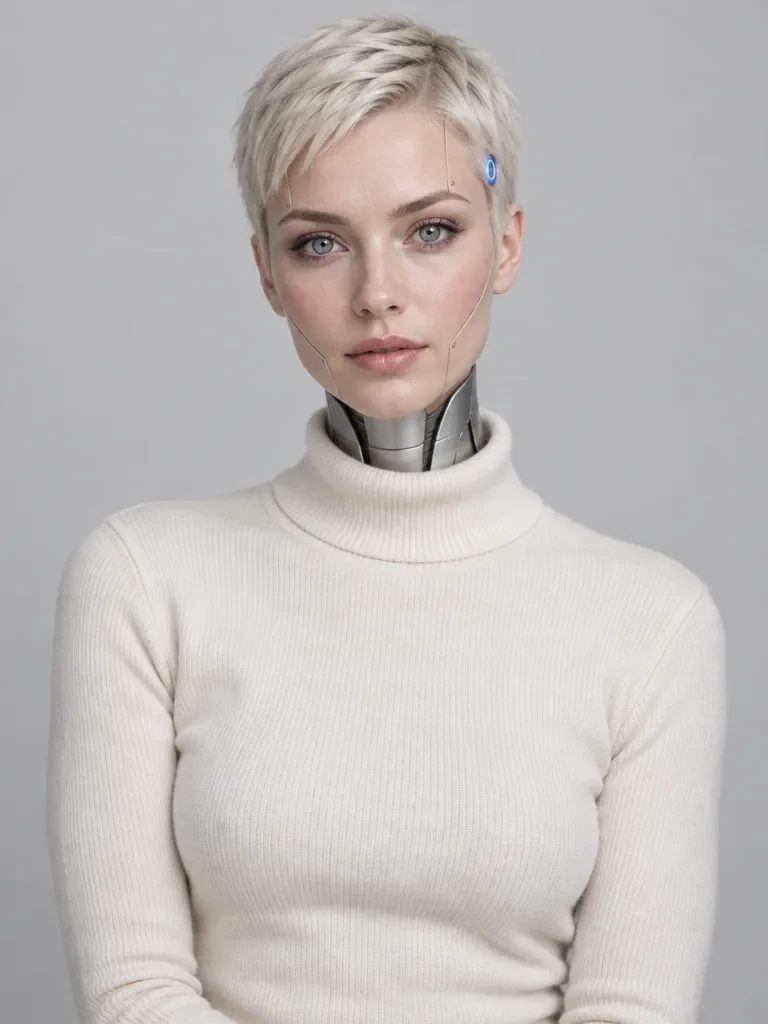
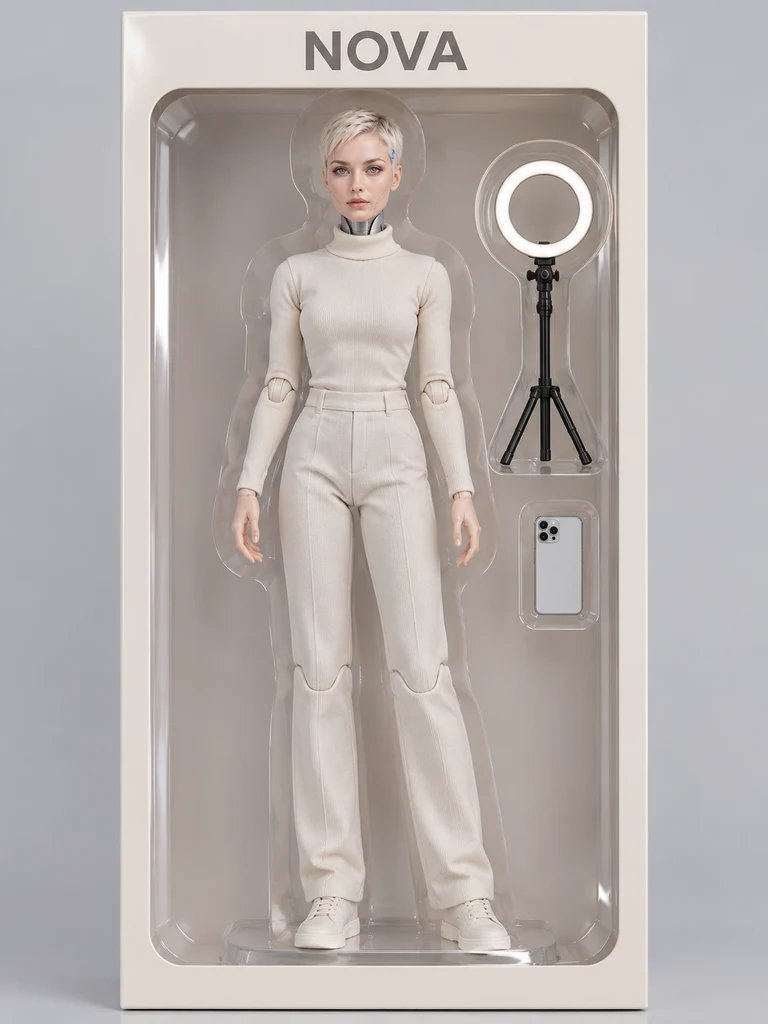
GPT Image 2.5 Flare (AI Action Figure Generator) · Generated · View both example records (JSON)
What creators make next
Make the figure move
Video effects: Action figure
The Action figure effect is a 6-second video from one photo of you: a giant hand lifts you out of the scene as a stiff plastic toy, turns you left and right like a toy review, and stands you on a small display base. It starts from your photo in its Character slot, not from the boxed picture, so upload your original photo. Under Prompt, turn the switch on to add details such as a box. The tool’s own tip is to use a strong, confident pose. The tool shows the price on Generate. This wasn’t run for this guide, so look at the result before you post it.
Make the person first
AI Influencer
No photo of yourself you want to use, or a character for a brand or a channel? Make a person in the AI Influencer studio and use the portrait as the figure’s photo. Odile and Nova, in the examples, are two of the studio’s example people, and a made-up person has no one to ask for permission.
Prompts you can inspect and adapt
Prompt recipe to adapt
Your figure, your box
Turn me into a full-body action figure in a retail toy box: a card-backed box with a clear plastic window showing the figure standing upright on a molded base, the figure made of glossy molded plastic with visible joint seams, a plain header across the top of the box that reads only "[YOUR NAME]" in capital block letters, and no other text, logos or numbers anywhere on the box. Two small accessories sit next to the figure: [a tiny accessory] and [a tiny accessory]. The figure wears the same [outfit] with matching trousers and shoes. Keep my face and hair exactly as in the photo.Fill in the brackets. Keep the box words the same for every figure in a set and change only the name, the accessories and the clothes. Only the two sentences below were run for this guide, so check what your own wording does.
Recorded generation prompt
What was typed for the first figure
Turn me into a full-body action figure in a retail toy box: a card-backed box with a clear plastic window showing the figure standing upright on a molded base, the figure made of glossy molded plastic with visible joint seams, a plain header across the top of the box that reads only "ODILE" in capital block letters, and no other text, logos or numbers anywhere on the box. Two small accessories sit next to the figure: a tiny microphone and a tiny briefcase. The figure wears the same suit with matching trousers and shoes. Keep my face and hair exactly as in the photo.AI Action Figure Generator sends your words as you type them, with your photo. It adds nothing of its own.
Prompt typed for the second figure
What was typed for the second figure
Turn me into a full-body action figure in a retail toy box: a card-backed box with a clear plastic window showing the figure standing upright on a molded base, the figure made of glossy molded plastic with visible joint seams, a plain header across the top of the box that reads only "NOVA" in capital block letters, and no other text, logos or numbers anywhere on the box. Two small accessories sit next to the figure: a tiny ring light and a tiny phone. The figure wears the same sweater with matching trousers and shoes. Keep my face and hair exactly as in the photo.The first figure’s sentence with the name, the accessories and the clothes changed. The photo is the second example’s.
How a figure is priced
Per figure: one photo and one prompt make one figure each time you press Generate. The total appears on Generate before you run it.
The tool always runs GPT Image 2.5 Flare at low quality with one photo, and at that setting every picture size it makes costs the same, so your photo’s shape doesn’t change the price. The video effect is priced separately, by the length of the clip.
Price source: AI Action Figure Generator · Checked
Each new try is priced again. Before a run starts, the price is checked; if it came out higher than the button showed, it stops and asks you to press Generate again. If the provider it was priced on fails, a backup provider can take the run at its own price, which can be higher. A run that fails isn’t charged.
What to review before you use the result
| What you see | What to try |
|---|---|
| The name on the box is misspelled | The tool can draw letters, but spelling is unreliable. Ask for one short word in capital letters in quotes, and no other text, as the examples do, then read every letter. The two names here came out right on the first try, which is two runs, not a promise. If a letter is wrong, run it again from the original photo, or leave the header empty and add the name in a design tool. |
| The figure doesn’t look like me | A strong style can pull a face away from the photo. Start from a sharp photo with the face large and in clear light, say what must stay the same (“my face and hair”), and run it again from the original: each run is a little different. |
| The legs, shoes or hands look wrong | A photo that stops at the waist leaves the tool to draw the rest. Describe the legs and shoes (“matching trousers and shoes”), as the examples do, and count the arms, legs and fingers on every figure. Run it again if there is an extra or a missing limb. A full-length photo gives it less to invent. |
| The second box doesn’t match the first | Use the first figure’s box sentence word for word and change only the name, the accessories and the clothes. Even then the box color and the lettering followed the outfit in the example. Asking for the same box color wasn’t tried for this guide, so compare the boxes side by side before you post the set. |
| The face and hands look like skin, not plastic | In both examples the face and hands read as skin, and the plastic look is in the joint seams, the molded base and the box. Asking for a more toy-like face wasn’t tried for this guide. Check it before you post. |
| It added a logo, a brand or extra words | Say “no other text, logos or numbers anywhere on the box” in the prompt, as the examples do, and read the whole box. Don’t ask for a toy brand’s name or packaging: describe a plain box instead. |
| Use a JPG, PNG, or WebP image of up to 20 MB | Save or export the photo in one of those formats, or make the file smaller. HEIC photos from an iPhone are converted for you. |
Questions about this workflow
How do I turn a photo of myself into an action figure in a box with AI?
Open AI Action Figure Generator, upload one photo of yourself, and describe the box in the Prompt box: a full-body figure in a toy box, a name on the header, two accessories and what must stay the same. The first example is exactly that: one photo and one sentence made a boxed figure with a microphone and a briefcase.
Is this the AI action figure trend, and can I make my own?
Yes. The trend is a person shown as a boxed toy with accessories, and this tool makes that picture from your photo. The two examples are two figures made the same way. Describe your own box and accessories, as the examples do, and use figures of yourself, your friends and made-up people.
Can ChatGPT make an action figure too?
A general chat assistant can make a picture like this. AI Action Figure Generator is built for the one job: you upload your photo and type the box, it keeps your words exactly as you typed them, and every figure is its own run, so a set comes from reusing one sentence. The Action figure effect then turns your photo into a short video.
Can it write my name on the box?
Yes, a short one, but not reliably. Both examples came out right on the first try, one short word each. Ask for one word in capital letters, no other text, and read every letter before you post. If a letter is wrong, run it again.
How do I add accessories?
Name them in the prompt as “a tiny …”, two at most, such as a tiny microphone or a tiny phone. Each came out in its own molded tray beside the figure in the examples. Choose things that say who you are.
Can I make it look like a toy from a brand I know?
No. Don’t ask for a toy brand’s name, logo or box design: it risks infringement, especially on anything you post or sell. Describe a plain toy box, as in the examples, and make figures of yourself, your friends and made-up people.
Can I turn the figure into a video?
Yes, in a different tool. The Action figure effect makes a 6-second video from one photo of you: a giant hand lifts you out as a stiff plastic toy and turns you like a toy review. It starts from your photo, not the boxed picture, and it wasn’t run for this guide.
Do I need to sign in?
Yes, to generate. You can upload the photo and type the prompt first; if you sign in from Generate, the tool keeps them.
Work with Claude and Made
AI Action Figure Generator runs in the tool. With the Made connector in Claude, you can ask for the same edit: Claude can find GPT Image 2.5 Flare in Made’s catalog, take your photo as the image to edit, quote the price and generate, if your client offers a way to upload.
Conversation starter
Ask your assistant
Use Made to turn my attached photo into a full-body action figure in a retail toy box: a card-backed box with a clear plastic window showing the figure standing upright on a molded base, the figure made of glossy molded plastic with visible joint seams, a plain header across the top of the box that reads only "[MY NAME]" in capital block letters, and no other text, logos or numbers anywhere on the box. Two small accessories sit next to the figure: a tiny [accessory] and a tiny [accessory]. Keep my face and hair exactly as in the photo. Use GPT Image 2.5 Flare as an image edit at low quality and the size closest to my photo’s shape. Show me the price before generating one image.If your client doesn’t offer a way to upload, use AI Action Figure Generator with the same photo and prompt.