The workflow
Open Caricature Maker and add one portrait
Open Caricature Maker and, under Photo, tap Upload image (on a phone, Upload a photo), or paste a picture from your clipboard. It takes JPG, PNG or WebP up to 20 MB, and an iPhone photo in HEIC format is converted for you. A photo longer than 2,048 pixels on its long side is scaled down before it uploads. Use a sharp portrait with the face large, facing the camera, in even light: the tool needs to see the features it will exaggerate.
Describe the caricature, or tap a style
Type what you want in the Prompt box: the drawing style, which features to push, and how kind to be. Or tap one of the three chips under Try, Classic style, Digital color or Pencil sketch, which fill the Prompt box with a ready sentence you can send as it is or change. The Prompt box says Optional: if you leave it empty, the tool asks for “Turn this photo into a classic hand-drawn caricature with playful exaggeration.”
Tap Generate
Generate shows the price before it runs. If you aren’t signed in, you sign in first and your photo and prompt wait for you. While it works the button reads “Making it…”, and the caricature appears in Generations beside the tool when it’s done.
Compare it with your photo
Put the drawing next to your photo. Check that it is clearly the same person, then look at what was pushed: the hair, the glasses, the smile, the nose. Then look at the background and the clothes. The tool redraws all of it, so some details will have changed.
Run it again or change how bold it is
Each press of Generate is a new drawing made from your original photo, so run it again if a feature went too far or not far enough. There is no strength control. To change how far it goes, change the words: add “gentle exaggeration” or “bold caricature” to your sentence, as the tool’s own examples do. Those two phrases were not run for this guide, so check what they do on your photo.
Recorded Made demonstration
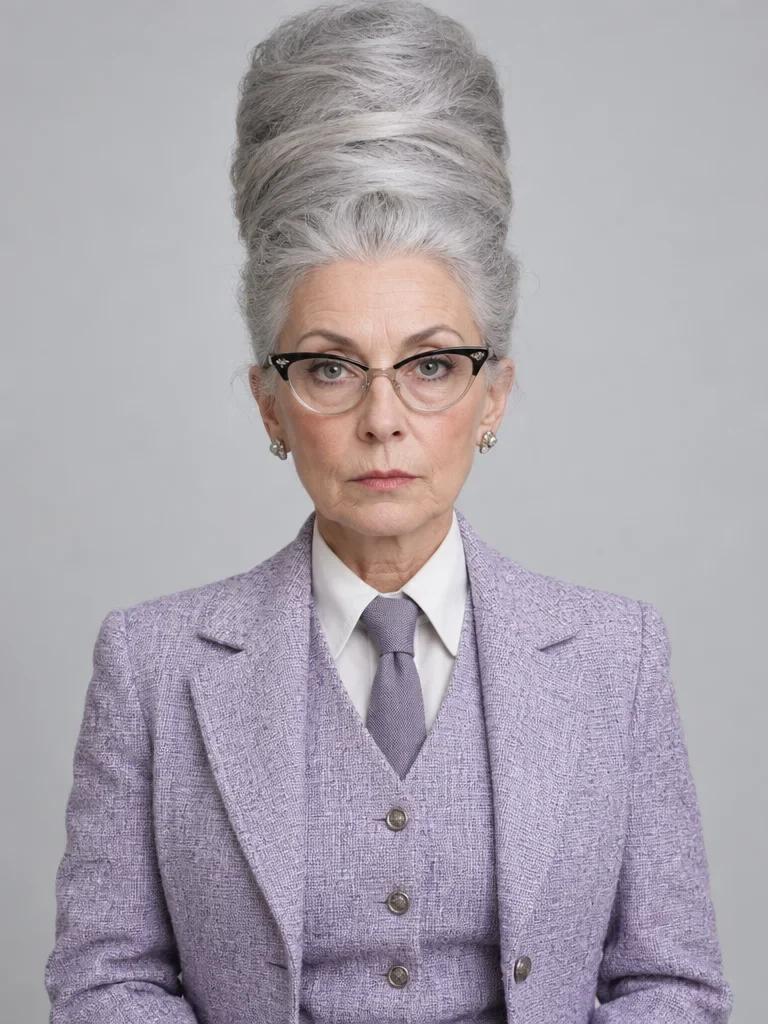
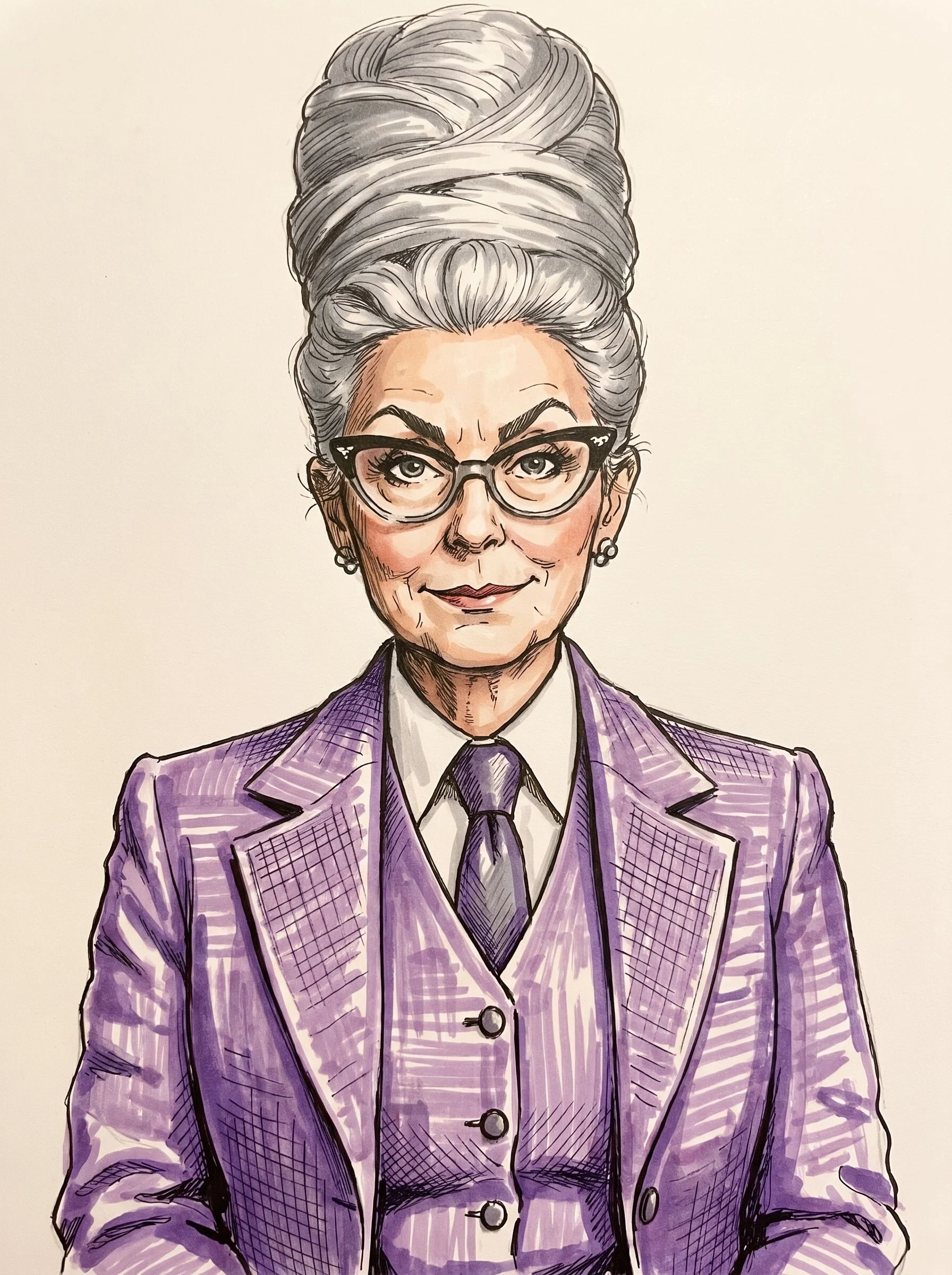
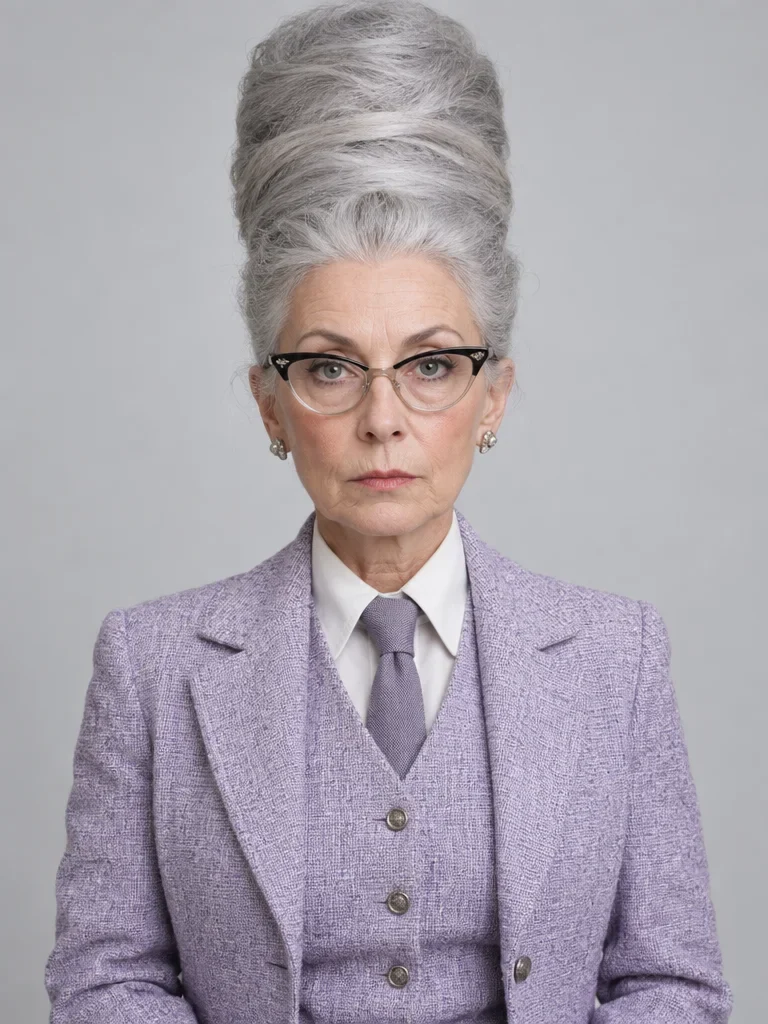
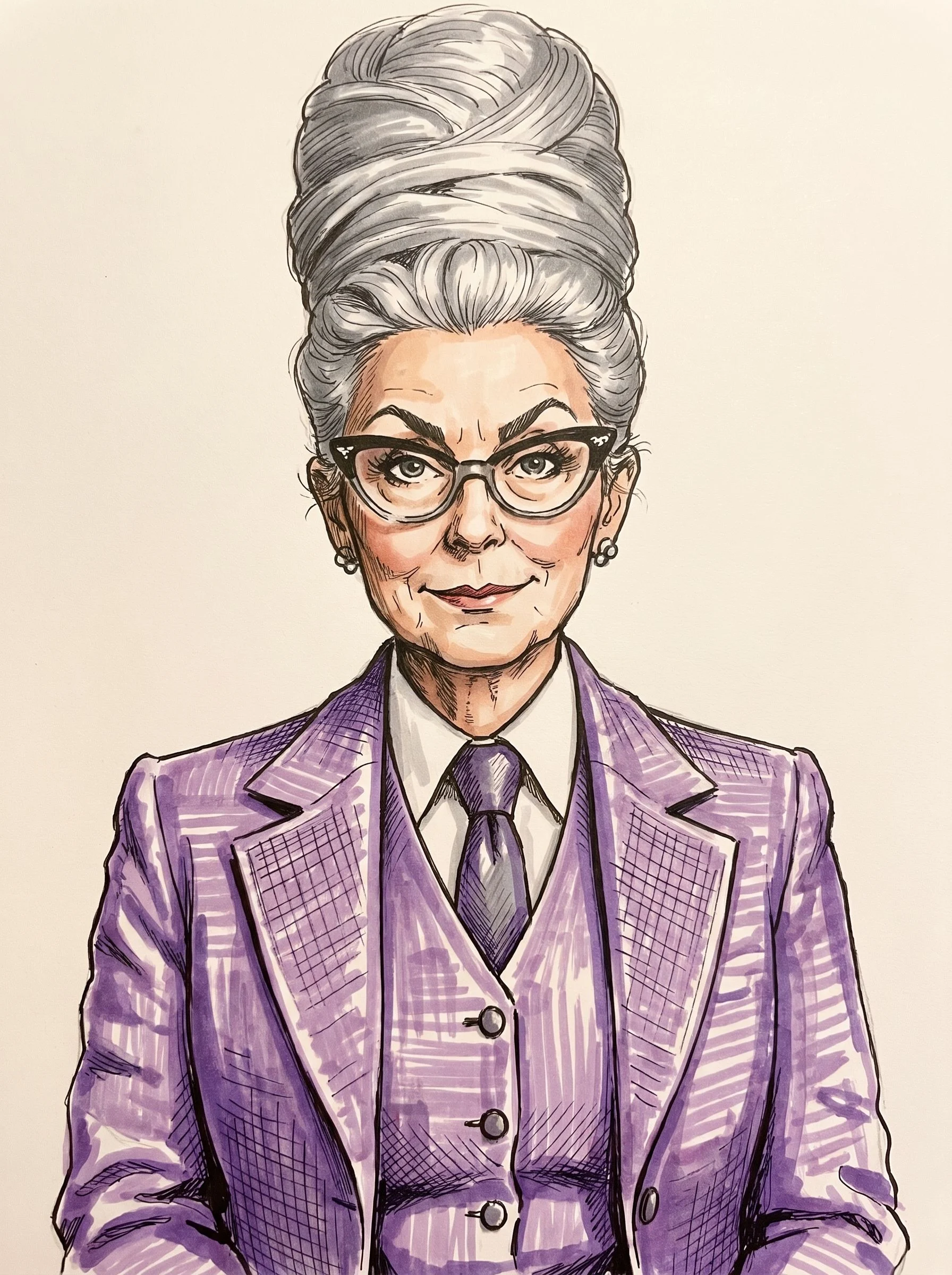
A woman with a tall silver beehive, as a marker-and-ink caricature
This is a real run of Caricature Maker from November 22, 2026. The photo is an AI Influencer example Made generated, a made-up woman in a lavender tweed three-piece suit with cat-eye glasses and a towering silver beehive, not a real person. The prompt was typed in the Prompt box, and the request is exactly what the tool builds for that photo and sentence, sent through Made’s API from a script rather than tapped through the browser. It came back at 1,792 × 2,400 pixels from a 768 × 1,024 photo, in the same 3:4 shape. I looked at it next to the photo. She is clearly the same person: the cat-eye glasses, the pearl earrings, the tie and the three-piece suit all carried over, in clean marker-and-ink line work with hatching. Four things changed: the beehive became a swirled twist of about the same height, so the exaggeration is mild, not extreme; her flat, deadpan mouth became a small smile; her eyebrows came back heavier; and the plain gray backdrop became cream paper. No hands were in the frame. One run, not a measure of how every photo comes out.
Nano Banana Pro (Caricature Maker) · Generated · View the example record and price basis (JSON)
Do it again: a matching set
Every press of Generate draws from the photo you added, so the same sentence on a second photo gives a second caricature in the same style. That is how you make a set, such as a team page, a family gift or a group of profile pictures. The tool takes one photo at a time, so you do one person per run.
The same sentence on the next photo
Add the next person’s photo and type or paste the same sentence in the Prompt box. The second example below used exactly the same words as the first, on a different person.
The same person in another style
Keep the photo and tap another chip under Try: Digital color for a bolder painted look, or Pencil sketch for loose line work. Those chips’ sentences were not run for this guide.
Everyone in one drawing
The tool’s own page says a photo with everyone in frame is drawn together, keeping their places. This guide ran one person per drawing, so check every face if you try a group.
Recorded Made demonstration
The same sentence on a second person
This is a real run from November 22, 2026, with the same sentence as the first example. The photo is Lucien, another AI Influencer example Made generated, a made-up man with a copper bowl cut, a waxed moustache, a mint plaid suit and a lavender bow tie, not a real person. The drawing came back in the same marker-and-ink style as the first: the bowl cut, the moustache, the plaid suit and the bow tie all carried over, the moustache curls further, the eyes are drawn much wider, and his nose and chin are longer. The gray backdrop stayed gray this time. One flaw: two small squiggles sit on his shirt front where buttons should be. No hands were in the frame. It came back at 1,792 × 2,400 pixels from a 768 × 1,024 photo. Side by side, the two drawings read as a set, though one run each is not a measure of how every pair comes out.
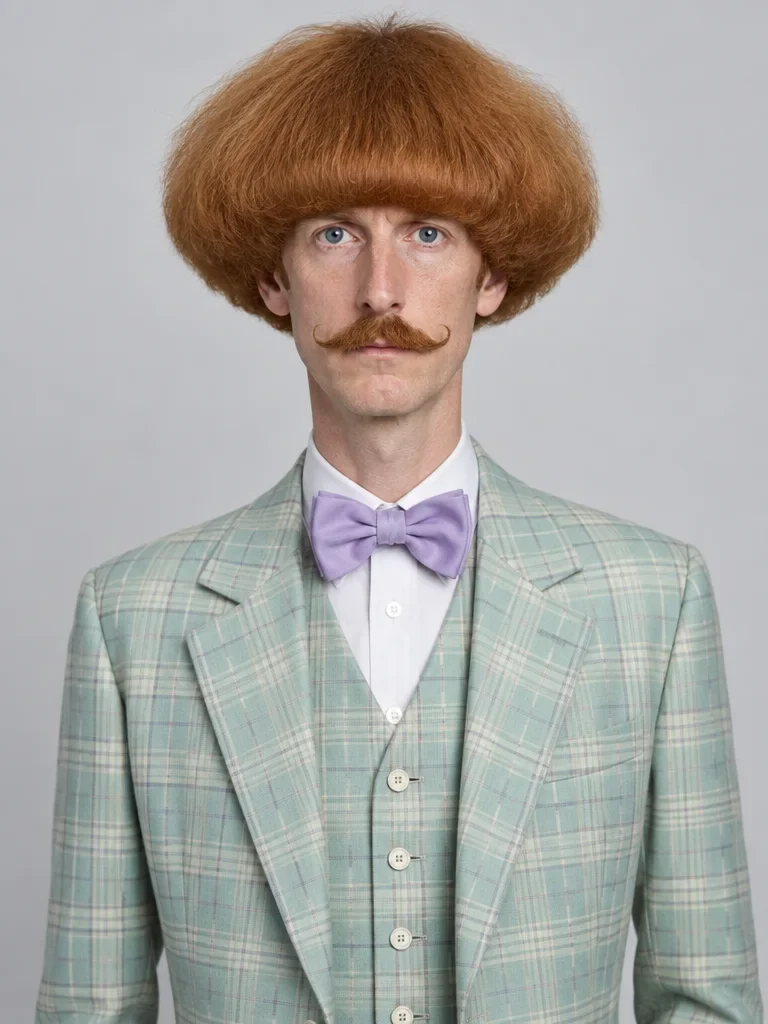
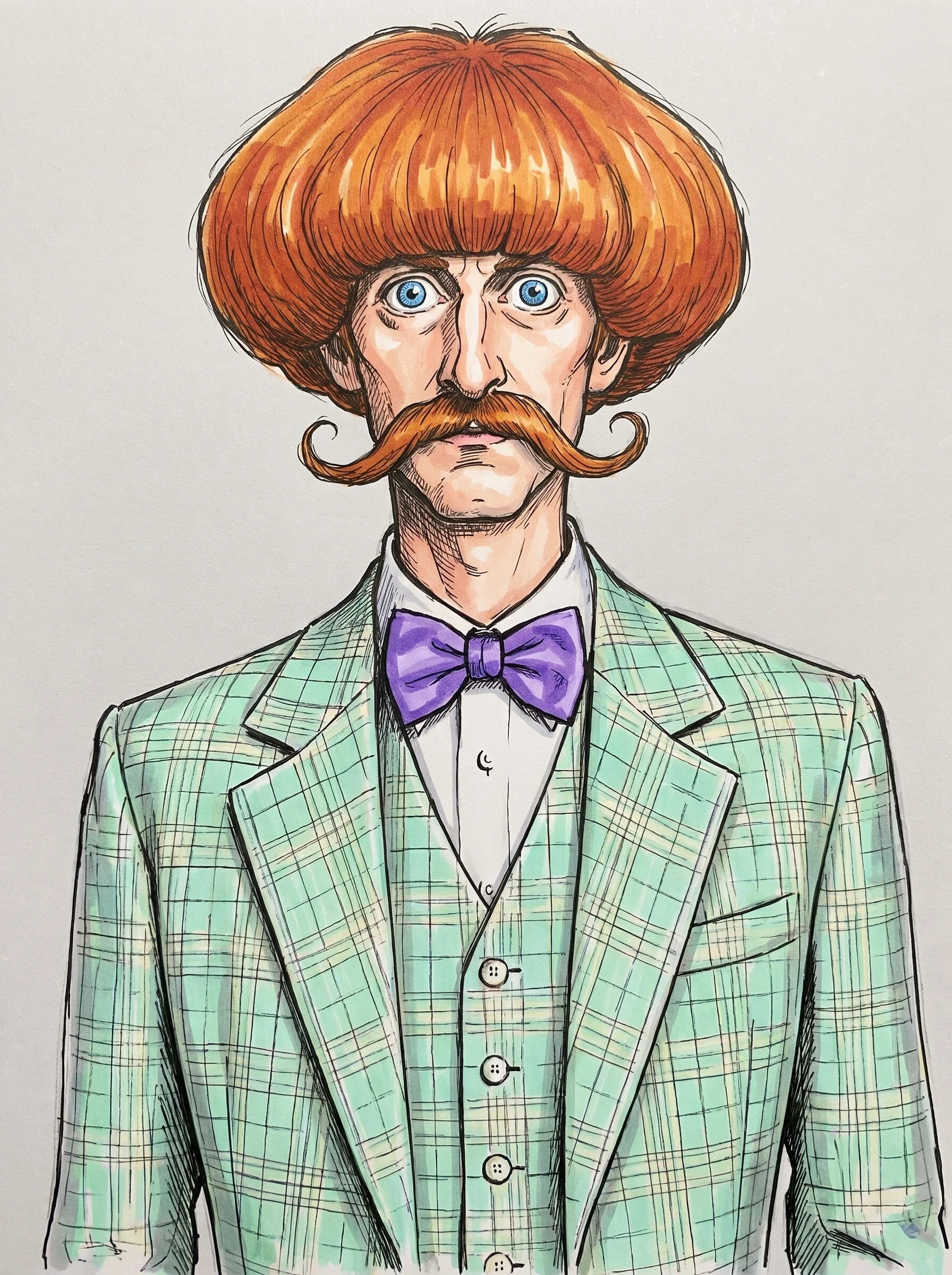
Nano Banana Pro (Caricature Maker) · Generated · View both example records (JSON)
What creators do with it next
Make it big enough to print
Image Upscaler
A caricature makes a gift or a card. The tool’s result is 2K, so for a bigger print open the Image Upscaler, tap “Upload an image or video” and add the drawing: it takes JPG, PNG or WebP up to 30 MB. Scale offers 2× or 4×; the first example’s drawing opens on 2×. Mode has an Art & CGI choice for illustrations, and Face recovery is a switch that starts on. Check the lines and faces at full size before you order.
Make the drawing move
AI Video Generator
To turn a caricature into a short clip, tap “Add a start frame” in the AI Video Generator and choose the drawing: JPG, PNG or WebP up to 25 MB. It opens on Seedance 2.5 at 4 seconds. Then type what should move. This guide did not animate its drawings, so check that the face still reads as the same person.
Prompts you can inspect and adapt
Prompt recipe to adapt
A starting point for your own photo
Turn this photo into a funny hand-drawn caricature in a classic marker-and-ink style. Playfully exaggerate [the features you want pushed, such as the hair, the glasses or the smile], keep it kind and clearly the same person, and keep the pose and the plain background.Put the features you want pushed in the brackets. Only the sentence below was run for this guide, so check what your own wording does on your photo.
Recorded generation prompt
The sentence typed for both examples
Turn this photo into a funny hand-drawn caricature in a classic marker-and-ink style. Playfully exaggerate the hair and the most striking features, keep it kind and clearly the same person, and keep the pose and the plain background.Typed in the Prompt box and sent as it is: the tool adds no other words to it. It names no color, so the drawing takes its colors from the photo.
How a caricature is priced
Per caricature: one image each time you press Generate. The total appears on Generate before you run it.
The tool always runs at 2K and makes one image per press, so changing the words in the Prompt box doesn’t change the price, and a set costs one run per person.
Price source: Nano Banana Pro price sheet · Checked
Before the run starts, the tool checks the price again; if it came out higher than the button showed, it stops and asks you to press Generate again. If the provider it was priced on fails, a backup provider can take the run at its own price, which can be higher. A run that fails is refunded.
What to review before you use the result
| What you see | What to try |
|---|---|
| It doesn’t look enough like me | The drawing is rebuilt, so a likeness can shift. Start from a sharp, front-facing photo with your face large and evenly lit, and run it again from the original: each run draws it a little differently. You can also name the features that matter in your sentence, such as your glasses, though that wording wasn’t run for this guide. |
| It is too mild, or too much | There is no strength control, so change the words. Ask for the features you want pushed, or add “gentle exaggeration” or “bold caricature”, then run it again. In the first example the beehive stayed about the same height, so name the one feature you want pushed hardest. |
| A feature was pushed too far for a gift | Run it again with “kind” in the sentence, or leave that feature out of the list of things to exaggerate. Look at the drawing before you give it to someone: a joke about a feature a person is sensitive about is worth another run. |
| Small details changed or look odd | The whole picture is redrawn, so buttons, jewelry and the background can change. The second example drew two squiggles where shirt buttons should be. Run it again, or crop in so the face is large. |
| Use a JPG, PNG, or WebP image | Save or export the photo in one of those formats. HEIC photos from an iPhone and other common picture formats are converted for you; a file that isn’t a picture can’t be used. |
| Images can be up to 20 MB | Make the file smaller before you add it. A photo longer than 2,048 pixels on its long side is already scaled down for the upload, so a smaller export loses nothing. |
| The run failed | The tool shows why, and a run that fails is refunded. Try again, or try another photo. |
Questions about this workflow
What tool turns an uploaded image into a caricature from a text description?
Made’s Caricature Maker. You add one photo and describe the drawing in the Prompt box, such as the style, the features to exaggerate and how kind to be, and it redraws the picture as a caricature. Tapping Classic style, Digital color or Pencil sketch fills the box for you.
Can I make a funny cartoon caricature of myself from a selfie?
Yes, add the selfie as your photo and say “funny” in the sentence. The examples here started from studio portraits, not selfies, so for a selfie use a sharp, front-facing one with your face large and evenly lit, and compare the drawing with it.
How is a caricature different from a cartoon of my photo?
A cartoon restyles how the photo is drawn. A caricature also exaggerates: the hair gets taller, the glasses bigger, the grin wider. Caricature Maker does both from your description, and keeps the pose and layout of your photo.
Can I choose the style?
Yes, in the Prompt box. The first example asked for a classic marker-and-ink style. The tool’s Try chips offer Classic style, Digital color and Pencil sketch, and you can name another look in your own words.
Is this a filter?
No. An AI image model redraws the whole picture from your photo, so the pose and layout stay but every part is rebuilt. That is why it looks hand-drawn, and why details such as buttons or the background can change.
Do I have to describe my photo?
No. The tool looks at the photo. The Prompt box is optional; with it empty, the tool asks for “Turn this photo into a classic hand-drawn caricature with playful exaggeration.”
Whose photo can I use?
Use photos of yourself, or of people who have agreed to be drawn. A caricature exaggerates a face, so it can hurt as well as amuse, and you are responsible for the photos you upload. The examples here are made-up people Made generated, and the tool is for friendly drawings.
Work with Claude and Made
Caricature Maker runs in the tool. With the Made connector in Claude, you can ask for the same edit: Claude can find Nano Banana Pro in Made’s catalog, take your photo as the image to edit, quote the price and generate, if your client offers a way to upload.
Conversation starter
Ask your assistant
Use Made to turn my attached portrait into a funny hand-drawn caricature in a classic marker-and-ink style. Playfully exaggerate the hair and the most striking features, keep it kind and clearly the same person, and keep the pose and the plain background. Use Nano Banana Pro with my photo as the image to edit, at 2K and the photo’s own shape. Show me the price before generating one image.If your client doesn’t offer a way to upload, use Caricature Maker with the same photo and sentence.