The workflow
Add one photo
Open Photo to Sketch and, under Photo, tap Upload image (on a phone, Upload a photo), or paste a picture from your clipboard. It takes JPG, PNG or WebP up to 20 MB, and an iPhone photo in HEIC format is converted for you. A photo longer than 2,048 pixels on its long side is scaled down before it uploads. A sharp photo with the face large in the frame and even light sketches best.
Tap Pencil sketch
Under Try, tap Pencil sketch. The tap fills the Prompt box with a sentence: “Turn this photo into a detailed graphite pencil sketch.” You can edit it or type your own look. The Prompt box says Optional: if you leave it empty, the tool asks for “Turn my photo into a sketch” and picks the drawing style itself.
Tap Generate
Generate shows the price before it runs. If you aren’t signed in, you sign in first and your photo and prompt wait for you. While it works the button reads “Making it…”, and the sketch appears in Generations beside the tool when it’s done.
Check the face and the edges
Zoom in on the eyes, the mouth, the ears and any hands, and compare them with your photo. The sketch keeps the layout, but it redraws every part. Writing on signs or clothes, fine patterns and small objects are the first things to change, and the framing can shift a little.
Run the next photo in the same style
For a set, swap in your next photo (tap Replace, or remove the photo and add another) and tap Pencil sketch again. The chip sends the same sentence every time, so the portraits come out in one style. Each run is a new sketch made from that photo, and each one has its own price.
Take the sketch further
To print it, open the Image Upscaler: it enlarges a JPG, PNG or WebP up to 30 MB, 2× or 4×, and its Mode menu has Art & CGI for illustrations, anime, renders and AI art. To make it move, open the AI Video Generator, tap Add a start frame and choose the sketch: it opens on Seedance 2.5 at 4 seconds and 480p.
Recorded Made demonstration
Two portraits, two pencil sketches, one chip
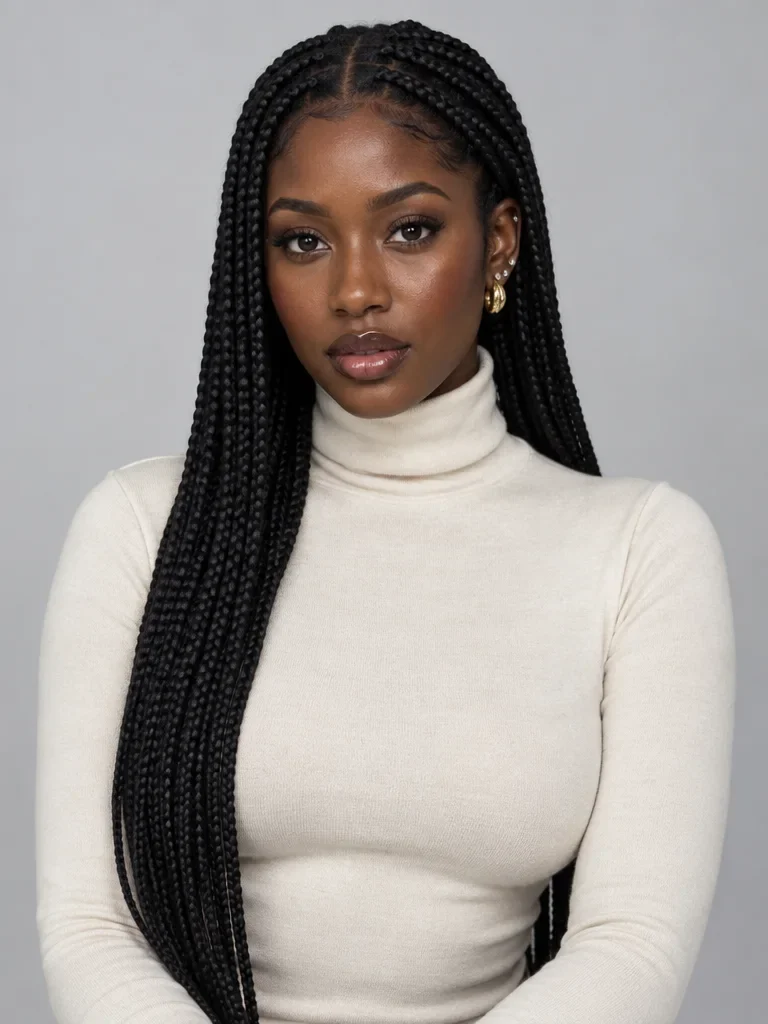
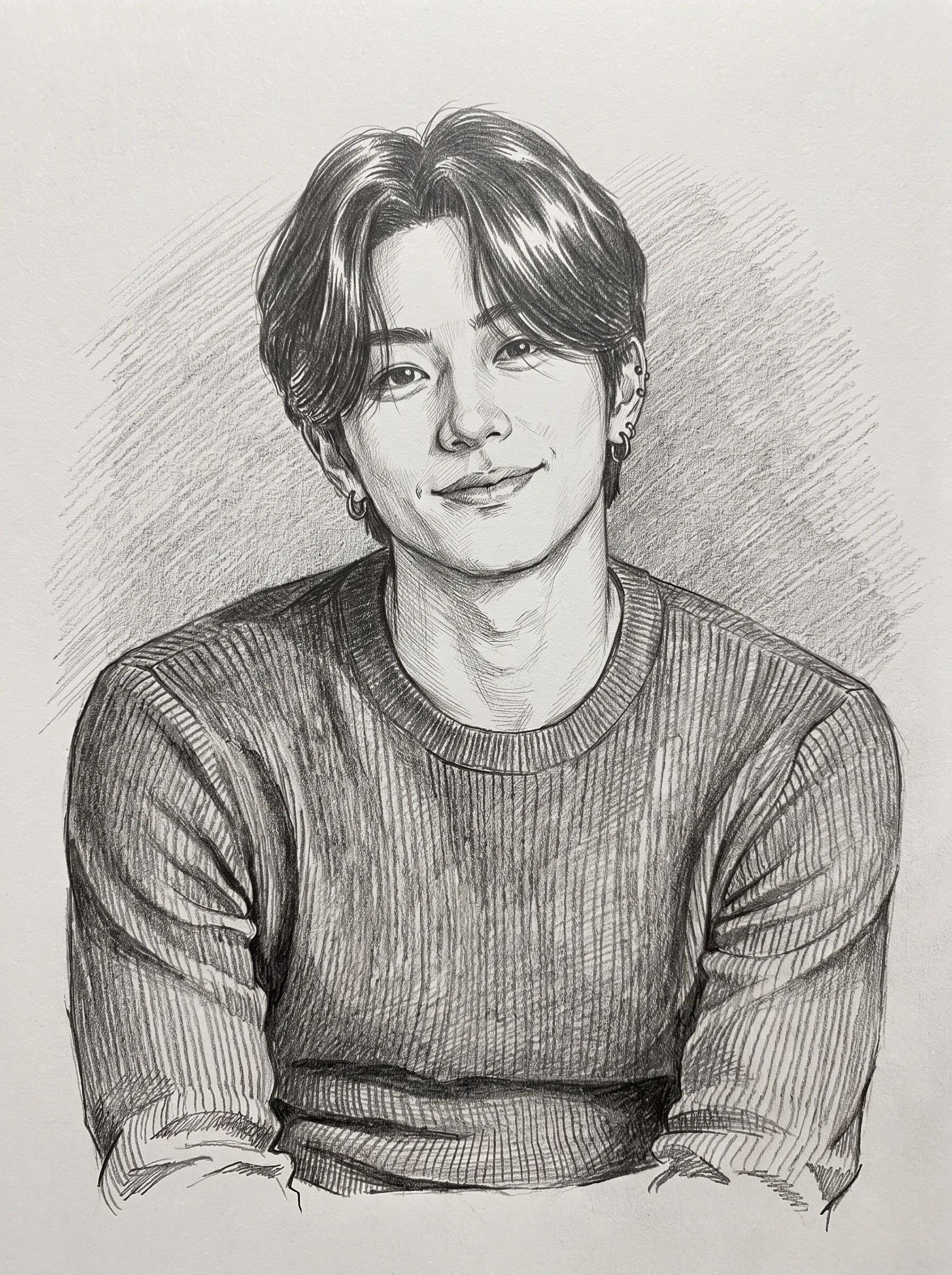
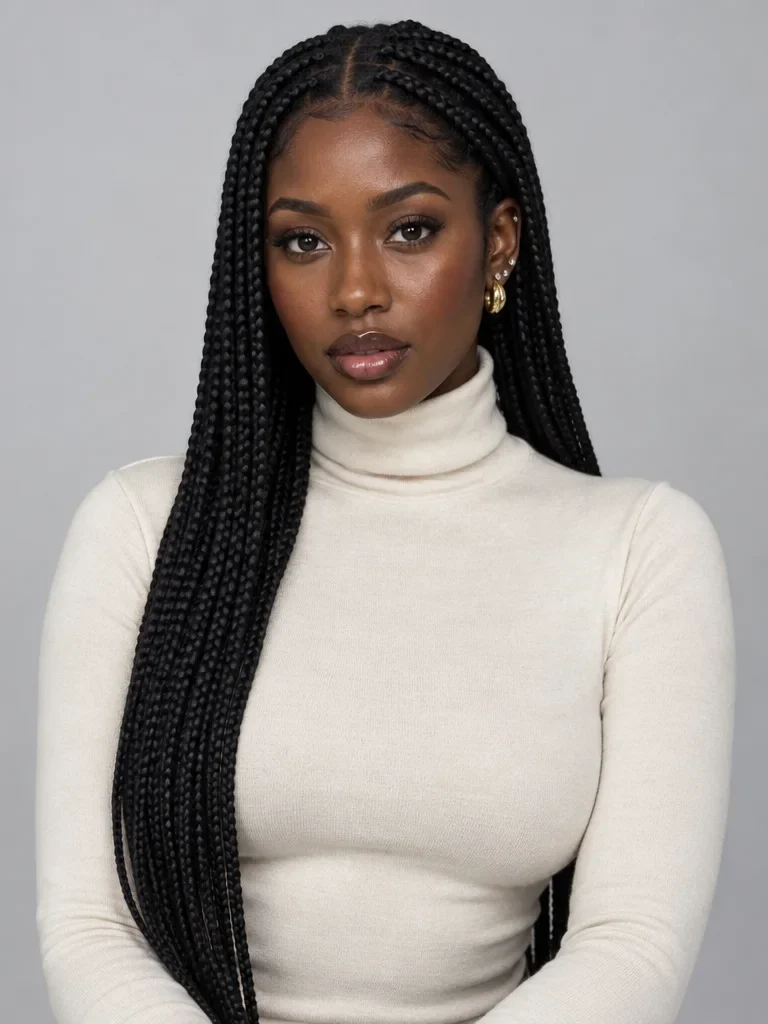
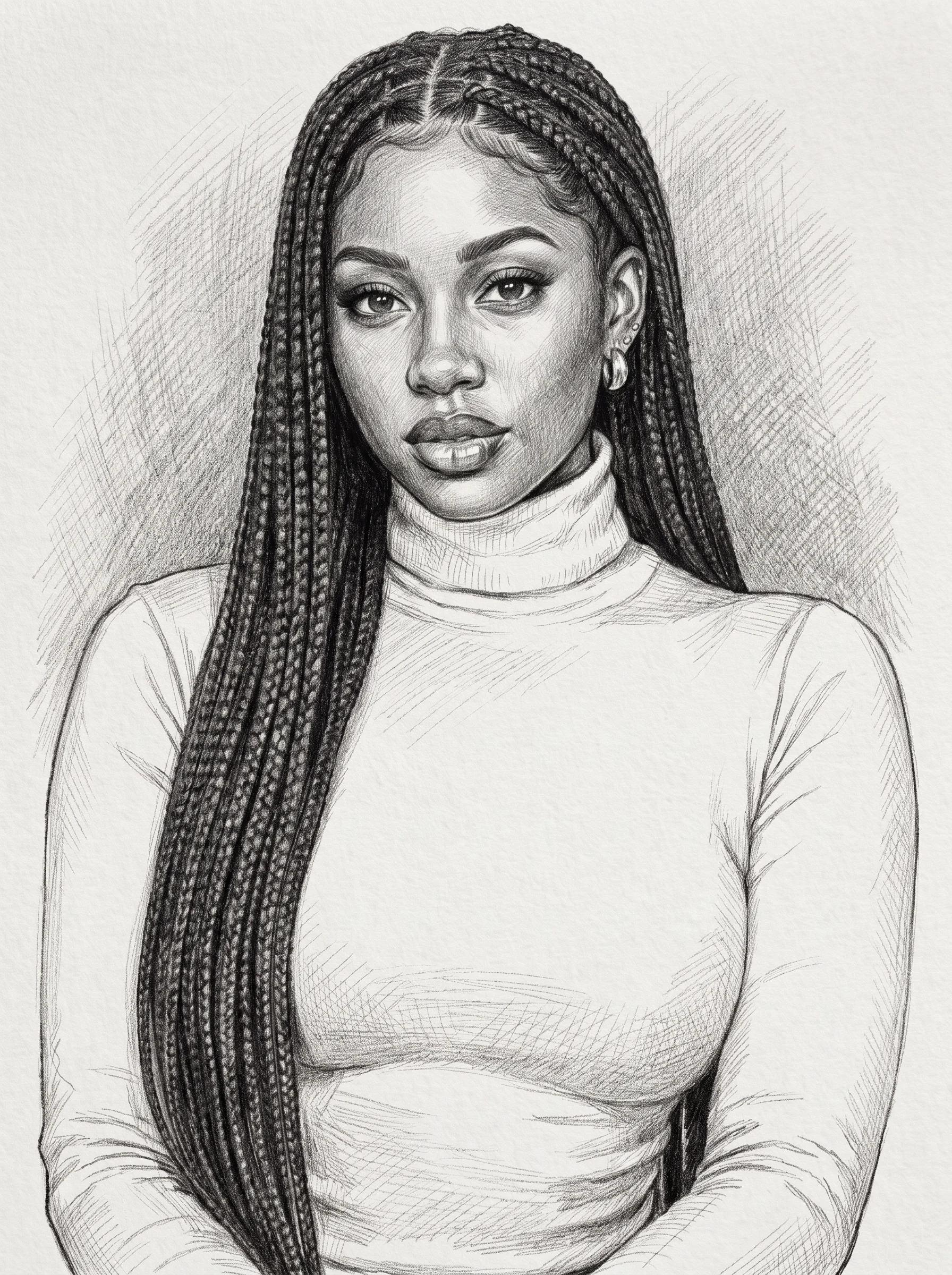
These are real Photo to Sketch runs from November 20, 2026. Both photos are made-up adults from Made’s AI Influencer examples, not real people: Amara, with long box braids and a cream turtleneck, and Jun, with a center-parted fringe and a knit sweater. Each sketch is exactly what the tool builds for that photo and the sentence behind its Pencil sketch chip, sent through Made’s API from a script rather than tapped through the browser. Both came back at 1,792 × 2,400 pixels from 768 × 1,024 photos, in the same shape. I looked at both next to their photos. In Amara’s, her face is recognizable (eyes, brows, lips, both earrings) and the braids are drawn strand by strand; the backdrop turned into loose hatching. In Jun’s, the parting, the half smile and the ear piercings stayed and the sweater rib became hatching. The framing in Jun’s is a little tighter: his trousers are cropped out and his head sits slightly larger. Neither photo shows hands, so this does not test them. Two runs, not a measure of how every photo sketches.
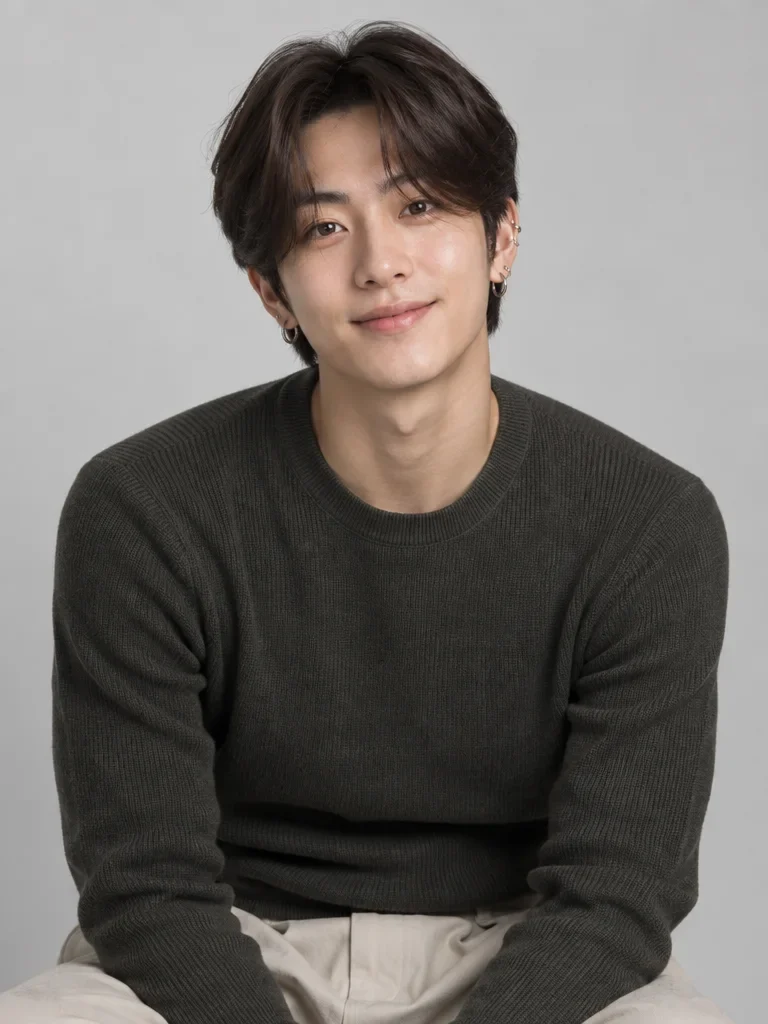
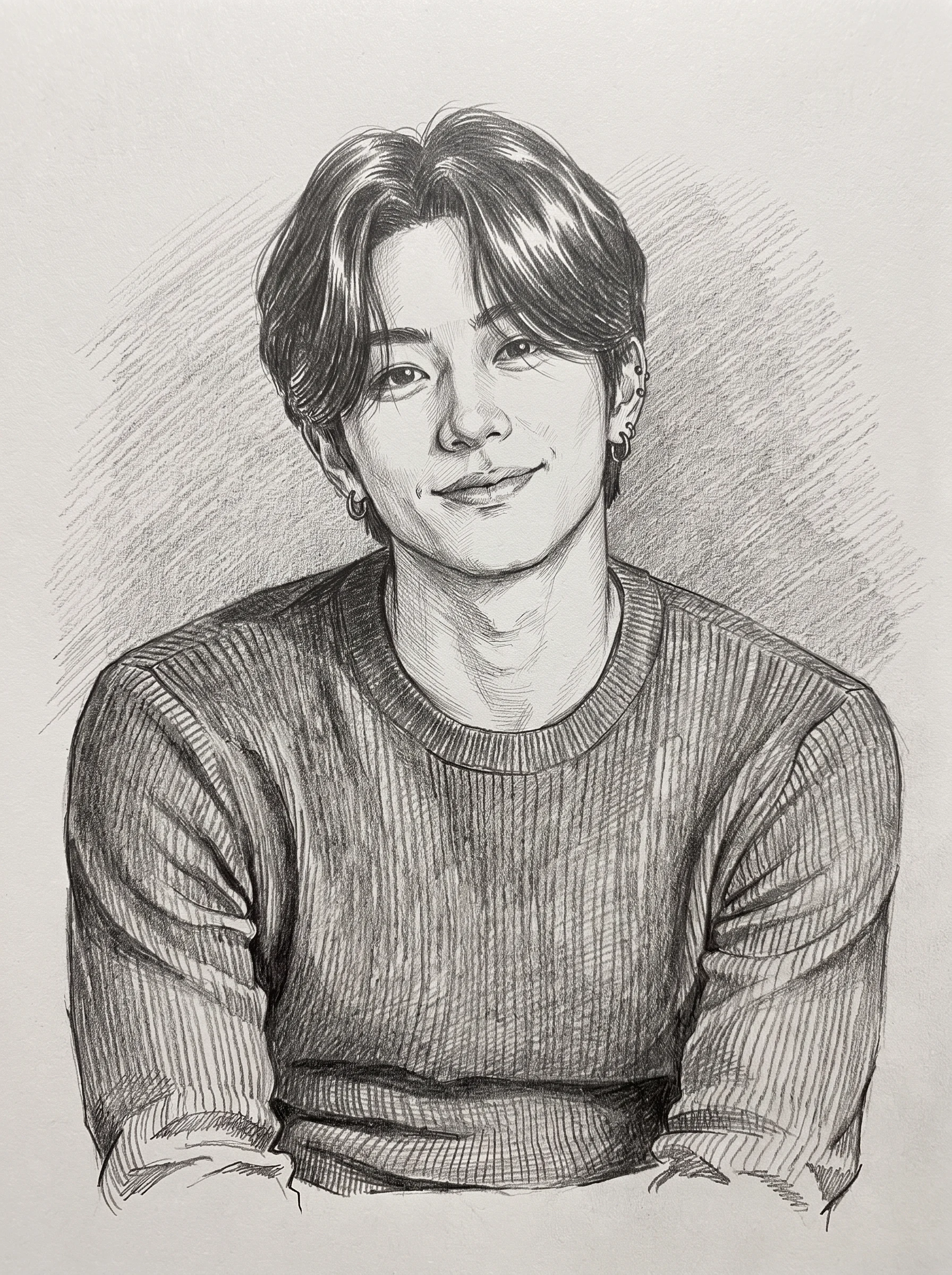
Nano Banana Pro (Photo to Sketch) · Generated · View the example record and price basis (JSON)
Prompts you can inspect and adapt
Prompt recipe to adapt
A starting point for your own photo
Turn this photo into a [pencil style] sketch with [shading or line detail].Put your pencil look and the detail you want in the brackets, such as “soft, smudged” and “light shading, clean outlines”. Only the chip sentence below was run for this guide, so check what your own wording does.
Recorded generation prompt
The Pencil sketch chip
Turn this photo into a detailed graphite pencil sketch.The sentence behind the Pencil sketch chip, sent as it is for both photos: the tool adds no other words to it.
How a sketch is priced
Per sketch: one image each time you press Generate. The total appears on Generate before you run it.
The tool always runs at 2K and makes one image per press, so a second photo is a second sketch with its own price, and a different style chip doesn’t change it.
Price source: Nano Banana Pro price sheet · Checked
Before the run starts, the tool checks the price again; if it came out higher than the button showed, it stops and asks you to press Generate again. If the provider it was priced on fails, a backup provider can take the run at its own price, which can be higher. A run that fails is refunded.
What to review before you use the result
| What you see | What to try |
|---|---|
| The face doesn’t look like the person | The sketch redraws the face, so a likeness can shift. Start from a sharp photo where the face is large and evenly lit, and run it again from the original: each run draws it a little differently. Put the sketch next to the photo before you use it. |
| The framing changed | The sketch keeps the layout but can crop or enlarge a little, as the second portrait in the example did with the trousers and the head. If you need an exact crop, crop the photo first, or crop the sketch afterwards. |
| Small details disappeared | Patterns, small jewelry, fine text and background objects turn into line and shading. That is part of how a pencil drawing looks. For a photo with lettering you need to keep, add the text again after you sketch it. |
| A hand or finger looks wrong | Neither photo in the example shows hands, so they weren’t tested. Zoom in on any hand, count the fingers, then run it again from the original, or use a photo where the hands are open and in clear light. |
| Use a JPG, PNG, or WebP image | Save or export the photo in one of those formats. HEIC photos from an iPhone and other common picture formats are converted for you; a file that isn’t a picture can’t be used. |
| Images can be up to 20 MB | Make the file smaller before you add it. A photo longer than 2,048 pixels on its long side is already scaled down for the upload, so a smaller export loses nothing. |
| The run failed | The tool shows why, and a run that fails is refunded. Try again, or try another photo. |
Questions about this workflow
Which sketch styles can I choose?
Under Try there are three: Pencil sketch, Charcoal drawing and Line art. You can also type your own look in the Prompt box. For this guide only the pencil sketch sentence was run, so check any other style on your own photo.
Will the sketch look like me?
Usually the face is recognizable, but it is redrawn, not traced: in the example the eyes, brows, lips and earrings stayed, while skin became shading and the backdrop became hatching. A sharp, front-facing photo works best, and you should compare the faces before you share it.
Do I have to describe my photo?
No. The tool looks at the photo. The Prompt box is optional, and you only say the style. With it empty, the tool asks for “Turn my photo into a sketch”.
How do I make several photos look like one set?
Use the same chip on each photo, as in the example, where two different portraits both got the Pencil sketch sentence and came out as pencil drawings on paper. The tool takes one photo at a time. The two sketches match in style, not exactly in shading or framing, so compare them side by side.
Can I sketch a photo with several people in it?
The tool takes one photo at a time, and everyone in it is redrawn together. This guide tested one person per photo, so look at every face and hand in a group photo.
Is it a filter?
No. An AI image model redraws the whole picture from your photo, so the layout stays but every part is redrawn. That is why the pencil lines follow the hair and the clothes, and why small details change.
Can I print it or make it bigger?
The example came back at 1,792 × 2,400 pixels. For a larger print, the Image Upscaler enlarges a JPG, PNG or WebP up to 30 MB, 2× or 4×, and has an Art & CGI mode for illustrations and AI art. We did not run it on this sketch, so check the result at full size.
Can I animate the sketch?
Yes, in the AI Video Generator: tap Add a start frame, choose the sketch and say what should move. It opens on Seedance 2.5 at 4 seconds and 480p. We did not run it on this sketch, so watch the lines and the face as the clip plays.
Work with Claude and Made
Photo to Sketch runs in the tool. With the Made connector in Claude, you can ask for the same edit: Claude can find Nano Banana Pro in Made’s catalog, take your photo as the image to edit, quote the price and generate, if your client offers a way to upload.
Conversation starter
Ask your assistant
Use Made to turn my attached photo into a detailed graphite pencil sketch. Use Nano Banana Pro with my photo as the image to edit, at 2K and the photo’s own shape. Show me the price before generating one image.If your client doesn’t offer a way to upload, use Photo to Sketch with the same photo and style.