The workflow
Pick the reference frame
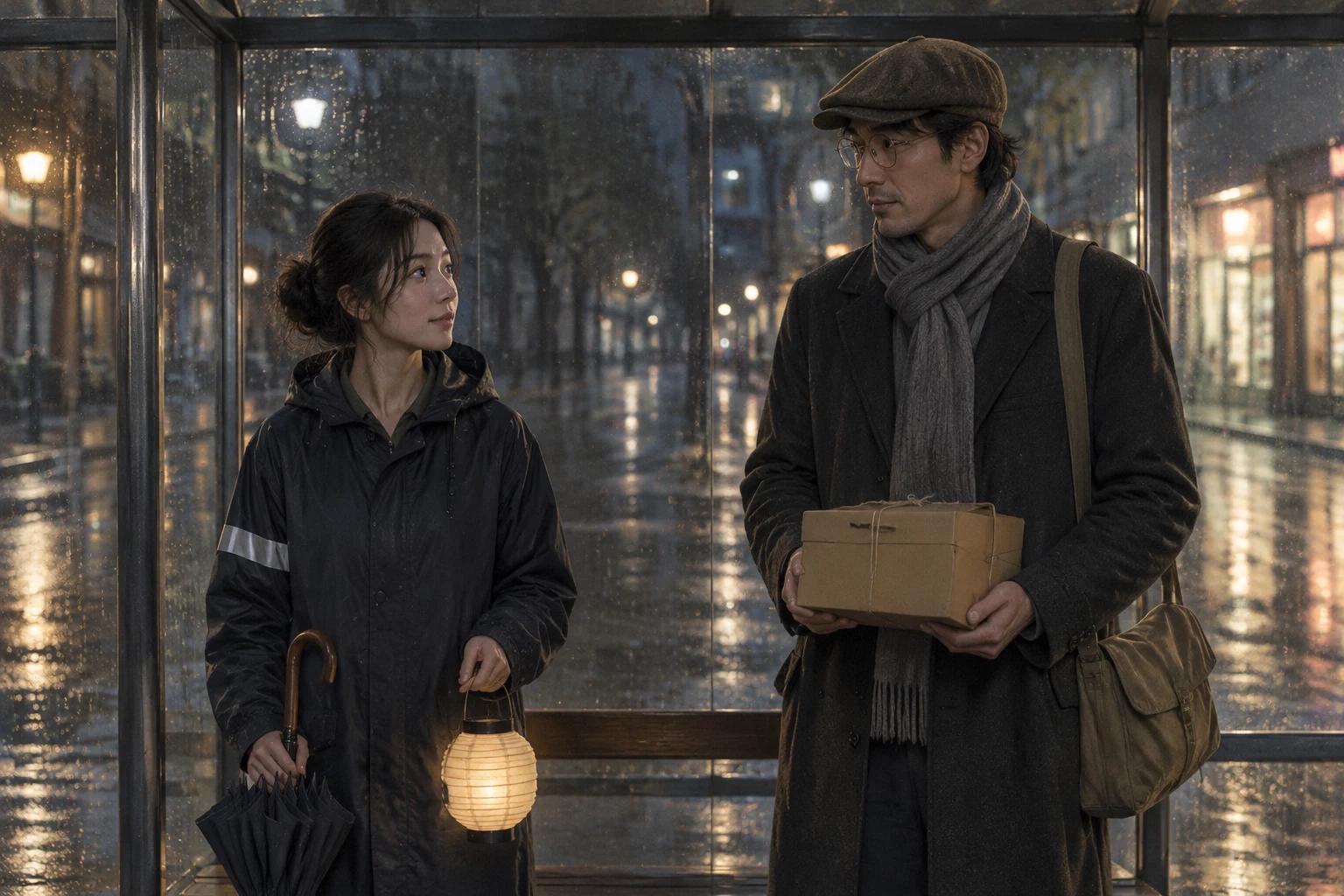
Use one image that already answers who is in the scene, what they wear, where they are and what the light does. Show every character you want in the board, and any prop that matters. The sheet comes back in the shape of your image. Use a still you made, a frame of a character you made up, or a photo of yourself or someone who agreed. No frame yet? Make one first in the AI Image Generator: the tool can’t start from text alone.
Upload it
Open the AI Storyboard Generator and tap “Upload image” (on a phone, Upload), or paste the image from your clipboard. It takes one JPG, PNG or WebP up to 20 MB; an iPhone HEIC photo is turned into a JPEG for you. Frames over 1,536 pixels on the long side are scaled down before the edit.
Type the shot list and what stays
Type in the Prompt box. Ask for a 3x3 grid, name the nine shots in order, say the panels run edge to edge with no borders, numbers or text, and name what must stay the same: the characters, their clothes, the props and the light. The chips under Try (9-angle grid, Shot sequence, Sketch style) fill in a starting prompt. With the box empty, the tool sends “Turn this frame into a 3x3 grid of nine camera angles of the same action, consistent characters and lighting.”
Check the price and generate
Generate shows the price. If you aren’t signed in, you sign in first, and your frame and prompt wait for you. Before the run starts, the price is confirmed again; if it came out higher than the button showed, nothing runs until you press Generate again. A run that fails isn’t charged.
Check every panel against your frame
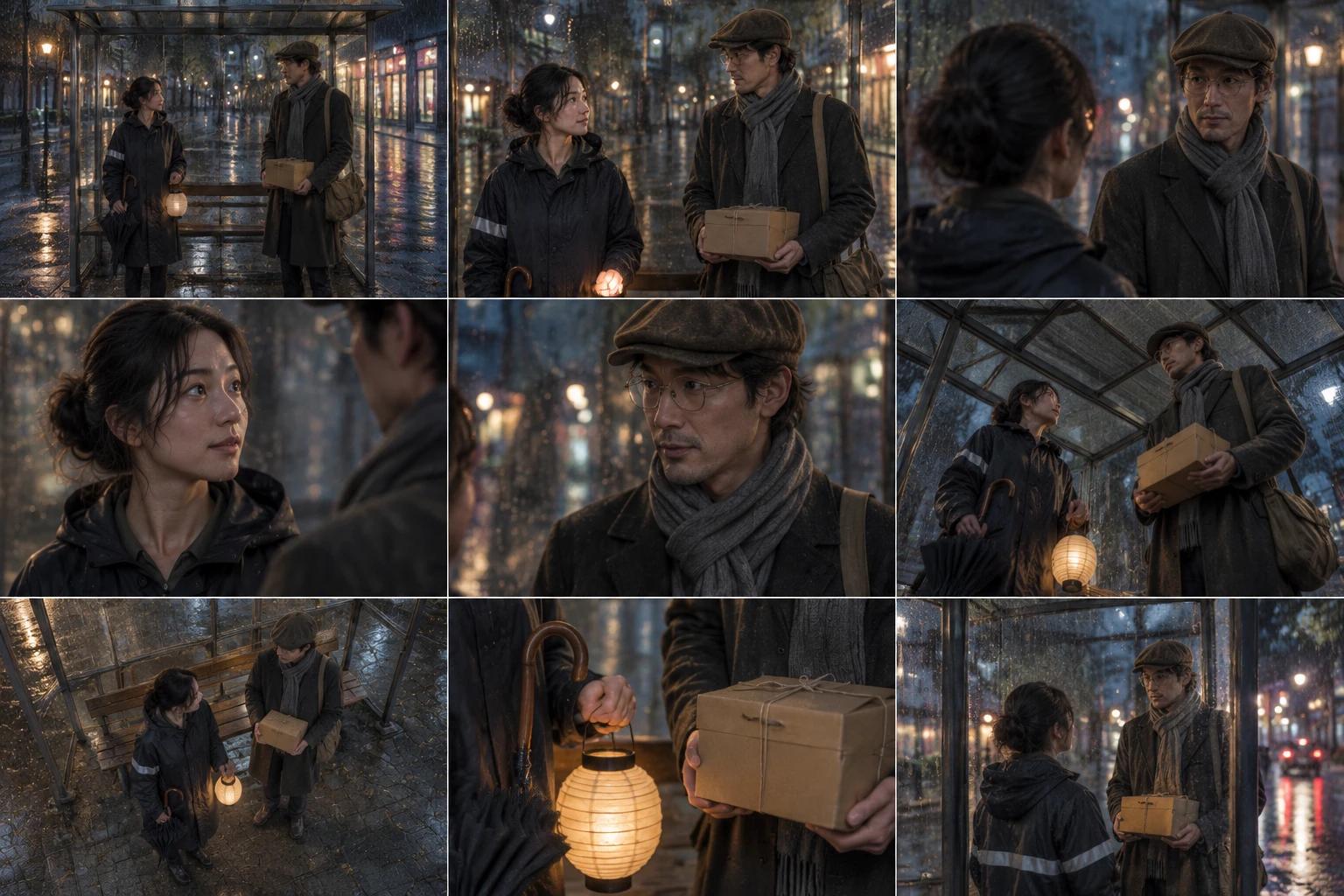
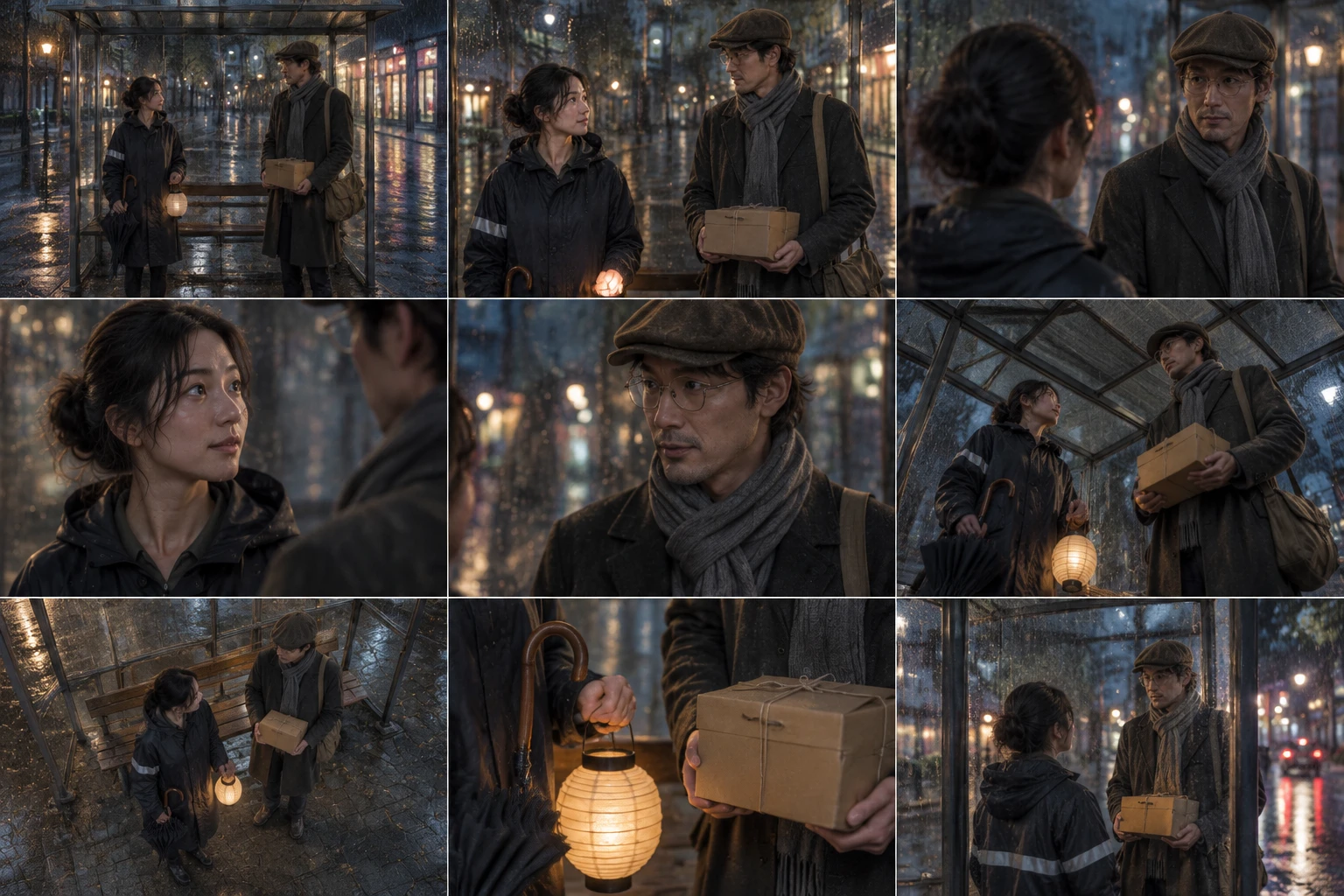
The sheet appears under Generations when it is ready; this example took about four minutes. Put it next to your frame and check the same things in all nine panels: faces, hair, clothes, then every prop and anything that sits on one side only. Then look at the angles: they are redrawn from a single image, so a side or a back is invented. If a panel is wrong, run it again and say what to fix.
Cut out a panel to carry on
The tool gives you one sheet, not nine files. To go on to the next scene, download the sheet, cut out the panel you like in any photo editor, and upload that panel as the frame for the next run. The example below does exactly this.
Recorded Made demonstration
A short-film moment at a bus shelter, boarded in nine shots
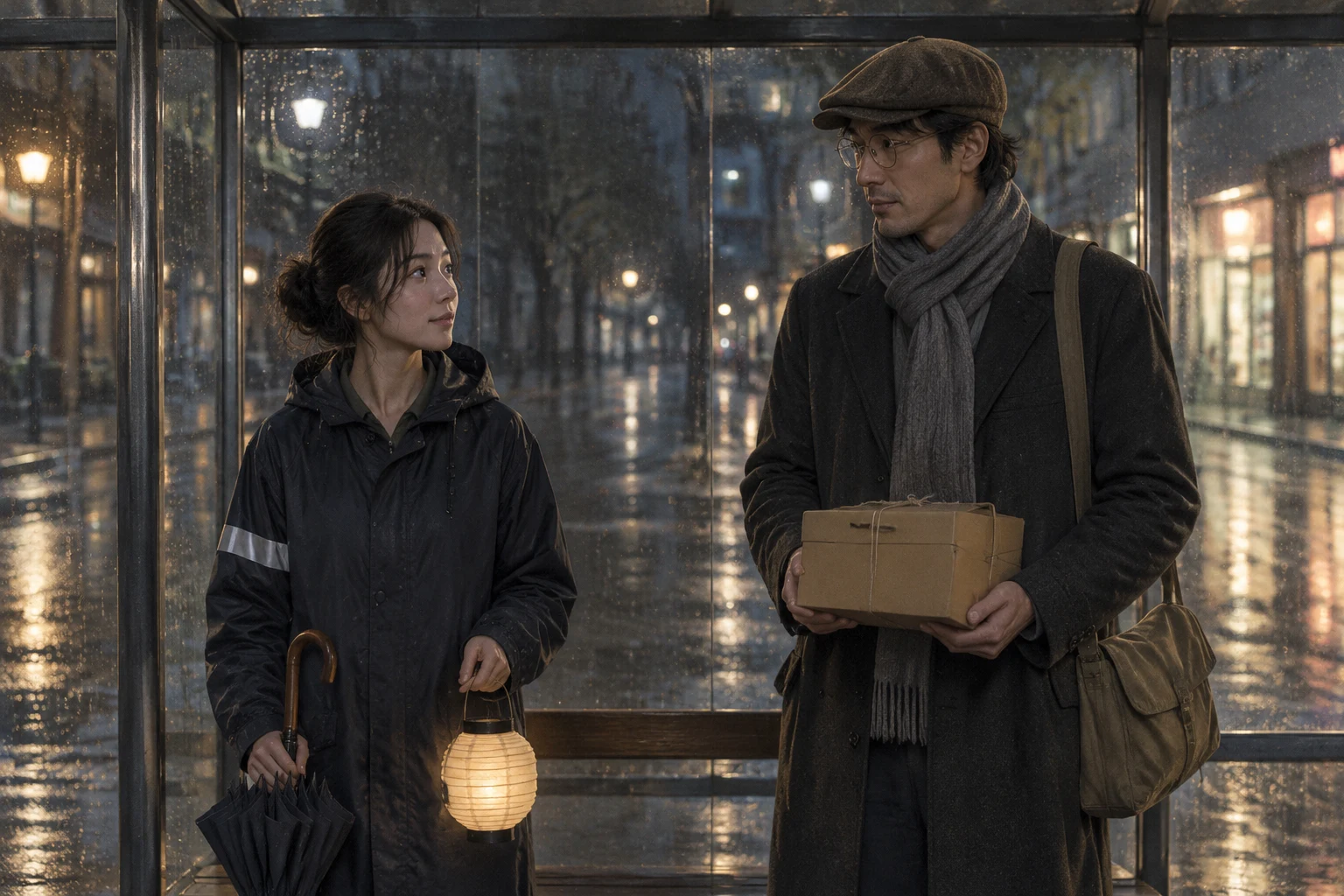
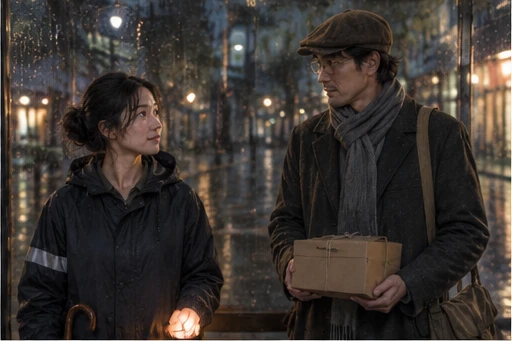
This is a real AI Storyboard Generator run from November 22, 2026. The frame is not a real picture: Made generated it first with GPT Image 2.5 Flare from a text prompt. Two made-up adults stand in a glass bus shelter on a rainy night: a woman in a hooded raincoat with a reflective stripe on one sleeve, holding a folded umbrella and a paper lantern, and a tall man in a flat cap, round glasses and a long scarf, with a canvas messenger bag and a box tied with string. The prompt is the one shown below, and the request is exactly what the tool sends for that frame and prompt, sent through Made’s API from a script rather than clicked through the browser. The sheet came back as nine panels, three by three, edge to edge, with no borders, numbers or text: wide, medium two-shot, over-the-shoulder, a close-up of each of them, low angle, high angle, a detail of the box and the lantern, and a reverse angle. The woman’s hair, raincoat and stripe, the man’s cap, glasses, scarf, coat and bag, the box and the rainy streetlights held in every panel. Weak points: in the reverse angle the one-sleeve stripe became a band across the back of her jacket; the close-ups show neither the umbrella nor the lantern, and the medium panel crops the lantern out; the two-shot, the over-the-shoulder and the reverse put the two people in nearly the same places, so the nine shots differ less than a shot list would; and each panel is only 512 by 341 pixels, so faces are soft at full size. It is one run, not a measure of how often a board holds.
GPT Image 2.5 Flare · Generated · View the example record and price basis (JSON)
Do it again: the next scene, from a panel
The AI Storyboard Generator starts from the image you give it each time and keeps nothing from the run before. A series stays on model when you hand the next run a panel from the last sheet, and say again what must stay the same. Each run is its own sheet or picture in Generations, and your earlier ones stay there.
The next scene from one panel
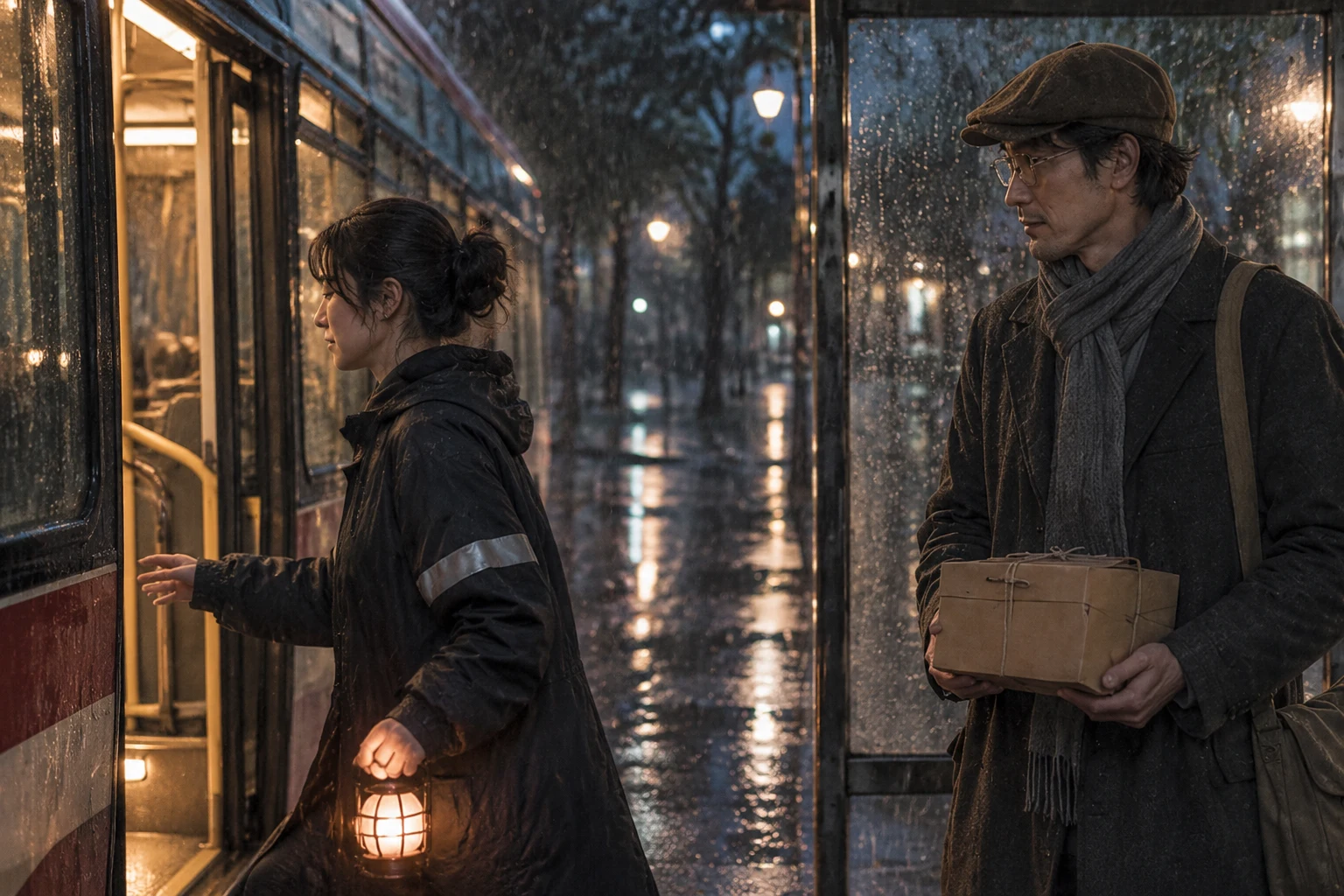
Download the sheet, cut out the panel you like, upload it as the frame and type what happens next. The example below is exactly this: panel 2, the medium two-shot, went in as a 512 by 341 picture and a bus scene came out at 1,536 by 1,024. The panel is small, so the tool redraws the scene from it rather than enlarging it.
Another pass from the same frame
Go back to your original frame and tap Shot sequence or Sketch style instead. Each run starts from the frame, so you can put the passes side by side before you pick one. Those two chips weren’t run for this guide.
One fix at a time
If a panel got something wrong, keep the same frame and add the correction to the same prompt: which side a stripe is on, which prop stays in view. Change one thing per run so you can see what moved. No second try was run for this guide.
Recorded Made demonstration
The next scene: the bus arrives
This is a real run from November 22, 2026, with the second prompt below. The picture is panel 2 of the sheet above, the medium two-shot, cut out of the sheet at 512 by 341 pixels and sent as it is. The bus arrives: she reaches for its open doors with the lantern in her other hand, and he stays under the shelter with the box, watching. The man matches the panel: cap, glasses, scarf, coat, bag and the box tied with string. Her raincoat, hair and the stripe on one sleeve match too, and her reaching hand and the hand on the lantern show normal fingers. Weak points: the umbrella she carried is gone, and the lantern is now a cage-style lantern with a grid instead of a round paper one. The bus, its doors and its lit inside are new, drawn from the prompt. It is one run, not a measure of how often the next scene holds.
GPT Image 2.5 Flare · Generated · View both example records (JSON)
What creators make next
Make a panel move
AI Video Generator
Open the AI Video Generator, tap “Add a start frame” and choose a panel you cut out, then type what moves and what stays the same. Seedance 2.5 takes 4 to 30 seconds and opens at 480p. If the sheet is in your Assets, Use in another tool then Animate opens it on Veo 3.1 Lite with a stock prompt, but that sends the whole sheet, not one panel. A video model redraws every frame, so check that the faces and props hold from the first frame to the last; no clip was made for this guide.
Get nine fixed angles as separate frames
Shots
Shots takes one reference image (JPG, PNG or WebP, up to 10 MB) and always makes nine shots on one 16:9 sheet, Classic (Wide, Medium, Close-up, Low angle, High angle, Profile, Three-quarter, Reverse, Detail) or Bold. It cuts the nine apart, lets you select the ones you want, and upscales each 2× or 4×. You can’t name your own shots there; use the Storyboard Generator for that. Shots wasn’t run for this guide.
Make a panel sharper or bigger
Image Upscaler
It takes JPG, PNG or WebP up to 30 MB, 2× or 4×. A cut-out panel of 512 × 341 pixels at 4× is 2,048 × 1,364. It was not run on a panel for this guide, so check the faces before you use the result.
Prompts you can inspect and adapt
Prompt recipe to adapt
Your frame, your nine shots
Turn this frame into a 3x3 storyboard grid of nine camera angles of the same moment, edge to edge with no borders, numbers or text. Shots: [wide establishing, medium two-shot, over-the-shoulder, close-up of her, close-up of him, low angle, high angle, a detail of the prop, a reverse angle]. The same [two characters] in every panel, with the same [clothes, props] and [lighting]. [A detail that sits on one side] stays on the [left sleeve] only.Fill in the brackets. Name the nine shots in order, say what must stay the same in every panel, and put any one-sided detail on its side. Anything you leave out, the model decides.
Recorded generation prompt
What was typed for this run
Turn this frame into a 3x3 storyboard grid of nine camera angles of the same moment, edge to edge with no borders, numbers or text. Shots: wide establishing, medium two-shot, over-the-shoulder, close-up of her, close-up of him, low angle, high angle, detail of the box and the lantern, and a reverse angle from the road. The same two characters in every panel, with the same clothes, props and rainy night lighting.The AI Storyboard Generator sends your words as you type them, with your frame.
Prompt for the next scene
What was typed for the next scene
The next scene of this story, as one cinematic frame: a bus pulls up at the shelter and its doors open. The woman steps toward the bus with the lantern, and the man stays under the shelter holding the box and watching her go. The same two characters with the same clothes and props, the same rainy night, 35mm look. No text, no logos, no readable signs.Run with one panel of the sheet as the frame. It says what happens next and repeats what must stay the same.
How a storyboard sheet is priced
One frame and one prompt make one sheet. The price is the same for every frame and shows on Generate before you run it.
The tool always runs GPT Image 2.5 Flare at low quality with one image, and at that setting every picture size it makes costs the same, so your frame’s shape doesn’t change the price.
Price source: AI Storyboard Generator · Checked
Each new try is priced again, and the next scene from a panel is a second run. Before a run starts, the price is checked; if it came out higher than the button showed, it stops and asks you to press Generate again. If the provider it was priced on fails, a backup provider can take the run at its own price, which can be higher. A run that fails isn’t charged.
What to review before you use the result
| What you see | What to try |
|---|---|
| A prop or a one-sided detail changes or moves | In this example the stripe on one sleeve became a band across the back of her jacket in the reverse angle. Name the side in the prompt (“the stripe is on the left sleeve only”), look at every panel, and run it again. |
| The nine shots look alike | In this example the two-shot, the over-the-shoulder and the reverse put the two people in nearly the same places. Name nine clearly different shots, and say what the camera sees in each (“high angle looking down at both of them”). Ask for fewer panels, such as the Shot sequence chip’s three, if you want each one to be distinct. |
| Panels are small and faces are soft | A sheet in the shape of a 3:2 frame has panels of 512 by 341 pixels. That is enough to judge framing, not to print. Use the sheet to choose a shot, then make that shot larger: Shots upscales the frames you pick, and the Image Upscaler takes a cut-out panel. |
| You have a script but no frame | The tool needs one reference image and can’t start from text alone. Make a still of your main scene in the AI Image Generator, check it against your story, and use it as the frame. A storyboard app built around scripts and scenes may suit a text-first job better. |
| The camera angles aren’t exact | The new viewpoints are AI-imagined from your single frame, not true camera moves, and some drift between panels is normal. For pitching and planning that is usually enough; for measured lenses and blocking, use a 3D tool. |
| You want one panel as its own picture | The tool returns the whole sheet as one PNG. Cut the panel out yourself, or use Shots, which cuts its nine frames apart for you and lets you download and upscale the ones you choose. |
Questions about this workflow
How do I keep the same characters in every panel?
Start from one clear frame that shows each character, then say in the prompt what must stay the same: their faces, clothes, props and the light. In this example the hair, clothes and props held in all nine panels, and the details that drifted were small ones: a stripe on one sleeve, a lantern left out of the close-ups. Compare every panel with your frame.
How is this different from Boords or Katalist?
The AI Storyboard Generator is one image and a prompt in, one sheet out. It has no script field, scene list or page layout, and it needs a reference frame: it can’t begin from text. Storyboard apps such as Boords and Katalist are built around scripts and scenes, so they may suit a text-first job better. This tool is the quick way to see how a frame you already have looks from nine angles.
Can I board a whole story with it?
One run boards one moment from one frame. To go on, cut out the panel you like and use it as the frame for the next run, as the second example does. Each run starts from the image you give it and remembers nothing from the one before, so repeat what must stay the same each time.
Are the angles accurate to real camera positions?
No. They are plausible, not measured: the model imagines what the scene looks like from positions it can’t see. For storyboarding and pitching that is usually enough. For technical previs with measured lenses, use a 3D tool.
Can I get sketch-style boards?
The tool has a Sketch style chip, which asks for loose pencil-sketch panels with framing notes. It wasn’t run for this guide, so try it on your own frame and check the result.
Can I use a photo of a real person as the frame?
Use your own photo or one from someone who agreed. The tool works with any frame, including people, but you are responsible for having the right to use it.
Do I need to sign in?
Yes, to generate. You can upload the frame and type the prompt first; if you sign in from Generate, the tool keeps them.
Work with Claude and Made
The AI Storyboard Generator runs in the tool. With the Made connector in Claude, you can ask for the same edit: Claude can find GPT Image 2.5 Flare in Made’s catalog, take your reference frame as the image to edit, quote the price and generate, if your client offers a way to upload.
Conversation starter
Ask your assistant
Use Made to turn my attached frame into a storyboard: one image with a 3x3 grid of nine camera angles of the same moment (wide, medium two-shot, over-the-shoulder, a close-up of each person, low angle, high angle, a prop detail and a reverse angle), edge to edge with no borders or text, with the same characters, clothes, props and lighting in every panel. Use GPT Image 2.5 Flare as an image edit at the size closest to my frame’s shape. Show me the price before generating one image.If your client doesn’t offer a way to upload, use the AI Storyboard Generator with the same frame and prompt.