The workflow
Make your two hosts
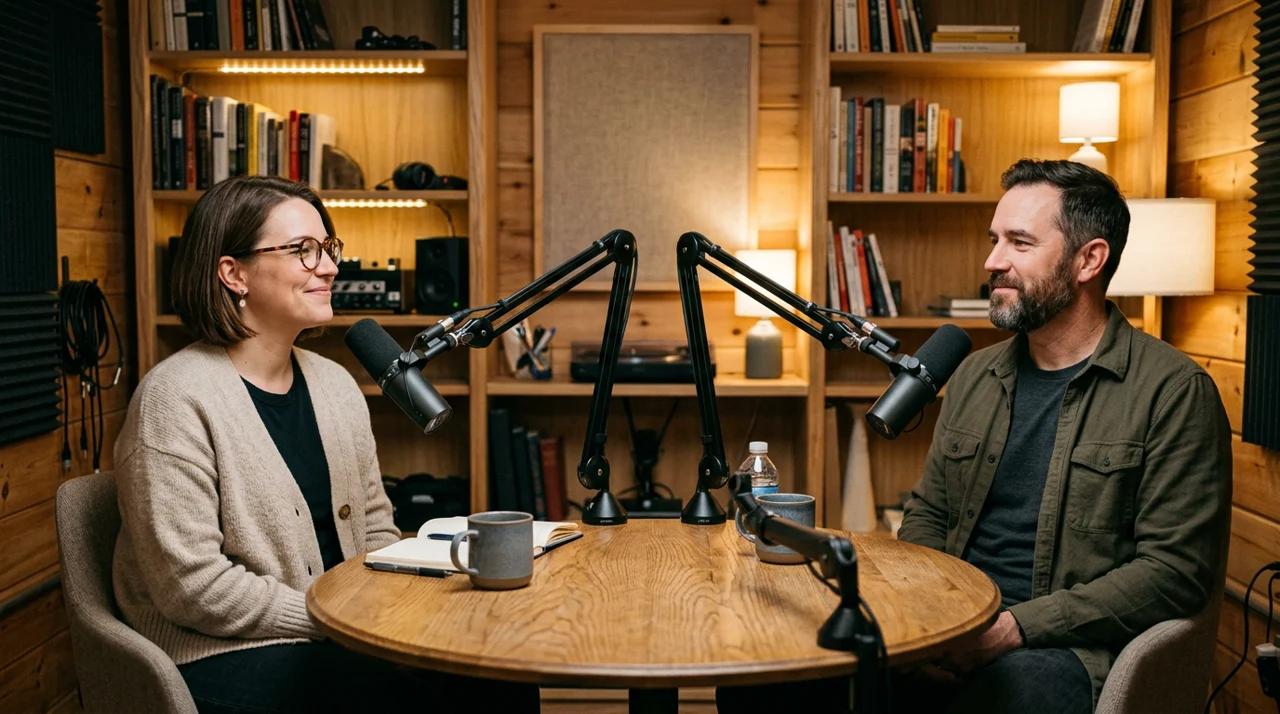
Open the AI Image Generator and describe the two hosts at their table: who sits on the left, who sits on the right, what each wears, the microphones and the room. Ask for a 16:9 picture with their mouths closed, so the clip starts from a calm frame. Use made-up people. Don’t use a real person who hasn’t agreed. Download the picture as a JPG, PNG or WebP.
Open the AI Podcast Generator and add the picture
On the page, the composer opens on Veo 3.1 Lite with sound. Tap Add start frame, beside the prompt, and choose your picture. If you aren’t signed in yet, it takes you to the AI Video Generator, where you sign in and add the picture. The picture decides who the hosts are, where they sit and what the room looks like, so describe the lines next, not the faces.
Type the lines, and who says them
Under “Describe the podcast clip you want”, write the scene in a few words, then put each host’s exact words in quotes: who speaks, where they sit and what they say. Two short lines fit a 6-second clip: keep to about two to three words a second. The presets Two hosts, Solo host, Interview and Vertical clip fill in a prompt you can edit. Ask for no music and no captions if you’ll add your own.
Pick the model, the length and the shape
The Model menu lists the 10 models with sound. Duration, Aspect ratio and Resolution sit beside it: on Veo 3.1 Lite they open on 6 seconds, 16:9 and 720p. Sound comes with the clip on Veo 3.1 Lite; Kling 3 Pro and Kling O3 Pro have a Sound on or off switch. For a longer line, pick a model with longer clips, such as Happy Horse 1.1 for up to 15 seconds.
Tap Generate and watch it with sound
Generate shows the price before anything runs. It hands your request to the AI Video Generator, and the clip appears there when it’s done. Watch it with the sound on. Check that each host says their own line, that the lips follow the words, that both faces stay the same, and that no words or captions were drawn in.
Recorded Made demonstration
Two hosts, two lines, a six-second clip
This is a real run from November 19, 2026. The hosts are Mara and Jon, two made-up adults in one 16:9 picture that Made generated with Nano Banana 2 the same day, not real people. The picture went in as the start frame, the prompt below was typed, and the clip came back from Veo 3.1 Lite at 6 seconds, 720p and 16:9, with its own sound. It was sent through Made’s API from a script with the same request the composer hands the AI Video Generator, not clicked through the browser. Both hosts keep their faces, hair, glasses, beard and clothes for all 6 seconds, Mara speaks first, and Jon laughs and answers. An independent transcript of the sound heard both lines, as two different voices, and one extra “Uh” from Jon that the prompt didn’t ask for. A third microphone arm beside Jon comes from the picture and stays. It’s one clip of one script, not a measure of how often a clip holds.
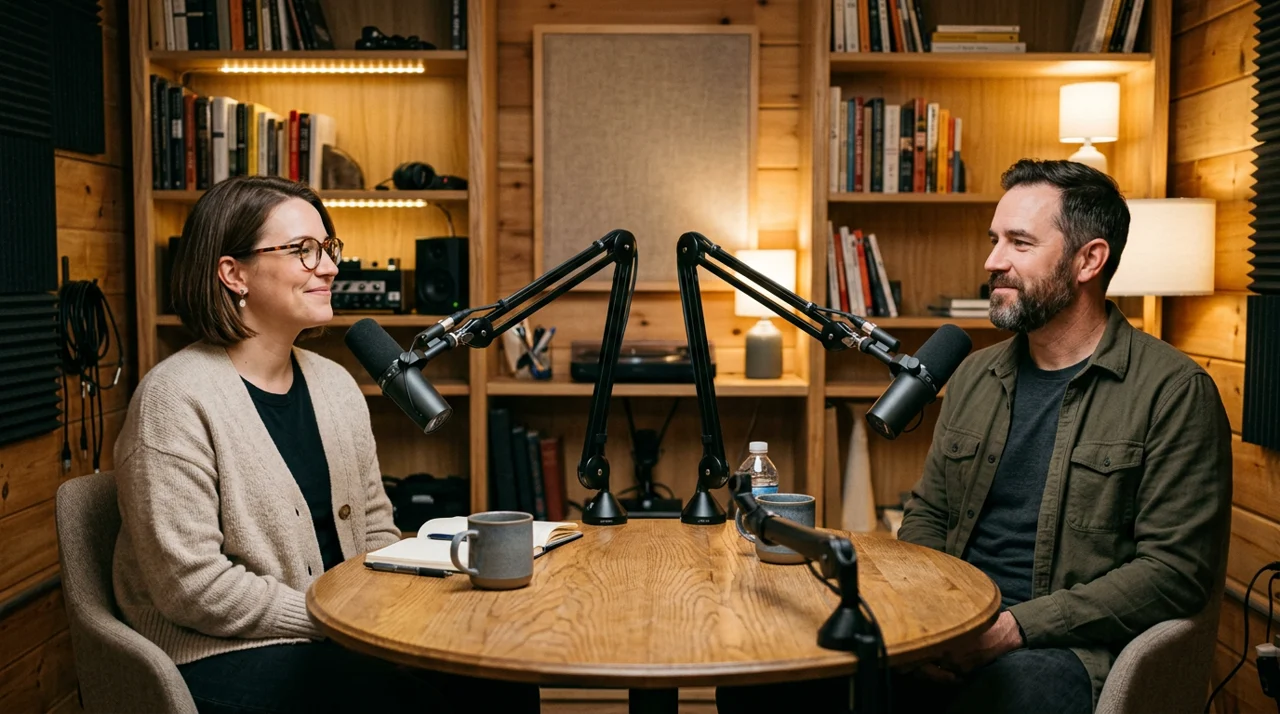
Veo 3.1 Lite · Generated · View the example record and price basis (JSON)
Do it again: the same two hosts in the next episode
Add the same hosts picture as the start frame each time, and every clip starts from the same two faces, the same table and the same room, while the lines and the sound are new. It needs a model that takes a start frame; Kling 3 Pro is text only, so it can’t. The faces come from the picture. The voices are made again for each clip, so listen for them to match.
The same hosts, a new script
Tap Add start frame, choose the same picture again and type the new lines. Say “The same two hosts” and who sits where, as in the second example below. Each clip starts from that picture, so the hosts look the same however the scene moves.
A longer line, on another model
In the Model menu, pick Happy Horse 1.1 for clips up to 15 seconds with a start frame, or Seedance 2.5 for up to 30. Seedance 2.5 opens on 720p here and also offers 480p, 1080p and 4K. Pick the length under Duration, and keep to about two to three words a second so the line fits.
A new show with a new pair
Make a new picture in the AI Image Generator and use it as the start frame. One picture is one pair of hosts in one set, so a new set or new hosts means a new picture.
Recorded Made demonstration
The same hosts, a new script
This is a real run from November 19, 2026, with the same picture as the example above, the same model and the same settings, and a new prompt typed for episode two. Veo 3.1 Lite gave back the same Mara and Jon at the same table, with the same hair, glasses, beard and clothes. Mara welcomes the listener, and Jon answers. The independent transcript heard both lines as two different voices, with an added “Yeah” from Jon. The voices were not compared by ear between the two clips, and the model makes them again for each clip. One clip of each, not a measure of how often the hosts match.
Veo 3.1 Lite · Generated · View both example records (JSON)
What creators use next
Cut it vertical, with captions
AI Reframe
AI Reframe turns a landscape video vertical, and the frame cuts to whoever is talking, with word-by-word captions. It takes an MP4, MOV, WebM or MKV from 2 seconds to 10 minutes and under 4 GB, so a 6-second clip fits. The output is 9:16, 4:5 or 1:1, cut from the clip’s full height, so a wide shot of two hosts loses its sides.
Make the hosts first
AI Image Generator
The hosts in both examples are one 16:9 picture from Nano Banana 2. Describe the pair, who sits where and the room, and keep their mouths closed. The podcast composer takes the picture as a JPG, PNG or WebP.
Start from your own recording
Podcast Studio
If you’ve already recorded yourself, Podcast Studio puts your video in a studio set with a boom microphone and keeps your original audio. It takes a video under 4 GB and up to 20 minutes, a lot more than one generated clip.
Prompts you can inspect and adapt
Prompt recipe to adapt
Name who speaks and where they sit
The two hosts stay seated at the table. [Host A], on the left, turns to [Host B] and says: "[a line of about eight words]" [Host B], on the right, [reacts] and says: "[a short answer]." Locked medium two-shot, natural room tone, no music, no captions.Replace the names, the two lines and the reaction. When the start frame is the same picture, don’t describe the faces again: say who sits on the left and who on the right.
Recorded generation prompt
What was typed for this clip
The two hosts stay seated at the table. Mara, on the left, turns to Jon and says: "Wait, you made this without a camera?" Jon, on the right, laughs and says: "Just a script and two hosts." Locked medium two-shot, natural room tone, no music, no captions.The composer sends the prompt as typed, with the start frame, the length, the shape and the resolution beside it. Nothing is added to the words.
Prompt typed for the second clip
What was typed for episode two
The same two hosts stay seated at the table. Mara, on the left, smiles into her microphone and says: "Welcome back to episode two." Jon, on the right, nods and says: "Same hosts, new script." Locked medium two-shot, natural room tone, no music, no captions.Only the lines and “The same two hosts” are new. The picture is the same one.
Prompt for the hosts picture
The prompt that made the hosts
Two original podcast hosts, adults, sit across a round oak table in a warm podcast studio with wooden shelves and soft lamps, each in front of a black broadcast microphone on a boom arm. On the left, Mara: a woman in her thirties with a short bob, round glasses and a soft knit cardigan. On the right, Jon: a man in his forties with a trimmed beard and a casual overshirt. They look at each other, relaxed, mouths closed. Photorealistic, 35mm lens, level medium two-shot, natural light, no text, no logos.Typed in the AI Image Generator on Nano Banana 2 at 16:9. It describes each host by age, hair and clothes, not by name or by a real person.
How a podcast clip is priced
By the model, the seconds of video and, where a model offers it, the resolution. Where a model has a Sound switch, sound can change the price too. The total appears on Generate before you run it.
A longer clip costs more than a shorter one on the same model, and a higher resolution costs more than 720p on Veo 3.1 Lite. The hosts picture is its own image generation, priced separately from each clip, and it’s made once for the whole series.
Price source: Veo 3.1 Lite on the Made price sheet · Checked
Each new clip is priced again, so try one short line before a longer one. Failed clips are refunded.
What to review before you use the result
| What you see | What to try |
|---|---|
| The wrong host says a line, or one voice says both | Name who speaks each line and where they sit, as in the recipe: “Mara, on the left… Jon, on the right…”. Keep each line short, and make the clip again if the lines land on the wrong mouths. |
| The words don’t fit the clip | Keep to about two to three words a second. Shorten the lines, pick 8 seconds on Veo 3.1 Lite, or pick a model with longer clips: up to 15 seconds on Happy Horse 1.1 and up to 30 on Seedance 2.5 and WAN 3.0. |
| The voices change between episodes | The faces come from the start frame, but the voices are made again for each clip. Make the clip again, and keep the lines short. If the voice matters most, make a clip with Lip Sync Studio from one host’s picture and your own voice track. |
| There’s no Add start frame, or the picture is ignored | Kling 3 Pro takes text only, so it has no start frame. Pick Veo 3.1 Lite, Veo 3.1, Happy Horse 1.1 or Seedance 2.5. The picture has to be a JPG, PNG or WebP. A clip can still shift a little from the picture, so check both faces. |
| It’s still one short clip | Each tap makes one clip, with no cuts between the hosts. For a longer show, make several clips from the same picture and post them as a series, or bring your own recording to Podcast Studio. |
| Captions or words show up in the picture | The prompt asks for no captions, but a model can still draw some. Make the clip again, and check all of it before you post. To add captions on purpose, use AI Reframe. |
Questions about this workflow
Can I make a whole podcast episode in one go?
No. Each generation is one clip, from a few seconds up to 30 seconds depending on the model, so an episode is several clips. To turn a real recording into a podcast video, Podcast Studio takes up to 20 minutes.
Will the hosts look the same in the next episode?
They can, if you add the same picture as the start frame each time on a model that takes one. The second example above is exactly this. The voices are made again for each clip, so they can differ.
Do I need to sign in?
Yes, to generate and to add a start frame. You can look at the models, the presets and the settings first.
Can I make hosts that look like real people?
No. Use made-up hosts, or your own face, or someone who has agreed. Don’t generate real people without their permission, and don’t present AI hosts as real customers or experts. Label AI-generated hosts where a platform asks.
Which model should I pick for dialogue?
The page opens on Veo 3.1 Lite, with sound, for a 6-second clip. Veo 3.1 gives 4, 6 or 8 seconds. Kling 3 Pro and Happy Horse 1.1 run up to 15 seconds, and Seedance 2.5 and WAN 3.0 up to 30. Kling 3 Pro takes text only, so it can’t start from a hosts picture.
Work with Claude and Made
Through the Made connector in Claude, an assistant can make the same clip: list the video models, use your hosts picture as the start image, quote the price and generate. It doesn’t use the composer, so spell out the model, the length and the lines, and ask it to rule out captions. The connector can also make the hosts picture first.
Conversation starter
Ask your assistant
Use Made to make a 6-second 16:9 video podcast clip on Veo 3.1 Lite, with my attached picture of two hosts as the start image. Mara, on the left, turns to Jon and says, word for word: "Wait, you made this without a camera?" Jon, on the right, laughs and says: "Just a script and two hosts." Locked medium two-shot, natural room tone, no music, no captions. Check the model in the catalog and show me the price before generating one video.If your client doesn’t offer the model or a picture upload, use the AI Podcast Generator with the same picture and lines.